
• Skip to primary navigation
  • Skip to main content
  • Skip to primary sidebar
webnzee

Webnzee

Webnzee — Your Web Dev Companion.

  • Home
  • Blog
  • Terms
    • Privacy
    • Disclaimer
  • Support
  • Subscribe
  • Contact
  • Show Search
Hide Search

webhosting

Migrating WordPress from AWS Lightsail to EC2: A Practical, Step-by-Step Perspective

Rajeev Bagra · February 3, 2026 · Leave a Comment


Running multiple WordPress websites on cloud infrastructure often starts with convenience and later evolves into questions around cost, scalability, and control. This is a common journey for founders, bloggers, and small businesses using AWS Lightsail.

As site portfolios grow, many users begin asking important questions:

  • Why is my Lightsail bill increasing every month?
  • Can multiple WordPress sites be consolidated onto a single server?
  • Is Amazon EC2 worth the additional complexity?
  • How do I migrate safely without downtime?

This article walks through those concerns from a real-world perspective, explaining how a gradual migration from Lightsail to EC2 can be approached safely, economically, and methodically.


Why Consider Moving Away from Lightsail?

AWS Lightsail is designed for simplicity. It bundles compute, storage, and networking into predictable monthly pricing. For a single WordPress site, it works extremely well.

However, challenges begin to appear when running multiple sites:

  • Each site often requires its own Lightsail instance
  • Monthly costs increase linearly with each new website
  • Resource utilization is often inefficient
  • Scaling vertically becomes limited and expensive

In one real scenario, a user running seven WordPress sites saw their Lightsail bill grow to USD 61 per month, even though traffic across the sites was modest.
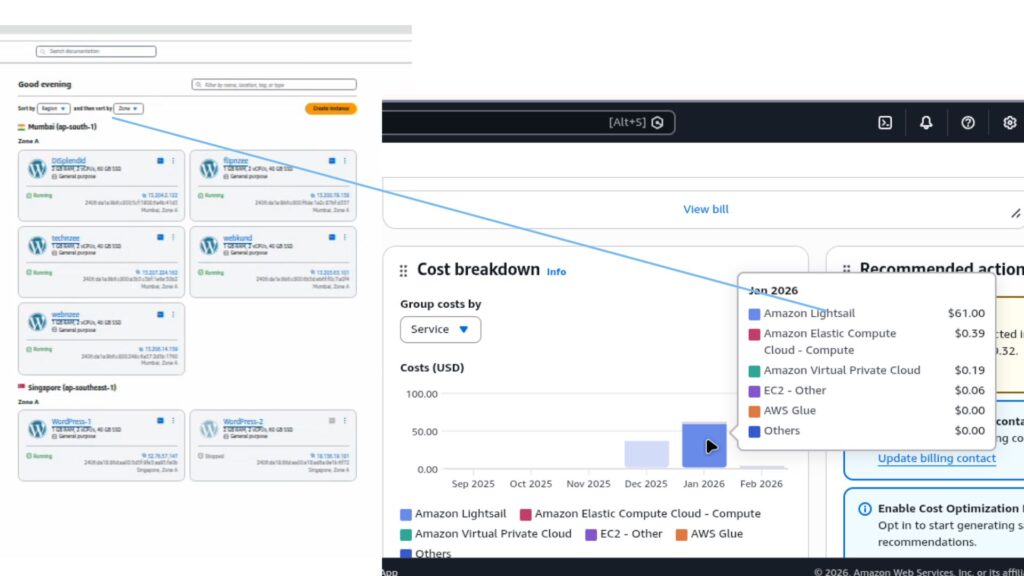
This raises a natural question:
Can the same workload run on fewer servers at a lower cost?


Why EC2 Becomes a Logical Next Step

Amazon EC2 offers raw infrastructure instead of packaged simplicity. While this introduces responsibility, it also provides flexibility.

With EC2:

  • One instance can host multiple WordPress sites
  • Resources like RAM and CPU can be scaled independently
  • Costs are based on actual usage rather than fixed bundles
  • Administrators gain full control over the software stack

In the discussed setup, a single EC2 instance with:

  • 2 GB RAM
  • Nginx
  • PHP-FPM
  • MariaDB
  • Swap enabled

was sufficient to safely host multiple low-to-moderate traffic WordPress sites.


Addressing the First Big Concern: “Is One EC2 Enough?”

A common misconception is that each WordPress site requires its own server. In reality, professional hosting environments routinely host dozens of WordPress sites on a single VM, provided resources are sized correctly.

Key considerations include:

  • Total traffic across all sites
  • WooCommerce usage (if any)
  • PHP memory limits
  • Database load

In this case, upgrading the EC2 instance from 1 GB RAM to 2 GB RAM before migration was a critical decision. Migration processes temporarily require more memory due to database imports, file extraction, and plugin execution.

Upgrading first avoids:

  • PHP memory errors
  • 502 Bad Gateway issues
  • Incomplete migrations
  • Database crashes

The Safe Migration Strategy: One Site at a Time

Rather than moving all websites at once, the recommended approach is incremental migration.

The process followed was:

  1. Launch a single EC2 instance
  2. Install WordPress as a “template” site
  3. Upgrade server memory before migration
  4. Enable swap for additional safety
  5. Migrate one Lightsail site at a time
  6. Test thoroughly before touching DNS
  7. Only delete Lightsail resources after verification

This method minimizes risk and ensures there is always a rollback option.


Understanding Bitnami vs Manual WordPress Installations

Many Lightsail WordPress instances are based on Bitnami stacks. These differ significantly from manual EC2 installations:

  • Bitnami uses predefined usernames
  • Credentials are stored in specific system files
  • Database paths and configuration locations differ

Understanding these differences is essential during migration, especially when exporting data or accessing admin credentials.


Cost Implications: The Bigger Picture

After consolidation:

  • Lightsail cost: ~USD 60/month
  • EC2 consolidated setup: ~USD 25/month

This represents a cost reduction of over 50%, without sacrificing performance or reliability.

Additionally, AWS billing is hourly and prorated, meaning Lightsail instances can be deleted mid-month without paying for unused time.


The Role of AI Assistance in Complex Migrations

One notable takeaway from this journey is the value of using AI tools during technical operations.

Infrastructure migrations often surface unexpected issues:

  • Permissions errors
  • Web server misconfigurations
  • Database access problems
  • Memory bottlenecks

Having an AI assistant available allows users to:

  • Troubleshoot errors in real time
  • Validate assumptions before making changes
  • Learn why something works, not just how
  • Proceed with confidence rather than guesswork

For many first-time EC2 users, this reduces stress and prevents costly mistakes.


Final Thoughts

Migrating from AWS Lightsail to EC2 is not about abandoning simplicity—it’s about graduating to efficiency.

For users managing multiple WordPress sites, EC2 offers:

  • Better cost control
  • Greater scalability
  • Centralized management
  • Long-term flexibility

When approached carefully, with incremental migration and proper sizing, the transition can be smooth, safe, and financially rewarding.


Key Takeaway

A gradual, well-planned migration—supported by proper server sizing and guided troubleshooting—can transform WordPress hosting from an expense into an optimized asset.


DigitalOcean Starter vs Contabo Starter for WordPress Hosting (Real Cost Per Website + Small/Medium/Large Estimates)

Rajeev Bagra · January 24, 2026 · Leave a Comment


Launching WordPress on a VPS is one of the smartest ways to get better performance, more control, and lower long-term cost—especially if you want to host multiple websites.

Two beginner-friendly choices people often compare are:

  • DigitalOcean Starter VPS
  • Contabo Starter VPS

Both can host WordPress successfully, but they serve different goals.

In this guide, you’ll get:

✅ A WordPress-focused comparison
✅ Realistic cost-per-website estimates
✅ What makes a website small, medium, or large in server load
✅ Clear recommendations depending on your use-case


Quick Verdict (If You Want the Answer Fast)

✅ Choose DigitalOcean Starter if…

  • You want to run one serious WordPress site
  • You want stable performance
  • You want easy upgrades when traffic grows

👉 DigitalOcean:
https://www.digitalocean.com/


✅ Choose Contabo Starter if…

  • You want to launch many WordPress sites cheaply
  • You want the lowest cost per website
  • You can manage optimization and performance tuning

👉 Contabo (Affiliate link):
https://www.jdoqocy.com/7a81cy63y5LNMNSQMOPVLNRSSRMNP


1) DigitalOcean Starter Plan (WordPress Hosting View)

A typical DigitalOcean entry plan (used for WordPress) is a small VPS such as:

✅ DigitalOcean Starter VPS

  • 1 vCPU
  • 1 GB RAM
  • 25 GB SSD
  • ~1 TB bandwidth
  • Price often around $6/month (varies by region/time)

Why people like DigitalOcean for WordPress

DigitalOcean is a favorite for developers because it offers:

✅ Predictable performance
✅ Strong uptime reputation
✅ Smooth scaling path (upgrade when needed)
✅ Great documentation and ecosystem

But here’s the limitation…

⚠️ 1 GB RAM is small for WordPress once you add:

  • caching plugins
  • security plugins
  • backups
  • multiple sites

So DigitalOcean Starter works best when you want quality over quantity.

👉 DigitalOcean official site:
https://www.digitalocean.com/


2) Contabo Starter Plan (WordPress Hosting View)

Contabo Starter VPS plans usually give much larger specs for the price.

✅ Contabo Starter VPS (typical range)

  • 2–4 vCPU
  • 4–8 GB RAM
  • 100 GB SSD (or more)
  • Price often around $6–$12/month, depending on plan

Why Contabo looks like insane value

Because for WordPress hosting, RAM matters a lot, and Contabo gives more RAM-per-dollar than many providers.

That makes it excellent for:

✅ Hosting many WordPress sites
✅ Multiple client websites
✅ SEO niche sites
✅ Testing sites + staging sites
✅ Multi-site VPS setup

👉 Contabo (Affiliate link):
https://www.jdoqocy.com/7a81cy63y5LNMNSQMOPVLNRSSRMNP


3) What Makes a WordPress Site “Small”, “Medium”, or “Large”?

WordPress site size is NOT decided by the number of pages.

A 10-page website can still be “large” if it’s heavily dynamic (like WooCommerce).
And a 500-page blog can still be “small” if everything is cached.

Here are the real factors that increase resource usage:


A) Traffic (Visitors per Month)

More visitors = more load.

Even a simple site with low traffic is easy to host, but high traffic means:

  • more concurrent users
  • more page generation
  • more bandwidth use

B) Page Weight (Images + Scripts)

Heavy pages often include:

  • large uncompressed images
  • videos and sliders
  • many scripts (ads, tracking, chat widgets)

These increase:
✅ load time
✅ bandwidth consumption
✅ CPU work for optimization plugins


C) Plugins (One of the Biggest Factors)

Plugins can increase:

  • PHP execution time
  • database queries
  • memory usage

Resource-heavy plugin categories:

  • WooCommerce
  • LMS + membership plugins
  • booking plugins
  • multi-vendor plugins
  • security scanners

D) Database Growth

WordPress databases grow fast due to:

  • revisions
  • product data
  • orders
  • users
  • logs
  • analytics and tracking

Bigger database = slower queries if not optimized.


E) Dynamic Features

Pages that don’t cache easily are “expensive”, like:

  • cart
  • checkout
  • login-based dashboards
  • personalized pages

4) Practical WordPress Size Categories (Simple & Realistic)

✅ Small WordPress Website

Examples:

  • portfolio
  • brochure business site
  • basic blog

Typical profile:

  • 0–5,000 visits/month
  • mostly static and cacheable pages

✅ Medium WordPress Website

Examples:

  • SEO blog with consistent growth
  • affiliate niche site
  • small WooCommerce store

Typical profile:

  • 5,000–50,000 visits/month
  • more plugins + heavier pages
  • moderate database activity

✅ Large WordPress Website

Examples:

  • WooCommerce store with daily orders
  • LMS with logged-in users
  • high traffic blog with ads + analytics

Typical profile:

  • 50,000–500,000+ visits/month
  • heavy PHP + DB usage
  • high concurrency

5) How Many WordPress Sites Can You Host on Each?

This section is where you see the real difference.


✅ DigitalOcean Starter (1GB RAM)

Realistic capacity:

  • Small sites: ✅ 1–3 sites
  • Medium sites: ✅ 1 site
  • Large sites: ❌ not recommended on starter

Why? Because WordPress needs RAM for:

  • PHP workers
  • MySQL/MariaDB caching
  • background tasks (cron jobs)
  • admin panel performance

✅ Contabo Starter (4–8GB RAM range)

Realistic capacity:

  • Small sites: ✅ 10–25 sites
  • Medium sites: ✅ 3–8 sites
  • Large sites: ✅ 1–2 sites

This is why Contabo is extremely popular for multi-site WordPress hosting.

👉 Contabo (Affiliate link):
https://www.jdoqocy.com/7a81cy63y5LNMNSQMOPVLNRSSRMNP


6) Cost Per Website Estimates (Small / Medium / Large)

Let’s estimate typical monthly server cost:

  • DigitalOcean starter VPS = ~$6/month
  • Contabo starter VPS = ~$7/month (starter estimate; your plan may differ)

Now divide the VPS cost by the number of sites you can realistically host.


✅ Small WordPress Sites Cost Per Website

DigitalOcean (1–3 small sites)

  • 1 site → $6/site
  • 2 sites → $3/site
  • 3 sites → $2/site

Contabo (10–25 small sites)

  • 10 sites → $0.70/site
  • 20 sites → $0.35/site
  • 25 sites → $0.28/site

🏆 Winner for multiple small sites: Contabo


✅ Medium WordPress Sites Cost Per Website

DigitalOcean

  • 1 medium site → $6/site

Contabo (3–8 medium sites)

  • 3 sites → $2.33/site
  • 5 sites → $1.40/site
  • 8 sites → $0.88/site

🏆 Winner: Contabo


✅ Large WordPress Sites Cost Per Website

DigitalOcean starter

❌ Large sites usually need bigger RAM/CPU. Not ideal on starter.

Contabo (1–2 large sites)

  • 1 large site → $7/site
  • 2 large sites → $3.50/site

🏆 Winner for starter-level large site hosting: Contabo
(assuming strong caching + optimization)


7) Hidden Costs People Forget (Important)

Your VPS may be cheap per website, but WordPress still needs:

✅ Domain cost (per site)
✅ Email (optional but common)
✅ Backup storage cost
✅ CDN (Cloudflare is often enough)
✅ Security + monitoring tools
✅ Your time managing the VPS

⚠️ Biggest risk of hosting many sites on one VPS:
If that server goes down, all sites go offline together.


8) Final Recommendation (Honest Verdict)

✅ Best for ONE serious WordPress website

DigitalOcean Starter is better if you value:

  • stability
  • consistent performance
  • smoother scaling

👉 DigitalOcean:
https://www.digitalocean.com/


✅ Best for MANY WordPress websites (lowest cost-per-site)

Contabo Starter is best if you want:

  • max value
  • many websites per VPS
  • cheap hosting per WordPress install

👉 Contabo (Affiliate link):
https://www.jdoqocy.com/7a81cy63y5LNMNSQMOPVLNRSSRMNP


Conclusion

If you’re building a network of WordPress sites or hosting for clients, Contabo Starter wins on cost-per-website.

If you’re focused on one primary website and want a more premium VPS experience, DigitalOcean Starter is a safer launch choice.


Primary Sidebar

Recent Posts

  • Developing Forms in WordPress vs Django: From Manual Coding to Plugins and Framework-Level Control
  • 🌐 Popular Websites Built with Django — And Where WordPress/PHP Still Shine
  • Is Operating Django Similar to Using DOS? Understanding Projects, Apps, and URLs
  • 🚀 How a WordPress (PHP) Website Can Run Python Code in the Browser
  • Migrating WordPress from AWS Lightsail to EC2: A Practical, Step-by-Step Perspective

Archives

  • February 2026
  • January 2026
  • December 2025
  • October 2025
  • August 2025

Categories

  • Blog

Tag

AWS EC2 AWS Lightsail Contabo CSS DBMS DigitalOcean Django Git Github HTML Python spreadsheets SQL webdev webhosting WordPress
Terms Display
Django Git WordPress AWS Lightsail webdev webhosting CSS Github HTML DBMS AWS EC2 Contabo Python SQL spreadsheets DigitalOcean

Start building your digital presence with Webnzee. Contact Us

Webnzee

This website may use AI tools to assist in content creation. All articles are reviewed, edited, and fact-checked by our team before publishing. We may receive compensation for featuring sponsored products and services or when you click on links on this website. This compensation may influence the placement, presentation, and ranking of products. However, we do not cover all companies or every available product.

  • Home
  • Blog
  • Terms
  • Support
  • Subscribe
  • Contact
Scroll Up