• Skip to primary navigation
  • Skip to main content
  • Skip to primary sidebar
webnzee

Webnzee

Webnzee β€” Your Web Dev Companion.

  • Home
  • Blog
  • Trending
  • Terms
    • Privacy
    • Disclaimer
  • Support
  • Subscribe
  • Contact
  • Show Search
Hide Search

Python

Where Django Has a Specific Advantage Over WordPress

Splendid · May 11, 2026 · Leave a Comment

For many beginners entering web development, and may initially appear to solve the same problem: building websites.

However, although both can power websites, they were designed with very different philosophies.

WordPress began primarily as a content management system (CMS), optimized for publishing and managing content efficiently.

Django, on the other hand, was built as a full-featured Python web framework designed for creating custom web applications and scalable software systems.

This difference creates several niches where Django holds a very strong advantage over WordPress.


Understanding the Core Difference

At a high level:

  • WordPress is optimized for content publishing.
  • Django is optimized for application development.

This distinction becomes increasingly important as projects grow more complex.

A blog, affiliate site, or company website may fit naturally into WordPress.

But a platform involving analytics, AI, APIs, dashboards, workflows, or complex databases often aligns more naturally with Django.


Django’s Strongest Niches

1. Data-Driven Applications

One of Django’s biggest advantages appears in data-heavy systems.

Because Django uses Python, it integrates seamlessly with the broader Python ecosystem used in data science and analytics.

This includes tools such as:

As a result, Django becomes highly suitable for:

  • analytics dashboards
  • financial systems
  • research platforms
  • data visualization tools
  • prediction systems

While WordPress can integrate with external services, it does not naturally belong to the Python data ecosystem.


2. SaaS Platforms and Web Applications

Django is particularly strong for building SaaS (Software as a Service) products.

Examples include:

  • CRM systems
  • learning management systems
  • workflow automation tools
  • project management platforms
  • custom business dashboards

Django provides many engineering-oriented features out of the box:

  • ORM for database modeling
  • authentication systems
  • permissions and access control
  • modular application architecture
  • scalable backend organization

WordPress can imitate SaaS behavior through plugins, but as systems become more customized, maintaining large plugin-based architectures often becomes difficult.


3. AI and Machine Learning Products

Modern AI applications represent one of Django’s most important advantages.

Since most AI and machine learning ecosystems revolve around Python, Django fits naturally into AI-based development workflows.

Examples include:

  • AI chat applications
  • recommendation engines
  • natural language processing systems
  • image recognition platforms
  • AI-powered analytics tools

In contrast, WordPress is PHP-based.

As a result, WordPress AI projects usually depend heavily on third-party APIs rather than native machine learning integration.


4. API-First Architectures

Django is also widely used for backend APIs.

Especially when combined with:

This makes Django ideal for:

  • mobile app backends
  • React applications
  • Vue frontends
  • microservices
  • headless architectures

Although WordPress offers REST APIs as well, Django generally provides a cleaner engineering experience for API-centric systems.


5. Security-Sensitive Systems

Django has a strong reputation for secure defaults.

Built-in protections include:

  • CSRF protection
  • SQL injection prevention
  • XSS mitigation
  • secure authentication systems

WordPress security often depends heavily on:

  • plugin quality
  • theme quality
  • maintenance discipline

Because WordPress has a massive plugin ecosystem, poorly maintained plugins can increase the attack surface significantly.


6. Long-Term Engineering Projects

Django is frequently preferred for projects expected to evolve substantially over time.

This includes systems where:

  • multiple developers collaborate
  • the codebase grows large
  • maintainability matters
  • software engineering discipline becomes important

Django encourages:

  • clean architecture
  • modular design
  • separation of concerns
  • maintainable backend organization

These characteristics become increasingly valuable as projects scale.


Where WordPress Still Dominates

Despite Django’s advantages, WordPress remains extraordinarily powerful in its own domain.

WordPress continues to dominate areas such as:

  • blogs
  • affiliate websites
  • SEO-focused publishing
  • business brochure websites
  • rapid low-code deployment
  • content-heavy websites

Its massive plugin ecosystem and ease of use make it ideal for many publishing-oriented businesses.

For content-first websites, WordPress is often faster and cheaper to deploy.


The Simplest Mental Model

A useful way to compare the two platforms is this:

Project TypeBetter Fit
Blog or affiliate siteWordPress
Custom web applicationDjango
AI or analytics platformDjango
SEO publishing websiteWordPress
Complex backend systemDjango
Rapid CMS deploymentWordPress

Final Thoughts

Django’s biggest advantage over WordPress appears when a project behaves more like software than a traditional website.

The more a project involves:

  • custom business logic
  • data processing
  • machine learning
  • APIs
  • automation
  • scalable backend engineering

the stronger Django’s advantages become.

Meanwhile, WordPress remains one of the best tools ever created for content publishing, SEO-focused websites, affiliate marketing, and rapid site deployment.

Rather than viewing them as direct competitors, it is often more accurate to see them as tools optimized for different kinds of problems.

Developing Forms in WordPress vs Django: From Manual Coding to Plugins and Framework-Level Control

Rajeev Bagra · February 12, 2026 · Leave a Comment

Forms are one of the most important features of modern websites. They power contact pages, registrations, surveys, feedback systems, and lead generation.

But the way forms are built in WordPress and Django is fundamentally different.

In this article, we’ll explore three approaches:

  1. Creating forms in WordPress without plugins
  2. Using ready-made form plugins like WPForms
  3. Building forms in Django using its built-in system

By the end, you’ll understand which approach fits your goals best.


1️⃣ Building Forms in WordPress Without Any Plugin

Image
Image
Image
Image
Image

Many people assume WordPress always needs plugins for forms. In reality, you can build forms manually, but it requires writing PHP inside your theme.


πŸ”Ή How It Works

When creating forms without plugins, you must:

  • Write HTML in theme templates
  • Handle submissions using PHP
  • Process data via $_POST
  • Send emails using wp_mail()
  • Secure data manually

Example:

<form method="post">
  <input type="text" name="name" required>
  <input type="email" name="email" required>
  <textarea name="message"></textarea>
  <button type="submit">Send</button>
</form>

Processing in functions.php:

if(isset($_POST['name'])) {
  $name = sanitize_text_field($_POST['name']);
  wp_mail("admin@example.com", "New Message", $name);
}

πŸ”Ή What You Must Manage Yourself

When you don’t use a plugin, you are responsible for:

❌ Validation
❌ Security (nonces, CSRF-like protection)
❌ Spam filtering
❌ Database storage
❌ Error messages
❌ User feedback

This makes development:

  • More technical
  • Less structured
  • More error-prone

πŸ”Ή Architectural Style

WordPress manual forms are:

  • Procedural
  • Template-based
  • Dependent on global variables
  • Not object-oriented

So, WordPress without plugins means:

β€œWrite everything yourself in PHP.”


2️⃣ Creating Forms in WordPress Using Plugins (WPForms and Similar Tools)

Image
Image
Image
Image
Image

Most WordPress users prefer plugins because they remove technical complexity.

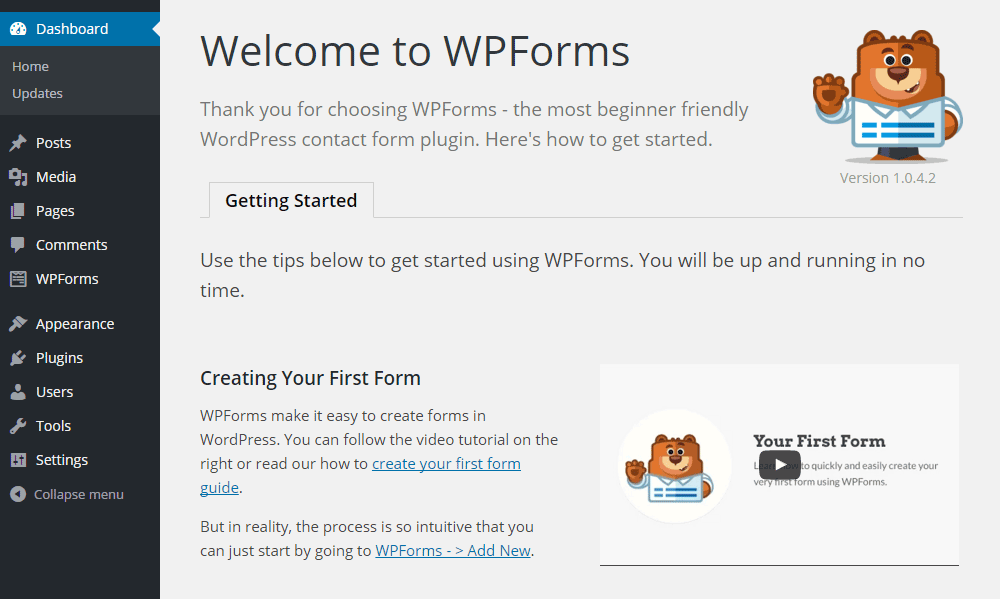
Popular tools like WPForms provide visual form builders.


πŸ”Ή How Plugin-Based Forms Work

With WPForms, you simply:

  1. Install the plugin
  2. Open the drag-and-drop editor
  3. Add fields visually
  4. Configure notifications
  5. Embed the form

No coding required.


πŸ”Ή Features Provided by Plugins

Plugins automatically handle:

βœ… Validation
βœ… Security
βœ… Spam protection
βœ… Database storage
βœ… Email alerts
βœ… Conditional logic
βœ… Payment integration

You only configure settings.


πŸ”Ή Ready-Made Templates

WPForms includes templates such as:

  • Contact forms
  • Registration forms
  • Surveys
  • Newsletter forms
  • Feedback forms

You select β†’ customize β†’ publish.


πŸ”Ή Development Model

Plugin-based forms are:

  • UI-driven
  • Configuration-based
  • Low-code or no-code

So, WordPress with plugins means:

β€œUse tools instead of building systems.”


3️⃣ Forms in Django: Framework-Level Integration

Image
Image
Image
Image

Unlike WordPress, Django treats forms as a core feature of the framework.

Forms are not add-ons. They are part of the system.


πŸ”Ή How Django Forms Work

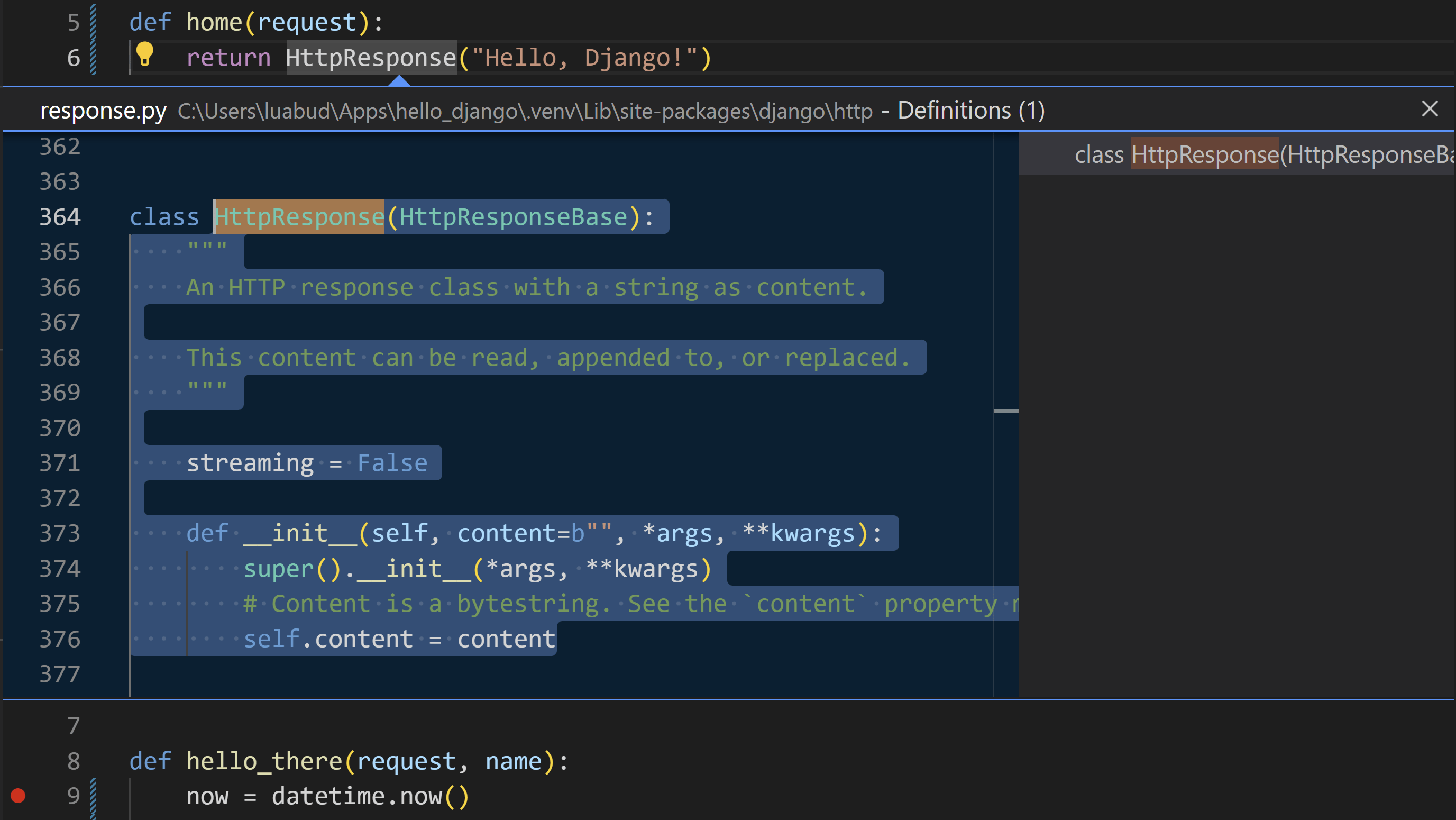
Forms are written as Python classes:

from django import forms

class ContactForm(forms.Form):
    name = forms.CharField(max_length=100)
    email = forms.EmailField()

In views:

if form.is_valid():
    data = form.cleaned_data

In templates:

{{ form.as_p }}

πŸ”Ή Built-In Capabilities

Django automatically provides:

βœ… Field validation
βœ… Type checking
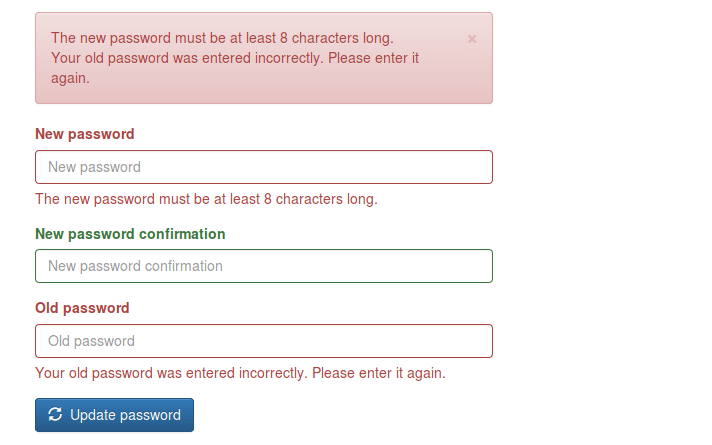
βœ… Error handling
βœ… CSRF protection
βœ… Data cleaning
βœ… Model integration
βœ… Security

No third-party plugin is required.


πŸ”Ή Template Form Features

Django templates allow full customization:

{{ form.name.label }}
{{ form.name }}
{{ form.name.errors }}

You control:

  • Layout
  • Styling
  • Error display
  • Accessibility

πŸ”Ή Development Model

Django forms are:

  • Object-oriented
  • Structured
  • Scalable
  • Framework-integrated

So, Django means:

β€œBuild robust systems using built-in tools.”


πŸ“Š Comparison: WordPress vs Django Forms

FeatureWordPress (No Plugin)WordPress (Plugin)Django
SetupManual codingVisual UIPython classes
ValidationManualPlugin-managedBuilt-in
SecurityManualPlugin-managedBuilt-in
DatabaseManualPlugin-dependentORM-based
FlexibilityMediumLimitedVery High
ScalabilityMediumMediumHigh
Learning CurveHighLowMedium–High

🧠 Philosophical Difference

WordPress Philosophy

Originally built for blogging and content management.

Forms are:

  • Optional features
  • Implemented via plugins
  • Not core architecture

Approach:

β€œExtend with tools.”


Django Philosophy

Built for application development.

Forms are:

  • Core components
  • Linked to models
  • Linked to validation
  • Linked to security

Approach:

β€œEngineer the system.”


πŸ” Real-World Example: Contact Form

In WordPress (Without Plugin)

You must create:

  1. HTML form
  2. PHP processor
  3. Validation logic
  4. Security system
  5. Email handler

More freedom, more work.


In WordPress (With WPForms)

You do:

  1. Install plugin
  2. Choose template
  3. Publish

Fast, simple, limited.


In Django

You create:

  1. Model (optional)
  2. Form class
  3. View logic
  4. Template

More setup, long-term stability.


πŸš€ When Should You Use Each?

Choose Manual WordPress Forms If:

βœ” You want full control in WordPress
βœ” You know PHP well
βœ” You need lightweight solutions


Choose WPForms If:

βœ” You want fast deployment
βœ” You run marketing or content sites
βœ” You don’t want to code
βœ” You need integrations


Choose Django Forms If:

βœ” You’re building SaaS platforms
βœ” You need complex validation
βœ” You manage large datasets
βœ” You want scalable systems


πŸ“ Final Summary

PlatformForm StyleStrength
WordPress (No Plugin)Manual PHPFlexibility
WordPress (Plugin)Visual BuilderSpeed
DjangoFramework-BasedPower & Scalability

πŸ‘‰ WordPress without plugins = Handcrafted
πŸ‘‰ WordPress with plugins = Tool-based
πŸ‘‰ Django = System-based


πŸ“Œ Conclusion

Forms reflect the philosophy of each platform:

  • WordPress gives you freedom or convenience, depending on plugins.
  • Django gives you structure and engineering depth.

If your goal is fast website deployment, WordPress plugins are ideal.
If your goal is building long-term software products, Django forms offer unmatched control.


🌐 Popular Websites Built with Django β€” And Where WordPress/PHP Still Shine

Rajeev Bagra · February 6, 2026 · Leave a Comment


When people learn Django, a common question is:

β€œIs Django really used in big websites, or is it only for small projects?”

The answer is clear: many global platforms started and scaled with Django.

At the same time, WordPress and PHP still dominate blogging and content publishing.

In this article, we’ll explore famous websites built with Django and also highlight where WordPress/PHP has a strong niche.


πŸ”— Official Websites

Before we begin, here are the official platforms:

  • βœ… Django (Official Website): https://www.djangoproject.com
  • βœ… WordPress (Official Website): https://wordpress.org

These are the best places to learn, download, and follow updates.


πŸ“Έ Instagram β€” Social Media at Massive Scale

Instagram chose Django in its early stage because it allowed developers to build features quickly and scale fast.

What Django Powers

  • User accounts
  • Posts, likes, comments
  • Feeds and APIs

πŸ“Œ Lesson: Django is ideal for user-driven platforms.


🎡 Spotify β€” Data & Internal Systems

Spotify uses Django mainly for internal dashboards and backend tools.

Django’s Role

  • Analytics systems
  • Admin dashboards
  • Content workflows

πŸ“Œ Lesson: Django works well for business systems.


πŸ“Œ Pinterest β€” Visual Discovery Platform

Pinterest relied heavily on Django while growing from a startup.

Django Supports

  • Boards and profiles
  • Search features
  • Recommendation systems

πŸ“Œ Lesson: Django handles large content platforms efficiently.


πŸ’¬ Disqus β€” Community & Discussions

Disqus manages millions of comments daily using Django.

Django Manages

  • Moderation
  • Spam filtering
  • User reputation

πŸ“Œ Lesson: Django is strong for community websites.


🦊 Mozilla β€” Open-Source Platforms

Mozilla uses Django for many of its developer services.

Django Powers

  • Documentation portals
  • Community platforms
  • Account systems

πŸ“Œ Lesson: Django fits technical ecosystems.


βš–οΈ Django vs WordPress/PHP: Where Each Has a Niche

Now let’s look at where each platform shines.


🐍 Where Django Is Strongest

Django is best for:

βœ… Custom web apps
βœ… SaaS platforms
βœ… AI & data systems
βœ… APIs & mobile backends
βœ… Enterprise software

πŸ“Œ Django is built for developers creating systems, not just websites.


🐘 Where WordPress/PHP Dominates

WordPress remains the top choice for:

βœ… Blogging & Content Sites

  • Personal blogs
  • News portals
  • Affiliate sites

βœ… Business Websites

  • Company pages
  • Portfolios
  • Service sites

βœ… E-commerce

  • Online stores (WooCommerce)
  • Digital products

βœ… Non-Technical Users

  • Visual editors
  • Easy publishing
  • Plugin ecosystem

πŸ“Œ WordPress is built for publishers and creators.


πŸ“Š Quick Comparison

FeatureDjango (Python)WordPress/PHP
Official Sitedjangoproject.comwordpress.org
SetupMediumVery Easy
CodingRequiredMinimal
BloggingWeakExcellent
Custom AppsExcellentLimited
CostHigherLower
ScalabilityHighModerate

🎯 Which Should You Choose?

Choose Django If You Want:

βœ… Build web applications
βœ… Create SaaS products
βœ… Work with APIs and data
βœ… Become a backend developer

πŸ‘‰ Start here: https://www.djangoproject.com


Choose WordPress If You Want:

βœ… Run a blog
βœ… Build affiliate sites
βœ… Launch quickly
βœ… Avoid heavy coding

πŸ‘‰ Start here: https://wordpress.org


πŸš€ Best Practice: Use Both Together

Many creators use:

  • WordPress β†’ Content & SEO
  • Django β†’ Tools & Applications

Connected via APIs, this gives:

βœ” Traffic
βœ” Automation
βœ” Monetization
βœ” Scalability


πŸ“ Final Thoughts

Platforms like Instagram, Pinterest, and Spotify prove that:

Django is enterprise-ready and scalable.

Meanwhile, WordPress proves that:

Content publishing doesn’t need complexity.

So it’s not:

❌ Django vs WordPress
βœ… It’s: β€œWhat am I building?”

  • Apps β†’ Django
  • Blogs β†’ WordPress
  • Hybrid β†’ Both

πŸš€ How a WordPress (PHP) Website Can Run Python Code in the Browser

Rajeev Bagra · February 5, 2026 · Leave a Comment

Today, WordPress websites can integrate and leverage multiple programming environmentsβ€”including Pythonβ€”without modifying server infrastructure.

This article explains how a Python-powered interactive widget can operate inside a WordPress website and why this capability is important for modern digital platforms.


πŸ”Ή WordPress Is Built on PHP β€” But Not Limited to It

WordPress is traditionally powered by:

  • PHP for server-side processing
  • MySQL for database management
  • HTML, CSS, and JavaScript for frontend rendering

Because of this architecture, many assume that WordPress is restricted to PHP-based features.

In reality, modern browsers now function as powerful execution environments capable of running multiple programming languages.

As a result, WordPress can seamlessly integrate with diverse technology stacks.


πŸ”Ή Running Python Inside a WordPress Page

In this implementation, a Python-based Monty Hall simulation widget was embedded directly into a WordPress page.

Importantly, the hosting server does not run Python.

Instead, the Python code executes inside the visitor’s web browser.

This is made possible through browser-based runtimes that enable Python execution using modern web standards.

This approach eliminates the need for:

  • Python servers
  • Backend configuration
  • Virtual machines
  • Additional hosting costs

All computation occurs on the client side.


πŸ”Ή The Technology Behind This Integration

Several technologies work together to enable this functionality.

1️⃣ JavaScript as the Integration Layer

JavaScript serves as the primary interface between the webpage and the Python runtime. It is responsible for:

  • Loading the Python engine
  • Sending user input
  • Executing scripts
  • Displaying output

2️⃣ Pyodide: Python in the Browser

Pyodide compiles Python into WebAssembly, allowing it to run securely inside modern browsers.

It provides:

  • Native Python syntax
  • Standard library support
  • High execution speed
  • Sandboxed security

3️⃣ WordPress Custom HTML Blocks

WordPress allows administrators to embed custom HTML and JavaScript using built-in editor blocks.

This makes it possible to integrate advanced functionality without additional plugins.


πŸ”Ή How the System Architecture Works

The simplified workflow is as follows:

User Browser
     ↓
JavaScript Interface
     ↓
Pyodide Runtime
     ↓
Python Program

Meanwhile, the WordPress server performs its standard role:

WordPress Server (PHP)
     ↓
Page Delivery

The server delivers content, while computation happens in the browser.

Both layers operate independently but collaboratively.


πŸ”Ή Benefits for Website Owners

This architecture provides several practical advantages.

βœ… 1. Reduced Server Load

All processing occurs on user devices, keeping hosting resource usage minimal.

This improves site speed and reduces infrastructure costs.

βœ… 2. Multi-Language Support

WordPress pages can integrate:

  • Python
  • JavaScript
  • WebAssembly modules
  • Data analysis libraries
  • AI frameworks

This enables advanced applications within standard CMS pages.

βœ… 3. Interactive Content Delivery

Websites can provide:

  • Simulators
  • Calculators
  • Visual tools
  • Educational modules
  • Analytical dashboards

Such features enhance user experience and engagement.

βœ… 4. Improved User Retention

Interactive tools increase visitor interaction time, which positively influences:

  • Search engine rankings
  • Bounce rates
  • Brand credibility
  • Monetization potential

πŸ”Ή Example: Monty Hall Probability Simulation

🎯 Monty Hall Simulation (Python Demo)


The embedded widget allows visitors to:

  • Select simulation parameters
  • Execute Python code
  • Observe probability outcomes
  • Learn through experimentation

This transforms passive reading into active learning.


πŸ”Ή PHP, Python, and JavaScript as Complementary Technologies

Modern web systems no longer rely on a single language.

Instead, they integrate specialized tools for different tasks.

A typical hybrid stack may look like:

LayerTechnology
ServerPHP (WordPress)
InterfaceHTML/CSS
LogicJavaScript
ComputationPython (WebAssembly)

Each layer contributes distinct capabilities.


πŸ”Ή Practical Use Cases

Cross-stack integration enables multiple applications.

πŸ“Š Data Analytics

  • Statistical simulations
  • Probability models
  • Visualization tools

πŸ€– Artificial Intelligence

  • In-browser inference
  • Text processing
  • Recommendation engines

πŸŽ“ Education Platforms

  • Coding labs
  • Math simulators
  • Interactive lessons

πŸ’Ό Business Applications

  • Financial calculators
  • ROI models
  • Pricing engines

All can be deployed within WordPress.


πŸ”Ή Security Considerations

This approach remains secure when properly implemented.

Key factors include:

  • Browser sandboxing
  • No server-side execution
  • No database access
  • No filesystem privileges

Client-side execution reduces exposure to backend vulnerabilities.


πŸ”Ή WordPress as a Modern Application Platform

WordPress is often perceived as a simple blogging system.

However, modern integrations demonstrate that it functions as a flexible digital platform.

With browser-based computing, WordPress can support:

  • Simulation environments
  • Educational tools
  • Data platforms
  • Micro-applications

Its capabilities extend far beyond content publishing.


πŸ”Ή Conclusion

The successful integration of a Python-based widget within a WordPress website demonstrates the evolving nature of web platforms.

By combining:

  • PHP for content delivery
  • JavaScript for orchestration
  • Python for computation

website owners can build sophisticated hybrid applications.

This approach eliminates traditional limitations associated with single-stack development.


✨ Key Takeaway

Modern WordPress websites can leverage multiple programming environments:

βœ” PHP
βœ” JavaScript
βœ” Python
βœ” WebAssembly
βœ” AI Libraries

All within a unified platform.

WordPress is no longer limited to blogging.
It functions as a comprehensive application ecosystem

Primary Sidebar

Recent Posts

  • Understanding the Difference Between a Public GitHub Repository and GitHub Releases
  • Why HubSpot Became Relevant Beyond Email Marketing
  • Where Django Has a Specific Advantage Over WordPress
  • πŸ›‘οΈ How to Safely Backup Your Code Before Making Changes (Beginner-Friendly Git Guide)
  • WordPress vs Django Admin Panels: How They Handle Backend Management Differently

Archives

  • May 2026
  • April 2026
  • March 2026
  • February 2026
  • January 2026
  • December 2025
  • October 2025
  • August 2025

Categories

  • Blog

Tag

AWS EC2 AWS Lightsail Azure Contabo crm CSS DBMS DigitalOcean Django email marketing forms Git Github HTML Hubspot Markdown Python spreadsheets SQL Twilio webdev webhosting WordPress
Terms Display
forms Python Twilio Nginx email marketing Django Web Server SQL webhosting WordPress Git Github webdev HTML CSS Hubspot spreadsheets DBMS Markdown DigitalOcean

Start building your digital presence with Webnzee. Contact Us

Webnzee

This website may use AI tools to assist in content creation. All articles are reviewed, edited, and fact-checked by our team before publishing. We may receive compensation for featuring sponsored products and services or when you click on links on this website. This compensation may influence the placement, presentation, and ranking of products. However, we do not cover all companies or every available product.

  • Home
  • Blog
  • Trending
  • Terms
  • Support
  • Subscribe
  • Contact
Scroll Up