• Skip to primary navigation
  • Skip to main content
  • Skip to primary sidebar
webnzee

Webnzee

Webnzee — Your Web Dev Companion.

  • Home
  • Blog
  • Terms
    • Privacy
    • Disclaimer
  • Support
  • Subscribe
  • Contact
  • Show Search
Hide Search

WordPress

From AWS EC2 to Azure Credits: A Practical WordPress Hosting Journey for Cost-Conscious Creators

Rajeev Bagra · February 16, 2026 · Leave a Comment

For bloggers, developers, and small startup founders, hosting WordPress efficiently is not just a technical decision — it’s a financial strategy.

This guide combines two important themes:

  1. Launching and managing multiple WordPress sites on AWS EC2
  2. Planning for Azure free credits once AWS credits expire

The goal is simple: build scalable WordPress infrastructure while minimizing hosting costs.


Part 1: Launching WordPress on AWS EC2 (Multi-Site Setup)

Using Amazon Web Services, specifically EC2, gives full control over your hosting environment.

Unlike managed platforms, EC2 allows you to:

  • Host multiple WordPress sites on one server
  • Configure Nginx and PHP manually
  • Optimize memory and performance
  • Reduce cost per site

Step 1: Create an EC2 Instance

A typical setup includes:

  • Ubuntu Server
  • 2 GB RAM (recommended minimum for multiple sites)
  • Open ports 80 and 443 in Security Group
  • Elastic IP attached

After launching the instance, install:

nginx
php-fpm
mariadb

Then install WordPress manually.

This gives full control compared to one-click installations.


Step 2: Host Multiple WordPress Sites on One Server

Instead of launching separate EC2 instances, you can:

  • Create separate folders inside /var/www/
  • Create separate Nginx server blocks
  • Create separate databases for each site

Example structure:

/var/www/html        → Site 1 (techcosec.com)
/var/www/datanzee    → Site 2 (datanzee.online)

Each site needs:

  • Its own database
  • Its own wp-config.php
  • Its own Nginx configuration

This dramatically reduces hosting cost per website.


Step 3: Configure Nginx Properly (Important)

For WordPress to work correctly, your Nginx config must include:

location / {
    try_files $uri $uri/ /index.php?$args;
}

location ~ \.php$ {
    include snippets/fastcgi-php.conf;
    fastcgi_pass unix:/run/php/php8.3-fpm.sock;
}

Without this, you may experience:

  • 404 errors on internal pages
  • Raw PHP code displaying in browser
  • “Error establishing a database connection”

Proper Nginx configuration is critical.


Step 4: Secure with Free SSL

Once your domain points to your EC2 Elastic IP, install SSL using:

sudo apt install certbot python3-certbot-nginx -y
sudo certbot --nginx -d yourdomain.com -d www.yourdomain.com

This gives:

  • Free HTTPS
  • Auto renewal
  • Production-ready security

Step 5: Cost Optimization

With a 2GB EC2 instance, you can typically host:

  • 3–6 low-traffic WordPress sites
  • 1–2 WooCommerce stores (light usage)

Monthly estimate (after credits):

~ $18–25 per month total

This is significantly cheaper than hosting each site separately on managed platforms.


Part 2: What Happens After AWS Free Credits End?

Many creators start with AWS credits. The next logical question is:

What happens when AWS credits are exhausted?

This is where Microsoft Azure becomes relevant.


Azure Free Credit Explained

Azure offers:

$200 Free Credit (30 Days Only)

  • One-time offer
  • Valid for 30 days
  • Usable on most services

This is ideal for migrating WordPress after AWS credits expire.


Are There Other Ways to Get Azure Credits?

Yes — but conditional.

1. Azure for Students

  • $100+ credits
  • No credit card required (in many regions)

2. Microsoft for Startups

  • $1,000 to $25,000+ credits
  • Requires approval

3. Promotional / Sponsorship Credits

  • Tech events
  • Microsoft Learn challenges
  • Hackathons

These are not guaranteed but are useful if eligible.


Azure vs AWS for WordPress Hosting

FeatureAWS EC2Azure VM
Initial Free CreditVaries$200 (30 days)
Long-term CostSlightly cheaperSlightly higher
Community SupportLargerStrong but smaller
Dashboard ComplexityMediumSlightly more complex

For most independent creators:

AWS remains slightly more cost-effective long-term.

Azure is an excellent secondary option.


A Smart Hosting Strategy

Many experienced founders follow this path:

  1. Launch on AWS EC2
  2. Use free credits fully
  3. Migrate to Azure for another credit cycle
  4. Eventually move to low-cost VPS for stability

This approach:

  • Reduces upfront cost
  • Builds infrastructure skills
  • Avoids vendor dependency

Important: Always Keep Backups

Before migrating between cloud providers:

  • Backup WordPress files
  • Export MySQL database
  • Use migration plugins (WPVivid / Updraft)
  • Test on temporary domain first

Never switch DNS before confirming migration works.


Final Recommendation

For bloggers hosting multiple WordPress sites:

  • AWS EC2 offers the best balance of control and cost.
  • Azure free credits provide a valuable second phase.
  • Long-term stability may come from optimized VPS hosting.

The key is not chasing free hosting blindly — but using free credits strategically while building real infrastructure skills.


Closing Thought

Cloud hosting is no longer just for enterprises. With careful configuration, a single properly optimized server can host multiple WordPress sites securely and affordably.

Free credits are temporary.

Knowledge is permanent.

And the real asset is learning how to control your own hosting stack.

Developing Forms in WordPress vs Django: From Manual Coding to Plugins and Framework-Level Control

Rajeev Bagra · February 12, 2026 · Leave a Comment

Forms are one of the most important features of modern websites. They power contact pages, registrations, surveys, feedback systems, and lead generation.

But the way forms are built in WordPress and Django is fundamentally different.

In this article, we’ll explore three approaches:

  1. Creating forms in WordPress without plugins
  2. Using ready-made form plugins like WPForms
  3. Building forms in Django using its built-in system

By the end, you’ll understand which approach fits your goals best.


1️⃣ Building Forms in WordPress Without Any Plugin

Image
Image
Image
Image
Image

Many people assume WordPress always needs plugins for forms. In reality, you can build forms manually, but it requires writing PHP inside your theme.


🔹 How It Works

When creating forms without plugins, you must:

  • Write HTML in theme templates
  • Handle submissions using PHP
  • Process data via $_POST
  • Send emails using wp_mail()
  • Secure data manually

Example:

<form method="post">
  <input type="text" name="name" required>
  <input type="email" name="email" required>
  <textarea name="message"></textarea>
  <button type="submit">Send</button>
</form>

Processing in functions.php:

if(isset($_POST['name'])) {
  $name = sanitize_text_field($_POST['name']);
  wp_mail("admin@example.com", "New Message", $name);
}

🔹 What You Must Manage Yourself

When you don’t use a plugin, you are responsible for:

❌ Validation
❌ Security (nonces, CSRF-like protection)
❌ Spam filtering
❌ Database storage
❌ Error messages
❌ User feedback

This makes development:

  • More technical
  • Less structured
  • More error-prone

🔹 Architectural Style

WordPress manual forms are:

  • Procedural
  • Template-based
  • Dependent on global variables
  • Not object-oriented

So, WordPress without plugins means:

“Write everything yourself in PHP.”


2️⃣ Creating Forms in WordPress Using Plugins (WPForms and Similar Tools)

Image
Image
Image
Image
Image

Most WordPress users prefer plugins because they remove technical complexity.

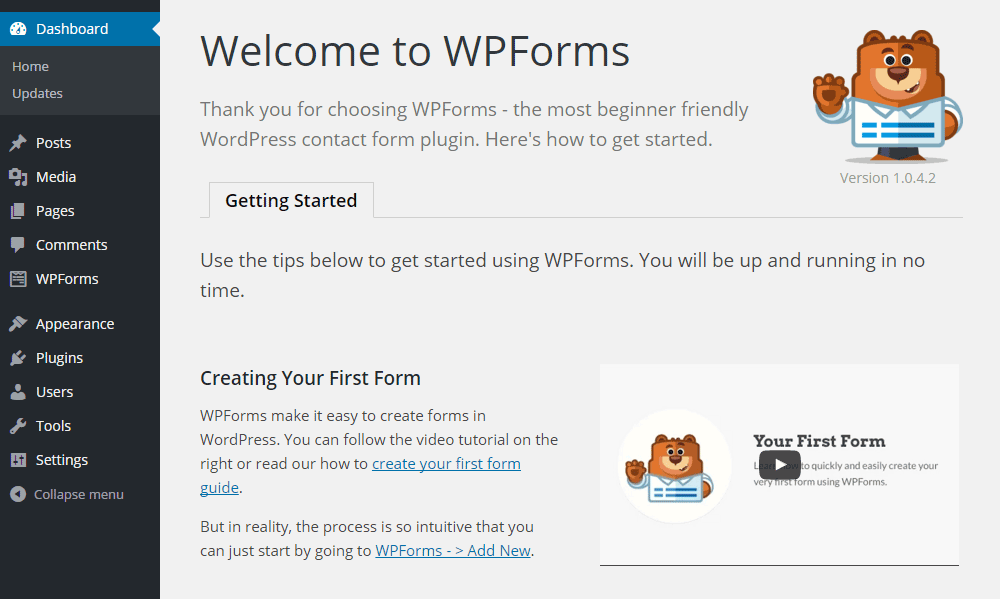
Popular tools like WPForms provide visual form builders.


🔹 How Plugin-Based Forms Work

With WPForms, you simply:

  1. Install the plugin
  2. Open the drag-and-drop editor
  3. Add fields visually
  4. Configure notifications
  5. Embed the form

No coding required.


🔹 Features Provided by Plugins

Plugins automatically handle:

✅ Validation
✅ Security
✅ Spam protection
✅ Database storage
✅ Email alerts
✅ Conditional logic
✅ Payment integration

You only configure settings.


🔹 Ready-Made Templates

WPForms includes templates such as:

  • Contact forms
  • Registration forms
  • Surveys
  • Newsletter forms
  • Feedback forms

You select → customize → publish.


🔹 Development Model

Plugin-based forms are:

  • UI-driven
  • Configuration-based
  • Low-code or no-code

So, WordPress with plugins means:

“Use tools instead of building systems.”


3️⃣ Forms in Django: Framework-Level Integration

Image
Image
Image
Image

Unlike WordPress, Django treats forms as a core feature of the framework.

Forms are not add-ons. They are part of the system.


🔹 How Django Forms Work

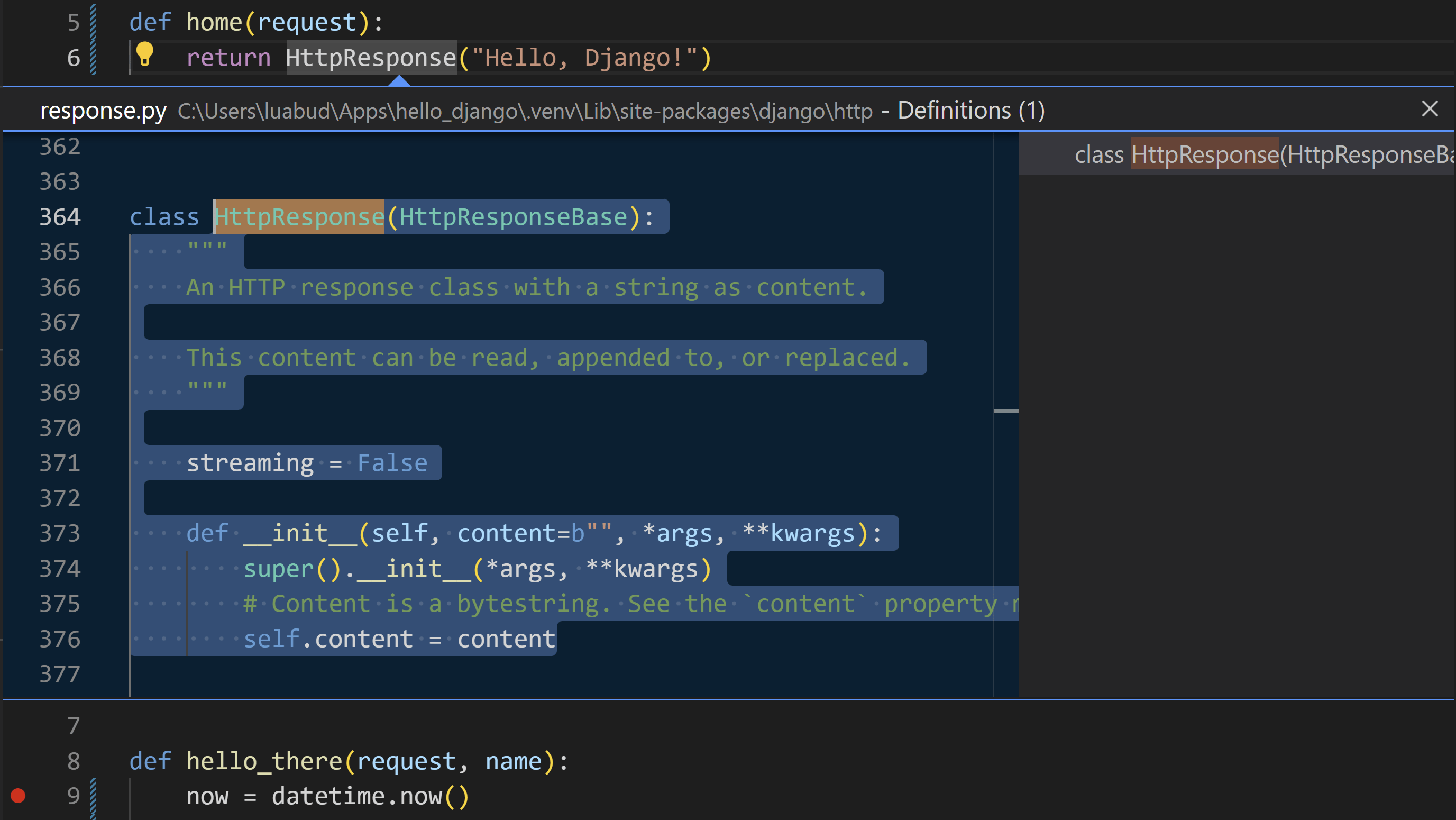
Forms are written as Python classes:

from django import forms

class ContactForm(forms.Form):
    name = forms.CharField(max_length=100)
    email = forms.EmailField()

In views:

if form.is_valid():
    data = form.cleaned_data

In templates:

{{ form.as_p }}

🔹 Built-In Capabilities

Django automatically provides:

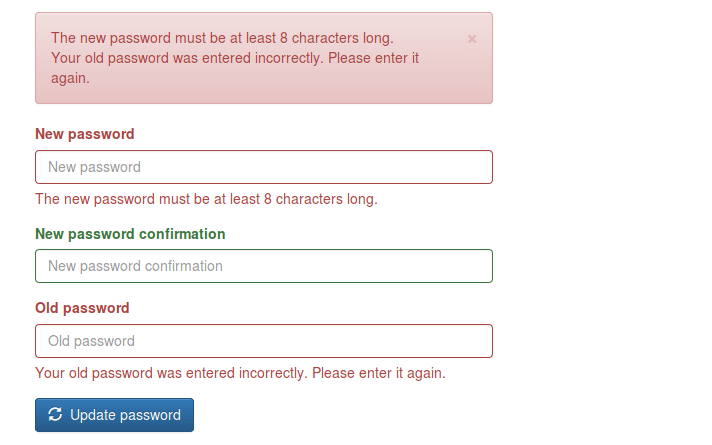
✅ Field validation
✅ Type checking
✅ Error handling
✅ CSRF protection
✅ Data cleaning
✅ Model integration
✅ Security

No third-party plugin is required.


🔹 Template Form Features

Django templates allow full customization:

{{ form.name.label }}
{{ form.name }}
{{ form.name.errors }}

You control:

  • Layout
  • Styling
  • Error display
  • Accessibility

🔹 Development Model

Django forms are:

  • Object-oriented
  • Structured
  • Scalable
  • Framework-integrated

So, Django means:

“Build robust systems using built-in tools.”


📊 Comparison: WordPress vs Django Forms

FeatureWordPress (No Plugin)WordPress (Plugin)Django
SetupManual codingVisual UIPython classes
ValidationManualPlugin-managedBuilt-in
SecurityManualPlugin-managedBuilt-in
DatabaseManualPlugin-dependentORM-based
FlexibilityMediumLimitedVery High
ScalabilityMediumMediumHigh
Learning CurveHighLowMedium–High

🧠 Philosophical Difference

WordPress Philosophy

Originally built for blogging and content management.

Forms are:

  • Optional features
  • Implemented via plugins
  • Not core architecture

Approach:

“Extend with tools.”


Django Philosophy

Built for application development.

Forms are:

  • Core components
  • Linked to models
  • Linked to validation
  • Linked to security

Approach:

“Engineer the system.”


🔁 Real-World Example: Contact Form

In WordPress (Without Plugin)

You must create:

  1. HTML form
  2. PHP processor
  3. Validation logic
  4. Security system
  5. Email handler

More freedom, more work.


In WordPress (With WPForms)

You do:

  1. Install plugin
  2. Choose template
  3. Publish

Fast, simple, limited.


In Django

You create:

  1. Model (optional)
  2. Form class
  3. View logic
  4. Template

More setup, long-term stability.


🚀 When Should You Use Each?

Choose Manual WordPress Forms If:

✔ You want full control in WordPress
✔ You know PHP well
✔ You need lightweight solutions


Choose WPForms If:

✔ You want fast deployment
✔ You run marketing or content sites
✔ You don’t want to code
✔ You need integrations


Choose Django Forms If:

✔ You’re building SaaS platforms
✔ You need complex validation
✔ You manage large datasets
✔ You want scalable systems


📝 Final Summary

PlatformForm StyleStrength
WordPress (No Plugin)Manual PHPFlexibility
WordPress (Plugin)Visual BuilderSpeed
DjangoFramework-BasedPower & Scalability

👉 WordPress without plugins = Handcrafted
👉 WordPress with plugins = Tool-based
👉 Django = System-based


📌 Conclusion

Forms reflect the philosophy of each platform:

  • WordPress gives you freedom or convenience, depending on plugins.
  • Django gives you structure and engineering depth.

If your goal is fast website deployment, WordPress plugins are ideal.
If your goal is building long-term software products, Django forms offer unmatched control.


🌐 Popular Websites Built with Django — And Where WordPress/PHP Still Shine

Rajeev Bagra · February 6, 2026 · Leave a Comment


When people learn Django, a common question is:

“Is Django really used in big websites, or is it only for small projects?”

The answer is clear: many global platforms started and scaled with Django.

At the same time, WordPress and PHP still dominate blogging and content publishing.

In this article, we’ll explore famous websites built with Django and also highlight where WordPress/PHP has a strong niche.


🔗 Official Websites

Before we begin, here are the official platforms:

  • ✅ Django (Official Website): https://www.djangoproject.com
  • ✅ WordPress (Official Website): https://wordpress.org

These are the best places to learn, download, and follow updates.


📸 Instagram — Social Media at Massive Scale

Instagram chose Django in its early stage because it allowed developers to build features quickly and scale fast.

What Django Powers

  • User accounts
  • Posts, likes, comments
  • Feeds and APIs

📌 Lesson: Django is ideal for user-driven platforms.


🎵 Spotify — Data & Internal Systems

Spotify uses Django mainly for internal dashboards and backend tools.

Django’s Role

  • Analytics systems
  • Admin dashboards
  • Content workflows

📌 Lesson: Django works well for business systems.


📌 Pinterest — Visual Discovery Platform

Pinterest relied heavily on Django while growing from a startup.

Django Supports

  • Boards and profiles
  • Search features
  • Recommendation systems

📌 Lesson: Django handles large content platforms efficiently.


💬 Disqus — Community & Discussions

Disqus manages millions of comments daily using Django.

Django Manages

  • Moderation
  • Spam filtering
  • User reputation

📌 Lesson: Django is strong for community websites.


🦊 Mozilla — Open-Source Platforms

Mozilla uses Django for many of its developer services.

Django Powers

  • Documentation portals
  • Community platforms
  • Account systems

📌 Lesson: Django fits technical ecosystems.


⚖️ Django vs WordPress/PHP: Where Each Has a Niche

Now let’s look at where each platform shines.


🐍 Where Django Is Strongest

Django is best for:

✅ Custom web apps
✅ SaaS platforms
✅ AI & data systems
✅ APIs & mobile backends
✅ Enterprise software

📌 Django is built for developers creating systems, not just websites.


🐘 Where WordPress/PHP Dominates

WordPress remains the top choice for:

✅ Blogging & Content Sites

  • Personal blogs
  • News portals
  • Affiliate sites

✅ Business Websites

  • Company pages
  • Portfolios
  • Service sites

✅ E-commerce

  • Online stores (WooCommerce)
  • Digital products

✅ Non-Technical Users

  • Visual editors
  • Easy publishing
  • Plugin ecosystem

📌 WordPress is built for publishers and creators.


📊 Quick Comparison

FeatureDjango (Python)WordPress/PHP
Official Sitedjangoproject.comwordpress.org
SetupMediumVery Easy
CodingRequiredMinimal
BloggingWeakExcellent
Custom AppsExcellentLimited
CostHigherLower
ScalabilityHighModerate

🎯 Which Should You Choose?

Choose Django If You Want:

✅ Build web applications
✅ Create SaaS products
✅ Work with APIs and data
✅ Become a backend developer

👉 Start here: https://www.djangoproject.com


Choose WordPress If You Want:

✅ Run a blog
✅ Build affiliate sites
✅ Launch quickly
✅ Avoid heavy coding

👉 Start here: https://wordpress.org


🚀 Best Practice: Use Both Together

Many creators use:

  • WordPress → Content & SEO
  • Django → Tools & Applications

Connected via APIs, this gives:

✔ Traffic
✔ Automation
✔ Monetization
✔ Scalability


📝 Final Thoughts

Platforms like Instagram, Pinterest, and Spotify prove that:

Django is enterprise-ready and scalable.

Meanwhile, WordPress proves that:

Content publishing doesn’t need complexity.

So it’s not:

❌ Django vs WordPress
✅ It’s: “What am I building?”

  • Apps → Django
  • Blogs → WordPress
  • Hybrid → Both

🚀 How a WordPress (PHP) Website Can Run Python Code in the Browser

Rajeev Bagra · February 5, 2026 · Leave a Comment

Today, WordPress websites can integrate and leverage multiple programming environments—including Python—without modifying server infrastructure.

This article explains how a Python-powered interactive widget can operate inside a WordPress website and why this capability is important for modern digital platforms.


🔹 WordPress Is Built on PHP — But Not Limited to It

WordPress is traditionally powered by:

  • PHP for server-side processing
  • MySQL for database management
  • HTML, CSS, and JavaScript for frontend rendering

Because of this architecture, many assume that WordPress is restricted to PHP-based features.

In reality, modern browsers now function as powerful execution environments capable of running multiple programming languages.

As a result, WordPress can seamlessly integrate with diverse technology stacks.


🔹 Running Python Inside a WordPress Page

In this implementation, a Python-based Monty Hall simulation widget was embedded directly into a WordPress page.

Importantly, the hosting server does not run Python.

Instead, the Python code executes inside the visitor’s web browser.

This is made possible through browser-based runtimes that enable Python execution using modern web standards.

This approach eliminates the need for:

  • Python servers
  • Backend configuration
  • Virtual machines
  • Additional hosting costs

All computation occurs on the client side.


🔹 The Technology Behind This Integration

Several technologies work together to enable this functionality.

1️⃣ JavaScript as the Integration Layer

JavaScript serves as the primary interface between the webpage and the Python runtime. It is responsible for:

  • Loading the Python engine
  • Sending user input
  • Executing scripts
  • Displaying output

2️⃣ Pyodide: Python in the Browser

Pyodide compiles Python into WebAssembly, allowing it to run securely inside modern browsers.

It provides:

  • Native Python syntax
  • Standard library support
  • High execution speed
  • Sandboxed security

3️⃣ WordPress Custom HTML Blocks

WordPress allows administrators to embed custom HTML and JavaScript using built-in editor blocks.

This makes it possible to integrate advanced functionality without additional plugins.


🔹 How the System Architecture Works

The simplified workflow is as follows:

User Browser
     ↓
JavaScript Interface
     ↓
Pyodide Runtime
     ↓
Python Program

Meanwhile, the WordPress server performs its standard role:

WordPress Server (PHP)
     ↓
Page Delivery

The server delivers content, while computation happens in the browser.

Both layers operate independently but collaboratively.


🔹 Benefits for Website Owners

This architecture provides several practical advantages.

✅ 1. Reduced Server Load

All processing occurs on user devices, keeping hosting resource usage minimal.

This improves site speed and reduces infrastructure costs.

✅ 2. Multi-Language Support

WordPress pages can integrate:

  • Python
  • JavaScript
  • WebAssembly modules
  • Data analysis libraries
  • AI frameworks

This enables advanced applications within standard CMS pages.

✅ 3. Interactive Content Delivery

Websites can provide:

  • Simulators
  • Calculators
  • Visual tools
  • Educational modules
  • Analytical dashboards

Such features enhance user experience and engagement.

✅ 4. Improved User Retention

Interactive tools increase visitor interaction time, which positively influences:

  • Search engine rankings
  • Bounce rates
  • Brand credibility
  • Monetization potential

🔹 Example: Monty Hall Probability Simulation

🎯 Monty Hall Simulation (Python Demo)


The embedded widget allows visitors to:

  • Select simulation parameters
  • Execute Python code
  • Observe probability outcomes
  • Learn through experimentation

This transforms passive reading into active learning.


🔹 PHP, Python, and JavaScript as Complementary Technologies

Modern web systems no longer rely on a single language.

Instead, they integrate specialized tools for different tasks.

A typical hybrid stack may look like:

LayerTechnology
ServerPHP (WordPress)
InterfaceHTML/CSS
LogicJavaScript
ComputationPython (WebAssembly)

Each layer contributes distinct capabilities.


🔹 Practical Use Cases

Cross-stack integration enables multiple applications.

📊 Data Analytics

  • Statistical simulations
  • Probability models
  • Visualization tools

🤖 Artificial Intelligence

  • In-browser inference
  • Text processing
  • Recommendation engines

🎓 Education Platforms

  • Coding labs
  • Math simulators
  • Interactive lessons

💼 Business Applications

  • Financial calculators
  • ROI models
  • Pricing engines

All can be deployed within WordPress.


🔹 Security Considerations

This approach remains secure when properly implemented.

Key factors include:

  • Browser sandboxing
  • No server-side execution
  • No database access
  • No filesystem privileges

Client-side execution reduces exposure to backend vulnerabilities.


🔹 WordPress as a Modern Application Platform

WordPress is often perceived as a simple blogging system.

However, modern integrations demonstrate that it functions as a flexible digital platform.

With browser-based computing, WordPress can support:

  • Simulation environments
  • Educational tools
  • Data platforms
  • Micro-applications

Its capabilities extend far beyond content publishing.


🔹 Conclusion

The successful integration of a Python-based widget within a WordPress website demonstrates the evolving nature of web platforms.

By combining:

  • PHP for content delivery
  • JavaScript for orchestration
  • Python for computation

website owners can build sophisticated hybrid applications.

This approach eliminates traditional limitations associated with single-stack development.


✨ Key Takeaway

Modern WordPress websites can leverage multiple programming environments:

✔ PHP
✔ JavaScript
✔ Python
✔ WebAssembly
✔ AI Libraries

All within a unified platform.

WordPress is no longer limited to blogging.
It functions as a comprehensive application ecosystem

Migrating WordPress from AWS Lightsail to EC2: A Practical, Step-by-Step Perspective

Rajeev Bagra · February 3, 2026 · Leave a Comment


Running multiple WordPress websites on cloud infrastructure often starts with convenience and later evolves into questions around cost, scalability, and control. This is a common journey for founders, bloggers, and small businesses using AWS Lightsail.

As site portfolios grow, many users begin asking important questions:

  • Why is my Lightsail bill increasing every month?
  • Can multiple WordPress sites be consolidated onto a single server?
  • Is Amazon EC2 worth the additional complexity?
  • How do I migrate safely without downtime?

This article walks through those concerns from a real-world perspective, explaining how a gradual migration from Lightsail to EC2 can be approached safely, economically, and methodically.


Why Consider Moving Away from Lightsail?

AWS Lightsail is designed for simplicity. It bundles compute, storage, and networking into predictable monthly pricing. For a single WordPress site, it works extremely well.

However, challenges begin to appear when running multiple sites:

  • Each site often requires its own Lightsail instance
  • Monthly costs increase linearly with each new website
  • Resource utilization is often inefficient
  • Scaling vertically becomes limited and expensive

In one real scenario, a user running seven WordPress sites saw their Lightsail bill grow to USD 61 per month, even though traffic across the sites was modest.

This raises a natural question:
Can the same workload run on fewer servers at a lower cost?


Why EC2 Becomes a Logical Next Step

Amazon EC2 offers raw infrastructure instead of packaged simplicity. While this introduces responsibility, it also provides flexibility.

With EC2:

  • One instance can host multiple WordPress sites
  • Resources like RAM and CPU can be scaled independently
  • Costs are based on actual usage rather than fixed bundles
  • Administrators gain full control over the software stack

In the discussed setup, a single EC2 instance with:

  • 2 GB RAM
  • Nginx
  • PHP-FPM
  • MariaDB
  • Swap enabled

was sufficient to safely host multiple low-to-moderate traffic WordPress sites.


Addressing the First Big Concern: “Is One EC2 Enough?”

A common misconception is that each WordPress site requires its own server. In reality, professional hosting environments routinely host dozens of WordPress sites on a single VM, provided resources are sized correctly.

Key considerations include:

  • Total traffic across all sites
  • WooCommerce usage (if any)
  • PHP memory limits
  • Database load

In this case, upgrading the EC2 instance from 1 GB RAM to 2 GB RAM before migration was a critical decision. Migration processes temporarily require more memory due to database imports, file extraction, and plugin execution.

Upgrading first avoids:

  • PHP memory errors
  • 502 Bad Gateway issues
  • Incomplete migrations
  • Database crashes

The Safe Migration Strategy: One Site at a Time

Rather than moving all websites at once, the recommended approach is incremental migration.

The process followed was:

  1. Launch a single EC2 instance
  2. Install WordPress as a “template” site
  3. Upgrade server memory before migration
  4. Enable swap for additional safety
  5. Migrate one Lightsail site at a time
  6. Test thoroughly before touching DNS
  7. Only delete Lightsail resources after verification

This method minimizes risk and ensures there is always a rollback option.


Understanding Bitnami vs Manual WordPress Installations

Many Lightsail WordPress instances are based on Bitnami stacks. These differ significantly from manual EC2 installations:

  • Bitnami uses predefined usernames
  • Credentials are stored in specific system files
  • Database paths and configuration locations differ

Understanding these differences is essential during migration, especially when exporting data or accessing admin credentials.


Cost Implications: The Bigger Picture

After consolidation:

  • Lightsail cost: ~USD 60/month
  • EC2 consolidated setup: ~USD 25/month

This represents a cost reduction of over 50%, without sacrificing performance or reliability.

Additionally, AWS billing is hourly and prorated, meaning Lightsail instances can be deleted mid-month without paying for unused time.


The Role of AI Assistance in Complex Migrations

One notable takeaway from this journey is the value of using AI tools during technical operations.

Infrastructure migrations often surface unexpected issues:

  • Permissions errors
  • Web server misconfigurations
  • Database access problems
  • Memory bottlenecks

Having an AI assistant available allows users to:

  • Troubleshoot errors in real time
  • Validate assumptions before making changes
  • Learn why something works, not just how
  • Proceed with confidence rather than guesswork

For many first-time EC2 users, this reduces stress and prevents costly mistakes.


Final Thoughts

Migrating from AWS Lightsail to EC2 is not about abandoning simplicity—it’s about graduating to efficiency.

For users managing multiple WordPress sites, EC2 offers:

  • Better cost control
  • Greater scalability
  • Centralized management
  • Long-term flexibility

When approached carefully, with incremental migration and proper sizing, the transition can be smooth, safe, and financially rewarding.


Key Takeaway

A gradual, well-planned migration—supported by proper server sizing and guided troubleshooting—can transform WordPress hosting from an expense into an optimized asset.


  • Page 1
  • Page 2
  • Page 3
  • Go to Next Page »

Primary Sidebar

Recent Posts

  • Is Twilio a Bad Company? A Balanced Review — And Should You Join the Twilio Champion Program?
  • From AWS EC2 to Azure Credits: A Practical WordPress Hosting Journey for Cost-Conscious Creators
  • How Forms Are Created and Managed in Django: A Complete Beginner’s Guide
  • Developing Forms in WordPress vs Django: From Manual Coding to Plugins and Framework-Level Control
  • 🌐 Popular Websites Built with Django — And Where WordPress/PHP Still Shine

Archives

  • February 2026
  • January 2026
  • December 2025
  • October 2025
  • August 2025

Categories

  • Blog

Tag

AWS EC2 AWS Lightsail Azure Contabo CSS DBMS DigitalOcean Django forms Git Github HTML Python spreadsheets SQL Twilio webdev webhosting WordPress
Terms Display
webhosting Python Github Git DBMS AWS Lightsail CSS DigitalOcean forms WordPress Twilio HTML spreadsheets Azure AWS EC2 SQL Django Contabo webdev

Start building your digital presence with Webnzee. Contact Us

Webnzee

This website may use AI tools to assist in content creation. All articles are reviewed, edited, and fact-checked by our team before publishing. We may receive compensation for featuring sponsored products and services or when you click on links on this website. This compensation may influence the placement, presentation, and ranking of products. However, we do not cover all companies or every available product.

  • Home
  • Blog
  • Terms
  • Support
  • Subscribe
  • Contact
Scroll Up
 

Loading Comments...