• Skip to primary navigation
  • Skip to main content
  • Skip to primary sidebar
webnzee

Webnzee

Webnzee β€” Your Web Dev Companion.

  • Home
  • Blog
  • Trending
  • Terms
    • Privacy
    • Disclaimer
  • Support
  • Subscribe
  • Contact
  • Show Search
Hide Search

webdev

Developing Forms in WordPress vs Django: From Manual Coding to Plugins and Framework-Level Control

Rajeev Bagra · February 12, 2026 · Leave a Comment

Forms are one of the most important features of modern websites. They power contact pages, registrations, surveys, feedback systems, and lead generation.

But the way forms are built in WordPress and Django is fundamentally different.

In this article, we’ll explore three approaches:

  1. Creating forms in WordPress without plugins
  2. Using ready-made form plugins like WPForms
  3. Building forms in Django using its built-in system

By the end, you’ll understand which approach fits your goals best.


1️⃣ Building Forms in WordPress Without Any Plugin

Image
Image
Image
Image
Image

Many people assume WordPress always needs plugins for forms. In reality, you can build forms manually, but it requires writing PHP inside your theme.


πŸ”Ή How It Works

When creating forms without plugins, you must:

  • Write HTML in theme templates
  • Handle submissions using PHP
  • Process data via $_POST
  • Send emails using wp_mail()
  • Secure data manually

Example:

<form method="post">
  <input type="text" name="name" required>
  <input type="email" name="email" required>
  <textarea name="message"></textarea>
  <button type="submit">Send</button>
</form>

Processing in functions.php:

if(isset($_POST['name'])) {
  $name = sanitize_text_field($_POST['name']);
  wp_mail("admin@example.com", "New Message", $name);
}

πŸ”Ή What You Must Manage Yourself

When you don’t use a plugin, you are responsible for:

❌ Validation
❌ Security (nonces, CSRF-like protection)
❌ Spam filtering
❌ Database storage
❌ Error messages
❌ User feedback

This makes development:

  • More technical
  • Less structured
  • More error-prone

πŸ”Ή Architectural Style

WordPress manual forms are:

  • Procedural
  • Template-based
  • Dependent on global variables
  • Not object-oriented

So, WordPress without plugins means:

β€œWrite everything yourself in PHP.”


2️⃣ Creating Forms in WordPress Using Plugins (WPForms and Similar Tools)

Image
Image
Image
Image
Image

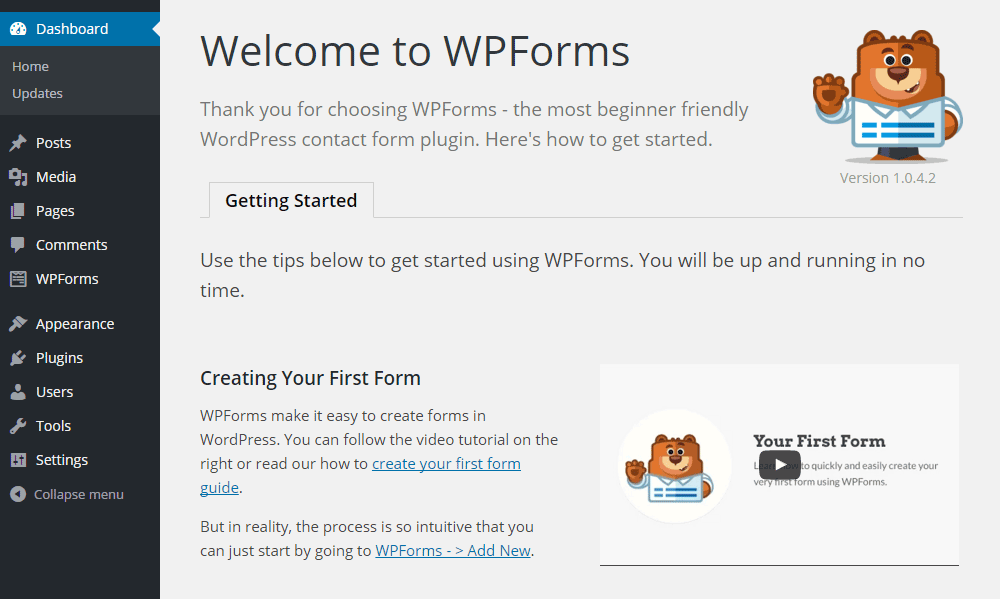
Most WordPress users prefer plugins because they remove technical complexity.

Popular tools like WPForms provide visual form builders.


πŸ”Ή How Plugin-Based Forms Work

With WPForms, you simply:

  1. Install the plugin
  2. Open the drag-and-drop editor
  3. Add fields visually
  4. Configure notifications
  5. Embed the form

No coding required.


πŸ”Ή Features Provided by Plugins

Plugins automatically handle:

βœ… Validation
βœ… Security
βœ… Spam protection
βœ… Database storage
βœ… Email alerts
βœ… Conditional logic
βœ… Payment integration

You only configure settings.


πŸ”Ή Ready-Made Templates

WPForms includes templates such as:

  • Contact forms
  • Registration forms
  • Surveys
  • Newsletter forms
  • Feedback forms

You select β†’ customize β†’ publish.


πŸ”Ή Development Model

Plugin-based forms are:

  • UI-driven
  • Configuration-based
  • Low-code or no-code

So, WordPress with plugins means:

β€œUse tools instead of building systems.”


3️⃣ Forms in Django: Framework-Level Integration

Image
Image
Image
Image

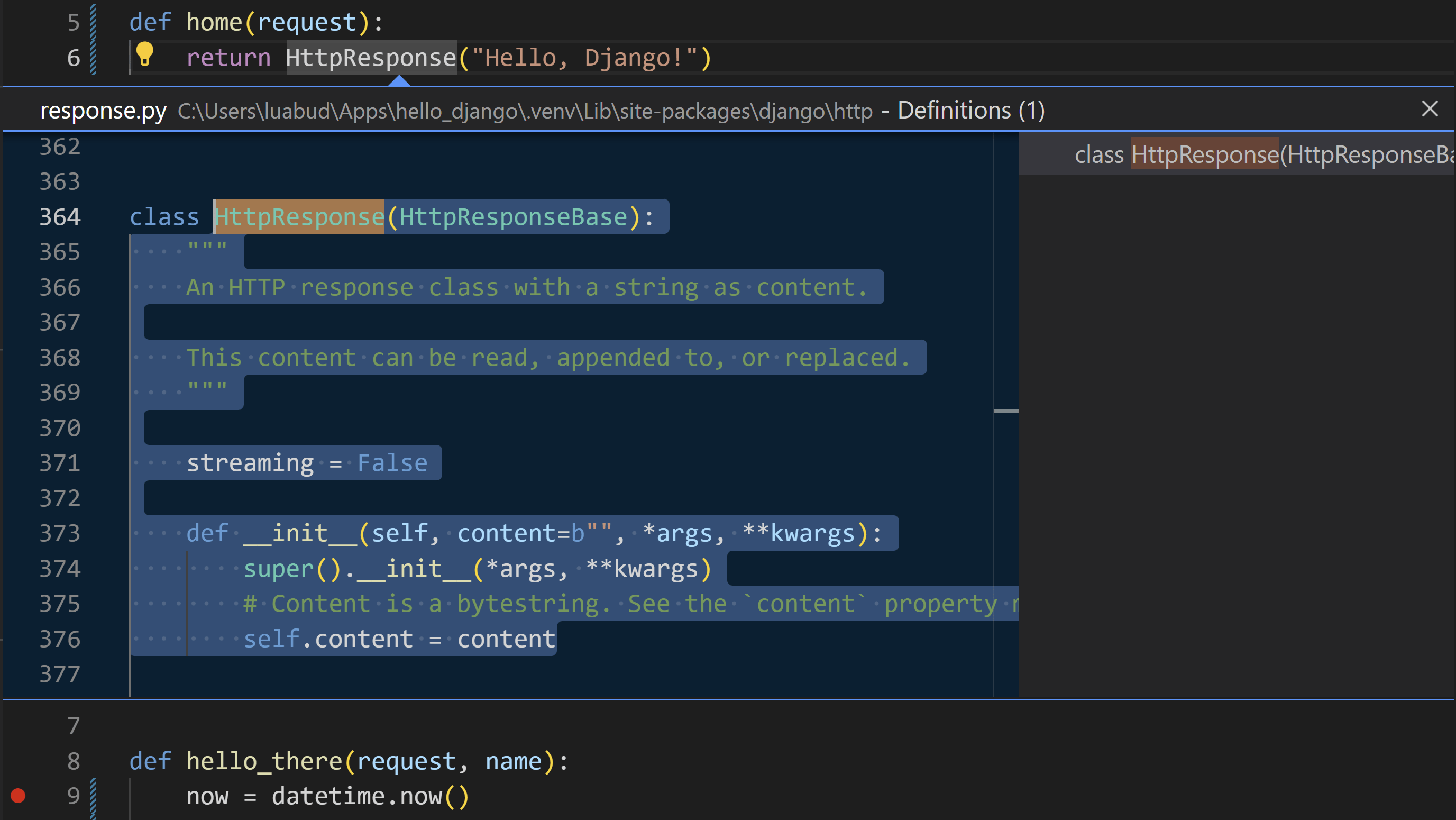
Unlike WordPress, Django treats forms as a core feature of the framework.

Forms are not add-ons. They are part of the system.


πŸ”Ή How Django Forms Work

Forms are written as Python classes:

from django import forms

class ContactForm(forms.Form):
    name = forms.CharField(max_length=100)
    email = forms.EmailField()

In views:

if form.is_valid():
    data = form.cleaned_data

In templates:

{{ form.as_p }}

πŸ”Ή Built-In Capabilities

Django automatically provides:

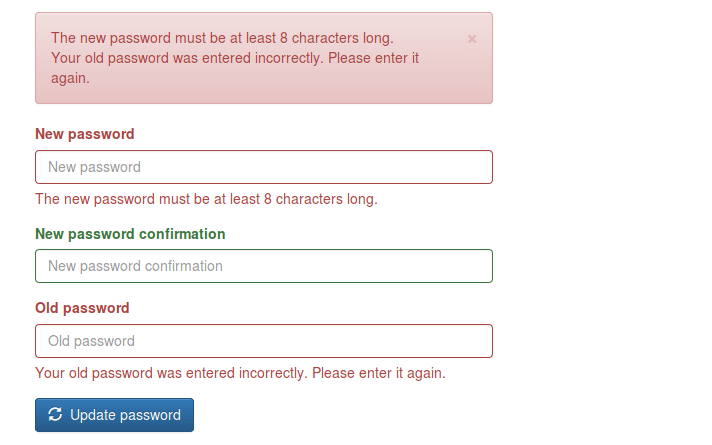
βœ… Field validation
βœ… Type checking
βœ… Error handling
βœ… CSRF protection
βœ… Data cleaning
βœ… Model integration
βœ… Security

No third-party plugin is required.


πŸ”Ή Template Form Features

Django templates allow full customization:

{{ form.name.label }}
{{ form.name }}
{{ form.name.errors }}

You control:

  • Layout
  • Styling
  • Error display
  • Accessibility

πŸ”Ή Development Model

Django forms are:

  • Object-oriented
  • Structured
  • Scalable
  • Framework-integrated

So, Django means:

β€œBuild robust systems using built-in tools.”


πŸ“Š Comparison: WordPress vs Django Forms

FeatureWordPress (No Plugin)WordPress (Plugin)Django
SetupManual codingVisual UIPython classes
ValidationManualPlugin-managedBuilt-in
SecurityManualPlugin-managedBuilt-in
DatabaseManualPlugin-dependentORM-based
FlexibilityMediumLimitedVery High
ScalabilityMediumMediumHigh
Learning CurveHighLowMedium–High

🧠 Philosophical Difference

WordPress Philosophy

Originally built for blogging and content management.

Forms are:

  • Optional features
  • Implemented via plugins
  • Not core architecture

Approach:

β€œExtend with tools.”


Django Philosophy

Built for application development.

Forms are:

  • Core components
  • Linked to models
  • Linked to validation
  • Linked to security

Approach:

β€œEngineer the system.”


πŸ” Real-World Example: Contact Form

In WordPress (Without Plugin)

You must create:

  1. HTML form
  2. PHP processor
  3. Validation logic
  4. Security system
  5. Email handler

More freedom, more work.


In WordPress (With WPForms)

You do:

  1. Install plugin
  2. Choose template
  3. Publish

Fast, simple, limited.


In Django

You create:

  1. Model (optional)
  2. Form class
  3. View logic
  4. Template

More setup, long-term stability.


πŸš€ When Should You Use Each?

Choose Manual WordPress Forms If:

βœ” You want full control in WordPress
βœ” You know PHP well
βœ” You need lightweight solutions


Choose WPForms If:

βœ” You want fast deployment
βœ” You run marketing or content sites
βœ” You don’t want to code
βœ” You need integrations


Choose Django Forms If:

βœ” You’re building SaaS platforms
βœ” You need complex validation
βœ” You manage large datasets
βœ” You want scalable systems


πŸ“ Final Summary

PlatformForm StyleStrength
WordPress (No Plugin)Manual PHPFlexibility
WordPress (Plugin)Visual BuilderSpeed
DjangoFramework-BasedPower & Scalability

πŸ‘‰ WordPress without plugins = Handcrafted
πŸ‘‰ WordPress with plugins = Tool-based
πŸ‘‰ Django = System-based


πŸ“Œ Conclusion

Forms reflect the philosophy of each platform:

  • WordPress gives you freedom or convenience, depending on plugins.
  • Django gives you structure and engineering depth.

If your goal is fast website deployment, WordPress plugins are ideal.
If your goal is building long-term software products, Django forms offer unmatched control.


🌐 Popular Websites Built with Django β€” And Where WordPress/PHP Still Shine

Rajeev Bagra · February 6, 2026 · Leave a Comment


When people learn Django, a common question is:

β€œIs Django really used in big websites, or is it only for small projects?”

The answer is clear: many global platforms started and scaled with Django.

At the same time, WordPress and PHP still dominate blogging and content publishing.

In this article, we’ll explore famous websites built with Django and also highlight where WordPress/PHP has a strong niche.


πŸ”— Official Websites

Before we begin, here are the official platforms:

  • βœ… Django (Official Website): https://www.djangoproject.com
  • βœ… WordPress (Official Website): https://wordpress.org

These are the best places to learn, download, and follow updates.


πŸ“Έ Instagram β€” Social Media at Massive Scale

Instagram chose Django in its early stage because it allowed developers to build features quickly and scale fast.

What Django Powers

  • User accounts
  • Posts, likes, comments
  • Feeds and APIs

πŸ“Œ Lesson: Django is ideal for user-driven platforms.


🎡 Spotify β€” Data & Internal Systems

Spotify uses Django mainly for internal dashboards and backend tools.

Django’s Role

  • Analytics systems
  • Admin dashboards
  • Content workflows

πŸ“Œ Lesson: Django works well for business systems.


πŸ“Œ Pinterest β€” Visual Discovery Platform

Pinterest relied heavily on Django while growing from a startup.

Django Supports

  • Boards and profiles
  • Search features
  • Recommendation systems

πŸ“Œ Lesson: Django handles large content platforms efficiently.


πŸ’¬ Disqus β€” Community & Discussions

Disqus manages millions of comments daily using Django.

Django Manages

  • Moderation
  • Spam filtering
  • User reputation

πŸ“Œ Lesson: Django is strong for community websites.


🦊 Mozilla β€” Open-Source Platforms

Mozilla uses Django for many of its developer services.

Django Powers

  • Documentation portals
  • Community platforms
  • Account systems

πŸ“Œ Lesson: Django fits technical ecosystems.


βš–οΈ Django vs WordPress/PHP: Where Each Has a Niche

Now let’s look at where each platform shines.


🐍 Where Django Is Strongest

Django is best for:

βœ… Custom web apps
βœ… SaaS platforms
βœ… AI & data systems
βœ… APIs & mobile backends
βœ… Enterprise software

πŸ“Œ Django is built for developers creating systems, not just websites.


🐘 Where WordPress/PHP Dominates

WordPress remains the top choice for:

βœ… Blogging & Content Sites

  • Personal blogs
  • News portals
  • Affiliate sites

βœ… Business Websites

  • Company pages
  • Portfolios
  • Service sites

βœ… E-commerce

  • Online stores (WooCommerce)
  • Digital products

βœ… Non-Technical Users

  • Visual editors
  • Easy publishing
  • Plugin ecosystem

πŸ“Œ WordPress is built for publishers and creators.


πŸ“Š Quick Comparison

FeatureDjango (Python)WordPress/PHP
Official Sitedjangoproject.comwordpress.org
SetupMediumVery Easy
CodingRequiredMinimal
BloggingWeakExcellent
Custom AppsExcellentLimited
CostHigherLower
ScalabilityHighModerate

🎯 Which Should You Choose?

Choose Django If You Want:

βœ… Build web applications
βœ… Create SaaS products
βœ… Work with APIs and data
βœ… Become a backend developer

πŸ‘‰ Start here: https://www.djangoproject.com


Choose WordPress If You Want:

βœ… Run a blog
βœ… Build affiliate sites
βœ… Launch quickly
βœ… Avoid heavy coding

πŸ‘‰ Start here: https://wordpress.org


πŸš€ Best Practice: Use Both Together

Many creators use:

  • WordPress β†’ Content & SEO
  • Django β†’ Tools & Applications

Connected via APIs, this gives:

βœ” Traffic
βœ” Automation
βœ” Monetization
βœ” Scalability


πŸ“ Final Thoughts

Platforms like Instagram, Pinterest, and Spotify prove that:

Django is enterprise-ready and scalable.

Meanwhile, WordPress proves that:

Content publishing doesn’t need complexity.

So it’s not:

❌ Django vs WordPress
βœ… It’s: β€œWhat am I building?”

  • Apps β†’ Django
  • Blogs β†’ WordPress
  • Hybrid β†’ Both

Is Operating Django Similar to Using DOS? Understanding Projects, Apps, and URLs

Splendid · February 6, 2026 · Leave a Comment


When beginners start learning Django, many feel that working with projects, apps, folders, and URLs looks similar to using DOS or command-line systems with directories and files.

So a common question arises:

β€œIs operating Django similar to operating DOS in terms of directories and files?”

The short answer is: Yes, at a basic level β€” but Django is far more structured and meaningful.

Let’s understand this clearly.


Understanding DOS: File and Directory Management

In DOS (or any command-line system), everything revolves around files and folders.

Example structure:

C:\
 └── Documents\
      └── report.txt

Common DOS commands:

cd Documents
dir
type report.txt

In DOS, you mainly:

  • Navigate folders
  • Open files
  • Copy/delete files
  • Manage storage

DOS treats all files the same. A file is just a file β€” it has no special role in the system.


Understanding Django: Project and App Structure

Django also uses folders and files, but with predefined meaning.

When you create a project:

django-admin startproject mysite

You get:

mysite/
 β”œβ”€β”€ manage.py
 └── mysite/
      β”œβ”€β”€ settings.py
      β”œβ”€β”€ urls.py
      β”œβ”€β”€ wsgi.py

When you create an app:

python manage.py startapp blog

You get:

blog/
 β”œβ”€β”€ models.py
 β”œβ”€β”€ views.py
 β”œβ”€β”€ urls.py
 β”œβ”€β”€ admin.py

Each file has a specific responsibility:

FilePurpose
models.pyDatabase structure
views.pyBusiness logic
urls.pyRouting
templates/HTML files
static/CSS & JavaScript

Unlike DOS, Django folders are not random storage β€” they are functional components.


Similarities Between DOS and Django

At a conceptual level, Django and DOS are similar in some ways.

1. Hierarchical Structure

Both use tree-like systems:

DOS:

C:\Projects\App\file.txt

Django:

project/app/templates/page.html

Everything is organized in levels.


2. Command-Line Usage

Both rely heavily on the terminal.

DOS commands:

cd
dir
copy

Django commands:

python manage.py runserver
python manage.py migrate
python manage.py startapp

In both systems, the terminal is your main control center.


3. Path-Based Navigation

In DOS:

C:\Users\Rajeev\Documents

In Django:

/blog/post/1/

Both use paths to locate something.

But in Django, paths are virtual.


URLs in Django Are Like β€œVirtual Directories”

This is one of the most important similarities.

In DOS:

C:\blog\post1.txt

represents a real file.

In Django:

example.com/blog/post1/

looks like a folder path β€” but it isn’t.

Instead, it maps to Python code.

Example:

path("blog/", views.blog_home)

This means:

When someone visits /blog/, run this function.

So:

  • DOS β†’ Physical folder
  • Django β†’ Logical route

Django URLs only look like directories.


The Biggest Difference: Django Is Semantic

In DOS, file names have no system-level meaning.

Example:

notes.txt

DOS doesn’t care what it contains.

In Django, file names are meaningful:

models.py  β†’ Database
views.py   β†’ Logic
urls.py    β†’ Routing

Django knows how to use these files.

So Django is not just storage β€” it is a framework with rules.


Django as an β€œOperating System for Websites”

A good way to think about Django is:

Django is like an Operating System for Web Applications.

Just as an OS manages:

  • Programs
  • Files
  • Users
  • Permissions

Django manages:

  • Apps
  • Requests
  • Databases
  • Templates
  • Security
  • Sessions

That’s why Django feels like working inside a system.


How a Django Request Works (Like File Lookup)

Let’s see how Django processes a request.

When a user visits:

example.com/blog/

Django follows these steps:

1️⃣ URL Router (urls.py) checks the path
2️⃣ Finds matching view
3️⃣ Runs Python function
4️⃣ Fetches data from models
5️⃣ Loads template
6️⃣ Returns HTML page

It is similar to how DOS finds a file through directories β€” but Django finds logic instead of files.


Simple Comparison Table

FeatureDOSDjango
Main PurposeFile managementWeb development
FoldersStore filesOrganize features
FilesData onlyLogic + Data
PathsPhysicalVirtual
CommandsOS controlApp control

Mental Model for Beginners

The best way to think about Django is:

DOS Thinking

β€œWhere is my file?”

Django Thinking

β€œWhere is my feature?”

Each Django app represents one feature:

blog/
 β”œβ”€β”€ models.py   β†’ Data
 β”œβ”€β”€ views.py    β†’ Logic
 β”œβ”€β”€ urls.py     β†’ Routes

One folder = One functionality.


Final Answer

Yes, operating Django is conceptually similar to using DOS because:

βœ” Both use hierarchical folders
βœ” Both rely on command lines
βœ” Both use paths
βœ” Both require navigation skills

But the difference is:

DOS manages files.
Django manages web applications.

Django adds rules, structure, and automation on top of basic file management.

So you can think of Django as:

DOS + Web Architecture + Automation


Conclusion

If you already understand DOS or command-line systems, you have a strong foundation for learning Django.

Your skills in:

  • Navigating directories
  • Using terminals
  • Understanding paths

will directly help you in Django development.

The main step forward is learning:

How folders and files work together to serve web pages.

Once you understand that, Django becomes much easier.


  • « Go to Previous Page
  • Page 1
  • Page 2

Primary Sidebar

Recent Posts

  • Understanding the Difference Between a Public GitHub Repository and GitHub Releases
  • Why HubSpot Became Relevant Beyond Email Marketing
  • Where Django Has a Specific Advantage Over WordPress
  • πŸ›‘οΈ How to Safely Backup Your Code Before Making Changes (Beginner-Friendly Git Guide)
  • WordPress vs Django Admin Panels: How They Handle Backend Management Differently

Archives

  • May 2026
  • April 2026
  • March 2026
  • February 2026
  • January 2026
  • December 2025
  • October 2025
  • August 2025

Categories

  • Blog

Tag

AWS EC2 AWS Lightsail Azure Contabo crm CSS DBMS DigitalOcean Django email marketing forms Git Github HTML Hubspot Markdown Python spreadsheets SQL Twilio webdev webhosting WordPress
Terms Display
CSS HTML DigitalOcean email marketing forms Markdown DBMS Python Web Server webhosting WordPress Nginx Github Twilio Git spreadsheets SQL Hubspot Django webdev

Start building your digital presence with Webnzee. Contact Us

Webnzee

This website may use AI tools to assist in content creation. All articles are reviewed, edited, and fact-checked by our team before publishing. We may receive compensation for featuring sponsored products and services or when you click on links on this website. This compensation may influence the placement, presentation, and ranking of products. However, we do not cover all companies or every available product.

  • Home
  • Blog
  • Trending
  • Terms
  • Support
  • Subscribe
  • Contact
Scroll Up