• Skip to primary navigation
  • Skip to main content
  • Skip to primary sidebar
webnzee

Webnzee

Webnzee — Your Web Dev Companion.

  • Home
  • Blog
  • Trending
  • Offers
  • Terms
    • Privacy
    • Disclaimer
  • Subscribe
  • Support
  • Contact
  • Show Search
Hide Search
You are here: Home / Archives for 2026

Archives for 2026

How Adding Swap Memory Fixed a Frequently Crashing AWS Lightsail WordPress Server

Rajeev Bagra · March 8, 2026 · Leave a Comment

Why my AWS Lightsail instance for WordPress site using Amazon stack keeps getting stopped
byu/DigitalSplendid inaws

Small cloud servers are extremely popular among developers, bloggers, and startup founders because they provide an affordable way to launch websites quickly. Platforms like AWS Lightsail make it easy to deploy applications such as WordPress in just a few clicks.

However, many users running WordPress on smaller Lightsail instances—especially those with 1 GB RAM or less—sometimes encounter a frustrating issue: the website suddenly stops responding and only starts working again after the server is rebooted.

This article explains why this happens and how a simple configuration change—adding swap memory—can significantly improve server stability.


The Initial Problem: Website Goes Down Until Reboot

In some Lightsail environments, users may notice the following pattern:

  • The website works normally after the server starts.
  • After some hours or a day, the site stops responding.
  • SSH access may still work, but the website itself becomes inaccessible.
  • Rebooting the server immediately restores the site.

This cycle can repeat frequently and is especially common on smaller instances running WordPress, MySQL, and Apache together.

While the issue might initially seem like a problem with WordPress plugins, the real cause is often much simpler: memory exhaustion.


Understanding the Role of Server Memory

A typical WordPress server running on Linux uses memory for several components:

  • Web server (Apache or Nginx)
  • Database server (MySQL or MariaDB)
  • PHP processes that generate dynamic pages
  • Operating system cache
  • WordPress plugins and themes

On a 1 GB Lightsail instance, the available RAM is usually around 945 MB. As traffic increases or background processes run, memory consumption can approach this limit.

If the server runs out of memory and no backup memory mechanism exists, Linux may terminate important services to recover resources. When this happens, components like MySQL or Apache stop working, causing the website to go offline.


What Is Swap Memory?

Swap memory is a portion of disk storage used as virtual memory when physical RAM becomes insufficient.

When the system approaches its RAM limit, Linux can temporarily move less-used memory pages to swap space. This prevents essential processes from crashing and allows the server to continue operating normally.

While swap is slower than RAM because it resides on disk, it acts as an important safety net.


Checking Server Memory Usage

Administrators can check memory usage using the following command:

free -h

Example output on a small Lightsail instance might look like this:

Mem: 945Mi total, 625Mi used, 208Mi free
Swap: 0B total

The key issue here is the absence of swap space. Without swap, the system has no fallback when RAM becomes full.


Creating Swap Memory on a Lightsail Server

Creating swap space on Linux is straightforward. The following commands create a 1 GB swap file.

Step 1: Create the swap file

sudo fallocate -l 1G /swapfile

Step 2: Secure the file

sudo chmod 600 /swapfile

Step 3: Prepare it as swap

sudo mkswap /swapfile

Step 4: Enable swap

sudo swapon /swapfile

Step 5: Make the configuration persistent

echo '/swapfile none swap sw 0 0' | sudo tee -a /etc/fstab

After completing these steps, running free -h again should display:

Swap: 1.0Gi total

This confirms that swap memory is active.


Why Swap Improves Stability

Once swap is enabled, the operating system can handle temporary memory pressure more gracefully.

Instead of terminating services like MySQL or Apache when RAM fills up, Linux can move inactive memory pages to swap space. This helps ensure that essential services remain running, preventing website downtime.

For small cloud servers, this simple adjustment often eliminates the need for frequent reboots.


Optional Optimization: Adjust Swap Behavior

Administrators may also want to reduce how aggressively Linux uses swap by adjusting the swappiness parameter.

sudo sysctl vm.swappiness=10

To make this setting permanent:

echo "vm.swappiness=10" | sudo tee -a /etc/sysctl.conf

Lower swappiness values encourage the system to prefer RAM while using swap only when necessary.


Learning From the Community While Troubleshooting

When troubleshooting infrastructure issues like this, developers rarely work in isolation. Many real-world solutions emerge from discussions within the broader technology community.

Useful places to seek guidance include:

  • AWS community forums
  • Developer discussions on Reddit
  • Open-source community blogs
  • Technical Q&A platforms

Often, someone else has already faced a similar issue and shared valuable insights or troubleshooting steps. Reading these discussions can save significant time and help identify practical solutions faster.


Using AI Tools for Faster Troubleshooting

Modern AI tools can also play a useful role in diagnosing server issues.

Tools like ChatGPT can help by:

  • Interpreting command outputs
  • Suggesting troubleshooting steps
  • Explaining Linux system behavior
  • Generating command sequences to test configurations

For developers who may not be deeply experienced in server administration, AI tools can act as a helpful companion during debugging sessions.

Of course, AI suggestions should still be reviewed carefully and tested in controlled environments, but they can significantly accelerate the learning and troubleshooting process.


Best Practices for Small Cloud Servers

Developers running WordPress or similar applications on lightweight cloud instances can improve reliability by following a few best practices:

  • Enable swap memory on instances with limited RAM.
  • Monitor system resources using tools like htop.
  • Limit excessive server processes such as Apache workers.
  • Regularly review plugin usage to avoid unnecessary memory consumption.
  • Learn from online developer communities when diagnosing issues.

These measures can significantly improve performance and uptime.


Final Thoughts

Affordable cloud servers make it easy to deploy websites quickly, but smaller instances come with limited resources. When RAM runs out, services may fail unless the system has a fallback mechanism.

Adding swap memory provides a simple yet effective safeguard against unexpected crashes. For many developers and site owners using AWS Lightsail, this small configuration change can mean the difference between a server that requires daily reboots and one that runs reliably for weeks or months.

Understanding and managing server memory—while also leveraging community knowledge and modern AI tools—can make cloud infrastructure far easier to maintain and troubleshoot.

Understanding Markdown and Its Relevance in WordPress

Rajeev Bagra · March 6, 2026 · Leave a Comment

When building websites, documentation systems, or content platforms, developers often encounter Markdown, a lightweight markup language designed to make writing formatted content simple and readable.

While platforms like Django applications, developer documentation sites, and static site generators rely heavily on Markdown, many people wonder whether Markdown has any relevance in WordPress, the world’s most widely used content management system.

This learning post explains what Markdown is, how it works, and how it fits into the WordPress ecosystem.


What Is Markdown?

Markdown is a lightweight markup language that allows writers to format text using simple symbols instead of complex HTML tags.

Instead of writing HTML like this:

<h1>Introduction</h1>
<p>This is <strong>important</strong> text.</p>

Markdown lets you write the same content in a much simpler form:

# Introduction

This is **important** text.

The Markdown text is then converted into HTML, which browsers can render.

This makes Markdown extremely popular for:

  • Technical documentation
  • Knowledge bases
  • Developer blogs
  • GitHub README files
  • Static websites

Why Markdown Was Created

Writing long documents directly in HTML can be tedious and difficult to maintain.

For example, consider formatting a simple list in HTML:

<ul>
<li>Python</li>
<li>Django</li>
<li>Flask</li>
</ul>

In Markdown, the same content becomes:

- Python
- Django
- Flask

This makes Markdown:

  • easier to read
  • easier to write
  • faster to edit
  • more portable across platforms

Because of these advantages, Markdown has become the standard writing format for developers.


Common Markdown Syntax

Here are some of the most commonly used Markdown elements.

Headings

# Heading 1
## Heading 2
### Heading 3

Bold and Italics

**Bold text**
*Italic text*

Lists

- Item one
- Item two
- Item three

Links

[OpenAI](https://openai.com)

Images

![Alt text](image.jpg)

When processed by a Markdown parser, these elements are automatically converted into HTML.


How Markdown Is Used in Web Applications

Many web applications store content as Markdown and convert it to HTML before displaying it in the browser.

For example, a simplified workflow looks like this:

Markdown file
      ↓
Markdown parser
      ↓
HTML output
      ↓
Browser rendering

Frameworks like Django commonly use Python libraries such as:

markdown2

to perform this conversion.

This approach allows developers to store content in a human-friendly format while still serving HTML pages to users.


How WordPress Handles Content

WordPress takes a different approach.

Instead of writing Markdown, most WordPress users write content using a visual editor, known as the Block Editor (Gutenberg).

When a user formats text inside the editor—such as adding headings, bold text, or lists—WordPress automatically converts that formatting into HTML behind the scenes.

For example, when you create a heading in WordPress, the system stores something like this in the database:

<h2>My Section Heading</h2>

So WordPress primarily works with HTML rather than Markdown.


Can Markdown Be Used in WordPress?

Even though WordPress does not use Markdown by default, it can still support Markdown through plugins.

Some plugins allow authors to write posts using Markdown syntax, which WordPress then converts into HTML when displaying the page.

Examples of such plugins include:

  • Jetpack Markdown
  • WP Markdown Editor
  • Parsedown Markdown integrations

With these tools, a WordPress post can be written like this:

# My Blog Post

This article explains **data science tools**.

## Tools

- Python
- Pandas
- Tableau

The plugin converts the Markdown into HTML before rendering the page.


Why WordPress Uses HTML Instead of Markdown

WordPress is designed primarily for non-technical users, such as bloggers, small business owners, and marketers.

These users usually prefer a visual editor, where formatting is applied through buttons rather than syntax.

Markdown requires remembering formatting symbols, which can be intimidating for beginners.

Therefore, WordPress focuses on:

  • drag-and-drop editing
  • visual formatting
  • block-based content design

This makes the platform easier for everyday users.


Where Developers Encounter Markdown Most Often

Even if someone primarily uses WordPress, Markdown remains an important skill because it appears in many developer environments.

Examples include:

  • GitHub documentation
  • README files
  • developer blogs
  • knowledge management tools
  • static site generators
  • collaborative documentation platforms

Platforms such as GitHub, Stack Overflow, and many technical blogging systems rely heavily on Markdown.


Markdown and the Future of Publishing

Modern publishing systems increasingly combine Markdown with automated workflows.

For example, many developers now write blog posts as Markdown files stored in Git repositories. These files are then automatically converted into web pages using static site generators.

This workflow allows content to be:

  • version controlled
  • easily portable
  • programmatically generated
  • automatically deployed

While WordPress still dominates traditional blogging, Markdown continues to power many developer-focused publishing platforms.


Key Takeaways

Markdown is a lightweight markup language that simplifies writing formatted content.

It allows writers to:

  • format text easily
  • maintain readability
  • convert content into HTML automatically

WordPress primarily uses HTML generated by its visual editor, but Markdown can still be used through plugins or developer workflows.

Understanding Markdown is particularly valuable for developers, as it plays a major role in modern documentation systems, programming communities, and automated publishing tools.


Learning Markdown provides a useful bridge between simple writing tools and structured web publishing, making it an important skill for anyone interested in web development or technical content creation.

Django vs WordPress: Project and App Equivalent

Rajeev Bagra · March 5, 2026 · Leave a Comment

Developers who learn both Django and WordPress often notice that the two platforms organize functionality differently.

  • Django uses Projects and Apps
  • WordPress uses Core, Themes, and Plugins

Although the terminology differs, the purpose is somewhat similar.


1. Django Project vs WordPress Installation

Image
Image
Image

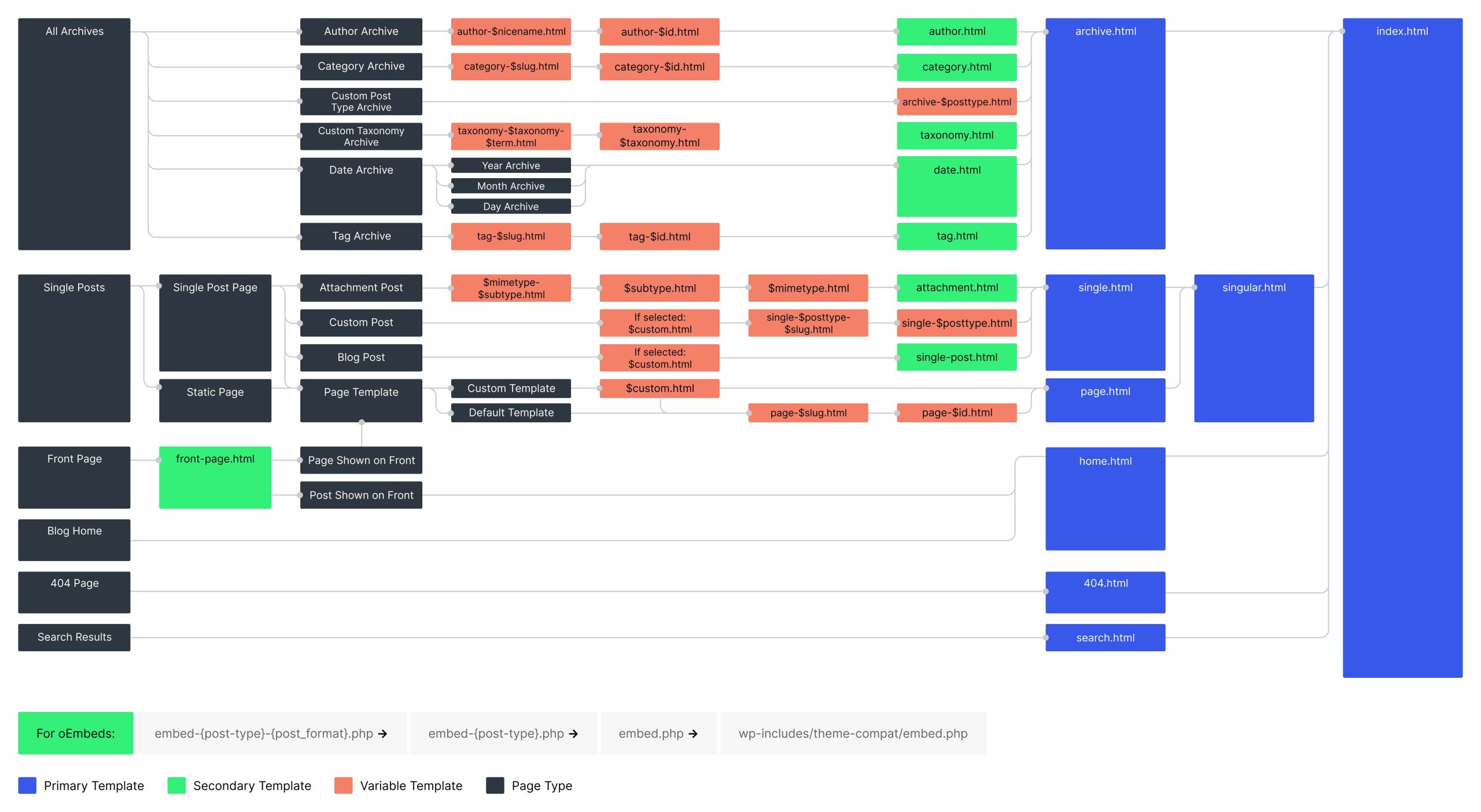
The closest equivalent of a Django Project in WordPress is a WordPress installation (the entire website).

When you install WordPress, you get a full site structure like:

wordpress/
   wp-admin/
   wp-content/
   wp-includes/
   wp-config.php

This installation manages:

  • Database connection
  • Core system functionality
  • Site configuration
  • Installed plugins
  • Installed themes

So conceptually:

DjangoWordPress
ProjectWordPress installation

Both represent the entire website application.


2. Django Apps vs WordPress Plugins

Image
Image

The closest equivalent of a Django App in WordPress is a Plugin.

A plugin adds a specific functionality to a WordPress site.

Examples:

  • Contact form
  • SEO tools
  • Membership systems
  • E-commerce

For example:

  • WooCommerce → adds an entire e-commerce system
  • Yoast SEO → adds SEO optimization features

Similarly, in Django an app might handle:

  • Blog system
  • Authentication
  • Payments
  • Forums

So conceptually:

DjangoWordPress
AppPlugin

Both are modules that extend functionality.


3. Django Templates vs WordPress Themes

Image
Image
Image

In Django, the user interface is built using templates.

In WordPress, the equivalent concept is a Theme.

Themes control:

  • Layout
  • Visual design
  • Page templates
  • Styling

For example:

  • Astra
  • GeneratePress

Themes define how the website looks, while plugins define what the website does.


4. Complete Conceptual Mapping

Django ConceptWordPress EquivalentPurpose
ProjectWordPress installationEntire website
AppPluginFeature module
TemplatesThemeWebsite design
ModelsDatabase tablesData structure
ViewsPHP logicApplication behavior

5. Key Architectural Difference

The biggest difference is who the platform is designed for.

Django

  • Framework for developers
  • Requires coding
  • Highly customizable architecture

WordPress

  • CMS for content creators and businesses
  • Functionality added using plugins
  • Development optional

6. Example Comparison

Suppose you want to build an online learning platform.

In Django

Project:

learning_platform/

Apps:

users/
courses/
payments/
forum/

In WordPress

Website installation:

wordpress site

Plugins:

  • LMS plugin
  • Membership plugin
  • Payment plugin
  • Forum plugin

Example LMS plugin:

  • LearnDash

Final Takeaway

There is no perfect one-to-one mapping, but the closest conceptual comparison is:

DjangoWordPress
ProjectWordPress site installation
AppPlugin
TemplatesTheme

Understanding this comparison helps developers move easily between framework-based development (Django) and CMS-based development (WordPress).

Community Discussions (Reddit)

Django

  • Made an accessibility linter for Django templates, is this useful?
  • I built a production-ready software foundation to skip the "platform rebuild" phase. What parts of this setup do you hate doing the most ?
  • For experienced dev. How u use AI
  • ¿Cual es el roadmap actual de Django para ustedes?
  • How Deep Should We Go When Learning a Framework Like Django?

WordPress

  • Any free gallery plugins that allow comments?
  • WordPress Homepage Editor Broken
  • Haven't coded in 20 years. Trying to build a simple WordPress site with AI, but getting pure spaghetti code. Help!
  • What should I do when a user leaves a 1-star review just to ask a support question?
  • How do you update custom themes

Twilio’s Hardware & Software Stack Explained — Skills Required and How to Build a Career in the Twilio Ecosystem

Team Webnzee · February 26, 2026 · Leave a Comment

When people think of Twilio, they usually think “SMS API.”

But behind that simple API call lies a sophisticated global hardware and software stack — and a developer ecosystem that rewards real technical depth.

In this article, we’ll explore:

  • Twilio’s hardware and infrastructure layer
  • Its software architecture and APIs
  • What skills businesses need to use Twilio effectively
  • What technical expertise Twilio expects from developers
  • How to get associated with Twilio professionally

All with relevant links for deeper exploration.


1️⃣ Twilio’s Hardware Stack (The Infrastructure Layer)

Twilio is a CPaaS (Communications Platform as a Service) provider. That means it operates at telecom-grade scale.

Although Twilio abstracts hardware away from developers, its infrastructure includes:


ߓ Carrier Connectivity

Twilio connects with:

  • Global telecom carriers
  • PSTN networks
  • Mobile operators
  • Internet backbone providers

This enables SMS and voice routing worldwide.

ߔ Twilio Super Network overview:
https://www.twilio.com/en-us/network


ߏ Data Centers & Cloud Infrastructure

Twilio operates distributed cloud infrastructure and edge locations to:

  • Minimize latency
  • Ensure high availability
  • Provide regional compliance

Twilio also partners with hyperscalers such as AWS for portions of its infrastructure stack.

ߔ Infrastructure & reliability overview:
https://www.twilio.com/en-us/trust


☎️ Voice & SIP Infrastructure

For voice communications, Twilio manages:

  • SIP trunking
  • Media gateways
  • Voice routing systems
  • Low-latency audio processing

ߔ Twilio Voice documentation:
https://www.twilio.com/docs/voice


2️⃣ Twilio’s Software Stack (What Developers Actually Use)

Here’s where Twilio becomes powerful.

Twilio exposes programmable APIs that sit on top of its telecom infrastructure.


Core Software Components

ߓ Messaging APIs

Send and receive SMS, WhatsApp, MMS.

ߔ Messaging API docs:
https://www.twilio.com/docs/messaging


ߓ Voice APIs

Programmable calls, IVR systems, call routing logic.

ߔ Voice API docs:
https://www.twilio.com/docs/voice


ߓ SendGrid (Email Infrastructure)

Twilio owns SendGrid for transactional and marketing email.

ߔ SendGrid documentation:
https://docs.sendgrid.com/


ߔ Twilio Verify (Authentication)

OTP and two-factor authentication systems.

ߔ Verify docs:
https://www.twilio.com/docs/verify


ߎ Twilio Flex (Contact Center Platform)

Twilio Flex is a programmable cloud contact center platform.

It allows businesses to build custom call centers using APIs rather than rigid software.

ߔ Twilio Flex overview:
https://www.twilio.com/en-us/flex

ߔ Flex documentation:
https://www.twilio.com/docs/flex


3️⃣ How Businesses Can Use Twilio (And Skills Required)

Twilio is not just for tech giants. Businesses of different sizes use it differently.


ߏ Small Businesses

Use cases:

  • Appointment reminders
  • OTP verification
  • SMS alerts
  • Customer notifications

Skills Needed:

  • Basic backend knowledge (Python, Node.js, PHP, etc.)
  • Understanding REST APIs
  • Ability to handle webhooks

ߚ SaaS Startups

Use cases:

  • Two-factor authentication
  • In-app messaging
  • Automated onboarding flows
  • Global phone verification

Skills Needed:

  • Backend development
  • Secure token handling
  • API rate limiting awareness
  • Logging and monitoring

ߏ Enterprise Organizations

Use cases:

  • Contact centers (Flex)
  • Customer data orchestration
  • Omnichannel communication systems
  • Fraud detection and identity verification

Skills Needed:

  • Microservices architecture
  • Cloud infrastructure knowledge
  • Compliance (GDPR, HIPAA awareness)
  • DevOps integration

4️⃣ What Technical Expertise Twilio Expects From Developers

If you’re aiming to associate professionally with Twilio — whether through:

  • Partner programs
  • Developer advocacy
  • The Twilio Champion Program
  • Or employment

Here’s what typically matters.


ߒ Core Technical Skills

You should be comfortable with:

  • REST APIs
  • Webhooks
  • JSON
  • Backend frameworks
  • OAuth / authentication concepts

Twilio supports multiple languages:

ߔ Supported SDKs:
https://www.twilio.com/docs/libraries

Languages include:

  • Python
  • Node.js
  • Java
  • PHP
  • C#
  • Ruby

☁️ Cloud & DevOps Familiarity

Twilio developers often integrate with:

  • AWS
  • Azure
  • GCP
  • Docker containers
  • CI/CD pipelines

Understanding scalable architecture increases credibility significantly.


ߓ Monitoring & Observability

Production communication systems require:

  • Logging
  • Error tracking
  • Rate-limit handling
  • Fraud detection mechanisms

Twilio provides monitoring tools within its console.

ߔ Twilio Console:
https://console.twilio.com/


5️⃣ How to Get Associated with Twilio Professionally

There are several structured pathways.


ߌ 1. Twilio Champion Program

Recognizes developers who:

  • Build with Twilio
  • Publish technical content
  • Speak at events
  • Contribute to the community

ߔ Twilio Champion Program:
https://www.twilio.com/en-us/champions


ߤ 2. Twilio Partner Program

For agencies and system integrators.

ߔ Twilio Partner Program:
https://www.twilio.com/en-us/partners


ߧ‍ߒ 3. Twilio Careers

If you want to work directly at Twilio:

ߔ Careers page:
https://www.twilio.com/company/jobs


6️⃣ How Twilio Grows Your Expertise Further

Once involved in the ecosystem, developers typically grow in:

  • Distributed systems design
  • Telecom protocol understanding
  • Global compliance
  • API product architecture
  • Developer advocacy skills

Twilio’s community resources help:

ߔ Twilio Blog:
https://www.twilio.com/blog

ߔ Twilio CodeExchange (example projects):
https://www.twilio.com/code-exchange


Final Thoughts

Twilio’s stack combines:

  • Telecom-grade hardware connectivity
  • Distributed cloud infrastructure
  • Programmable APIs
  • Enterprise-ready scalability

It rewards developers who understand:

  • Backend architecture
  • Secure API integrations
  • Cloud infrastructure
  • Production reliability

If you’re serious about building communication-driven products, Twilio is not just a tool — it’s an ecosystem.

And if you aim to associate with Twilio professionally, your edge will come from:

✔ Building real-world integrations
✔ Publishing technical insights
✔ Contributing to developer communities
✔ Demonstrating architectural maturity


What the Community Is Saying (Reddit Pulse)

For unfiltered community discussions about Twilio’s real-world usage, support issues, and technical implementation challenges, monitor:

ߔ Reddit Twilio Community:
https://www.reddit.com/r/twilio/

ߔ RSS Feed:

  • Twilio Video Media SDK (public beta): pipe live call audio/video into your own AI models
    October 20, 2026
    submitted by /u/Fit-Sky8697 [link] [comments]
  • What's your default for onboarding small business clients: coexistence on their own number, or a fresh number?
    October 19, 2026
    Hey all, A few days ago some of you helped me with error 3441038 on a coexistence signup. Thanks for that. This is the bigger question behind it. Quick background: I'm a one-man shop in South America building WhatsApp booking bots for barbershops (n8n + an LLM, connected through Kapso). Building the bot turned out […]
  • WhatsApp bot answering over a human operator is a race condition, not a prompt problem (Twilio + Supabase)
    October 19, 2026
    I have been building a small open source CRM for WhatsApp on top of Twilio, where an AI agent answers customers and a person can take any chat from a panel. The part I want to share is not the AI, is the handoff, because it is there where things get complicated. Each conversation has […]
  • How I use Twilio (SMS, WhatsApp, SendGrid) in a safety app for people living alone, and where I’m still stuck
    October 17, 2026
    Hi r/twilio, a Twilio Developer Advocate suggested I share this here after a post on r/SideProject, so here’s what I built. The idea After my mother ended up living alone, I kept wondering “is she okay today?” without wanting to call her every day like she’s being watched. So I built AliveGuard, a daily check-in […]
  • I mapped out all 42 Twilio A2P 10DLC & 2026 Unified Policy rejection codes (30880–30971 & 305xx) and what the DCA crawlers check on your DOM
    October 16, 2026
    After dealing with repeated A2P 10DLC and Toll-Free vetting rejections (and burning $15+ every resubmission cycle), I spent time going through Twilio's 2026 error catalog including the newer March 2026 granular codes (`30940–30971`) and the Sept 2026 Unified Content Policy codes (`30532–30567`) to document what the DCA reviewers and automated crawlers look for on your […]
  • Can a Meta Tech Provider send outbound WhatsApp messages, or do we need a provider like Twilio?
    October 16, 2026
    submitted by /u/Melodic_Tower_482 [link] [comments]
  • This month's developer hub theme: Twilio Agent Connect
    October 15, 2026
    submitted by /u/Fit-Sky8697 [link] [comments]
  • Twilio SMS API: Idempotency and terminal cancellation after a lost Message SID
    October 15, 2026
    Hi everyone! I'm evaluating Twilio Programmable Messaging SMS for a future business automation application. Before integrating the API, I would like to understand its reliability and safety guarantees. I have four technical questions: Lost Message SID: If a Messages API POST succeeds but the HTTP response is lost, is there an officially supported way to […]
  • Twilio voice charge
    October 14, 2026
    Currently im running a voice agent on pay as you go and im having a bulk amount of outbound calls that is around 15s and im being charged for a whole minute i believe instead of per seconds. so i want to ask how to do you guys contact their support team or like sales […]
  • First client, stuck on WhatsApp coexistence signup (error 3441038). Anyone get past this with Kapso?
    October 14, 2026
    submitted by /u/Fit-Stretch-182 [link] [comments]

Is Twilio a Bad Company? A Balanced Review — And Should You Join the Twilio Champion Program?

Rajeev Bagra · February 26, 2026 · Leave a Comment

Image
Image
Image
Image

If you’re considering testing Twilio — or even applying to the Twilio Champion Program — you may have noticed an explosion of negative reviews online.

That raises two important questions:

  1. Is Twilio actually a bad company?
  2. Could representing yourself as a Twilio Champion harm your professional reputation?

Let’s examine this objectively — with relevant links so you can verify everything yourself.


ߒ What Is Twilio?

Twilio is a cloud communications platform that allows developers to integrate:

  • SMS
  • Voice calls
  • WhatsApp
  • Video
  • Email (via SendGrid)
  • Authentication (OTP / 2FA)

directly into applications via APIs.

ߔ Official website:
https://www.twilio.com/

ߔ Twilio documentation (excellent developer resource):
https://www.twilio.com/docs

ߔ Product overview:
https://www.twilio.com/en-us/products

Twilio is not a simple no-code marketing tool. It is infrastructure — similar to AWS for communications.


ߓ Why So Many Negative Reviews?

On platforms like Trustpilot, Twilio has many 1-star reviews:

ߔ Trustpilot reviews:
https://www.trustpilot.com/review/www.twilio.com

Common complaints include:

  • Account verification problems
  • Billing confusion
  • Support delays
  • Spam calls from numbers using Twilio infrastructure

However, context matters.

Twilio provides the infrastructure — if a bad actor uses Twilio to send spam, the complaint often targets Twilio itself. This is similar to blaming a hosting provider for malicious content hosted on its servers.

Also, review platforms naturally attract dissatisfied users more than satisfied ones.


✔ What Independent Software Review Sites Show

While Trustpilot skews negative, verified software platforms show more balanced sentiment:

ߔ Capterra Reviews:
https://www.capterra.com/p/180158/Twilio-Communications-Platform/reviews/

ߔ G2 Reviews:
https://www.g2.com/products/twilio/reviews

These platforms include many developers praising:

  • API flexibility
  • Global messaging reach
  • Integration capabilities
  • Scalability

This difference highlights something important:
Technical users and infrastructure builders often view Twilio very differently from frustrated end-users.


ߏ Twilio’s Real USP (What Others Often Lack)

Here’s where Twilio stands out.

1️⃣ Programmable Communications

Twilio allows you to program communication logic directly into your app:

  • Conditional SMS triggers
  • Automated call routing
  • Workflow-based messaging
  • OTP authentication
  • Event-based notifications

This programmable depth is something many simpler SMS or VoIP providers don’t match at the same scale.


2️⃣ Omnichannel Unified API

Instead of juggling multiple vendors, Twilio supports:

  • SMS
  • Voice
  • WhatsApp
  • Chat
  • Email
  • Video

from a unified platform.

That architecture is especially attractive for SaaS founders and product teams.


3️⃣ Enterprise Scalability

Twilio is used by startups — but also powers enterprise-grade communication systems globally.

It is built to scale across countries, compliance environments, and large message volumes.


⚠ Honest Weaknesses

To be fair:

  • Pricing can become expensive at scale
  • Support quality can vary by plan tier
  • Learning curve is steep for non-developers
  • Abuse by bad actors affects public perception

These explain many of the negative reviews.


ߌ What About the Twilio Champion Program?

If you’re thinking long-term about ecosystem positioning, this matters.

ߔ Official Twilio Champion Program page:
https://www.twilio.com/en-us/champions

The program recognizes developers and community leaders who:

  • Build innovative solutions using Twilio
  • Share knowledge
  • Contribute to developer communities
  • Publish tutorials or talks

It’s not a marketing affiliate program — it’s more of a developer advocacy recognition.


Will Being a Twilio Champion Harm You?

Only if you present it uncritically.

Tech credibility comes from nuance.

If you say:

“Twilio is perfect for everyone.”

That’s risky.

If you say:

“Twilio is powerful for programmable communications but not ideal for every use case.”

That’s professional and credible.

Balanced representation strengthens your reputation.


ߎ Final Verdict

Is Twilio a bad company?

No.

It is a developer-focused communications infrastructure company with:

✔ Strong APIs
✔ Global scalability
✔ Omnichannel architecture
✔ Large developer ecosystem

But also:

✖ Mixed support reviews
✖ Pricing concerns
✖ Expectation mismatches

If your audience is technical or SaaS-focused, Twilio remains highly respected.

If your audience expects plug-and-play marketing simplicity, alternatives may fit better.


Strategic Recommendation

If you’re considering applying to the Twilio Champion Program:

  1. Test Twilio in real projects.
  2. Publish balanced technical content.
  3. Share strengths and limitations openly.
  4. Build credibility through implementation — not promotion.

That positions you as thoughtful — not biased.


Official Reddit RSS Feed for Twilio Discussions

  • Twilio Video Media SDK (public beta): pipe live call audio/video into your own AI models
    October 20, 2026
    submitted by /u/Fit-Sky8697 [link] [comments]
  • What's your default for onboarding small business clients: coexistence on their own number, or a fresh number?
    October 19, 2026
    Hey all, A few days ago some of you helped me with error 3441038 on a coexistence signup. Thanks for that. This is the bigger question behind it. Quick background: I'm a one-man shop in South America building WhatsApp booking bots for barbershops (n8n + an LLM, connected through Kapso). Building the bot turned out […]
  • WhatsApp bot answering over a human operator is a race condition, not a prompt problem (Twilio + Supabase)
    October 19, 2026
    I have been building a small open source CRM for WhatsApp on top of Twilio, where an AI agent answers customers and a person can take any chat from a panel. The part I want to share is not the AI, is the handoff, because it is there where things get complicated. Each conversation has […]
  • How I use Twilio (SMS, WhatsApp, SendGrid) in a safety app for people living alone, and where I’m still stuck
    October 17, 2026
    Hi r/twilio, a Twilio Developer Advocate suggested I share this here after a post on r/SideProject, so here’s what I built. The idea After my mother ended up living alone, I kept wondering “is she okay today?” without wanting to call her every day like she’s being watched. So I built AliveGuard, a daily check-in […]
  • I mapped out all 42 Twilio A2P 10DLC & 2026 Unified Policy rejection codes (30880–30971 & 305xx) and what the DCA crawlers check on your DOM
    October 16, 2026
    After dealing with repeated A2P 10DLC and Toll-Free vetting rejections (and burning $15+ every resubmission cycle), I spent time going through Twilio's 2026 error catalog including the newer March 2026 granular codes (`30940–30971`) and the Sept 2026 Unified Content Policy codes (`30532–30567`) to document what the DCA reviewers and automated crawlers look for on your […]
  • Can a Meta Tech Provider send outbound WhatsApp messages, or do we need a provider like Twilio?
    October 16, 2026
    submitted by /u/Melodic_Tower_482 [link] [comments]
  • This month's developer hub theme: Twilio Agent Connect
    October 15, 2026
    submitted by /u/Fit-Sky8697 [link] [comments]
  • Twilio SMS API: Idempotency and terminal cancellation after a lost Message SID
    October 15, 2026
    Hi everyone! I'm evaluating Twilio Programmable Messaging SMS for a future business automation application. Before integrating the API, I would like to understand its reliability and safety guarantees. I have four technical questions: Lost Message SID: If a Messages API POST succeeds but the HTTP response is lost, is there an officially supported way to […]
  • Twilio voice charge
    October 14, 2026
    Currently im running a voice agent on pay as you go and im having a bulk amount of outbound calls that is around 15s and im being charged for a whole minute i believe instead of per seconds. so i want to ask how to do you guys contact their support team or like sales […]
  • First client, stuck on WhatsApp coexistence signup (error 3441038). Anyone get past this with Kapso?
    October 14, 2026
    submitted by /u/Fit-Stretch-182 [link] [comments]
  • Same number for WhatsApp Business app (manual replies) + automated messages any platform or way to do it?
    October 13, 2026
    submitted by /u/AdventurousRemote964 [link] [comments]
  • UniFi Protect animal detections to send real-time black bear SMS / MMS alerts to our short-term rental guests
    October 10, 2026
    submitted by /u/WRankin [link] [comments]
  • Transcribing whatsapp voicenotes
    October 9, 2026
    submitted by /u/Severe-Station-9439 [link] [comments]
  • Whatsapp for one off interactions?
    October 8, 2026
    I want to use WhatsApp for my online service to update users or get an update from Them. I’ll be sending these on average once a week. Basically. Hey are you coming to this event? Reply No otherwise do nothing. I’m not having conversations, not trying to sell anything and not using it for business […]
  • Keeping Twillio SMS synced with your CRM?
    October 8, 2026
    Yo so I’m trying to figure out how people handle SMS when Twilio is doing the sending but the actual customer record lives somewhere else. Obviously in an ideal world, every inbound/outbound text would automatically show up on the right contact, and whoever replies next SHOULD without jumping between tools. We’re using webhooks + custom […]

  • « Go to Previous Page
  • Page 1
  • Interim pages omitted …
  • Page 7
  • Page 8
  • Page 9
  • Page 10
  • Page 11
  • Interim pages omitted …
  • Page 15
  • Go to Next Page »

Primary Sidebar

Recent Posts

  • The Future of the Internet: Every Person, Every Business, One Digital Identity
  • Affiliate Marketing in the Age of AI: How the Industry Works and Why Affiliate Networks Still Matter
  • Why Direct Traffic and Organic Search Should Be Analyzed Separately
  • Does 0 Keywords in Google Search Console Mean 0 Google Impressions?
  • Public Analytics Reports for WordPress: A Practical Way to Share Website Performance

Archives

  • October 2026
  • September 2026
  • August 2026
  • July 2026
  • June 2026
  • May 2026
  • April 2026
  • March 2026
  • February 2026
  • January 2026
  • December 2025
  • November 2025
  • October 2025
  • September 2025
  • August 2025

Categories

  • Blog
  • Offers

Tag

adsense affiliate marketing ai AI website builder AWS EC2 AWS Lightsail bitnami cloud computing Codespace CSS digitalassets Django domain domainsale email marketing forms freelancing gaming Genesis Framework Git Github Google Analytics Google Search hardware HTML IONOS mediavine Moosend Omnisend oop PayPal premium domain publisher ads Python Sendpulse SEO social media software SQL StudioPress Twilio webdev web hosting webhosting WordPress

Explore expert guides on WordPress, web hosting, website development, and online business growth. Visit Our Blog

Webnzee

This website may use AI tools to assist in content creation. All articles are reviewed, edited, and fact-checked by our team before publishing. We may receive compensation for featuring sponsored products and services or when you click on links on this website. This compensation may influence the placement, presentation, and ranking of products. However, we do not cover all companies or every available product.

  • Home
  • Blog
  • Trending
  • Offers
  • Terms
  • Subscribe
  • Support
  • Contact
Scroll Up