• Skip to primary navigation
  • Skip to main content
  • Skip to primary sidebar
webnzee

Webnzee

Webnzee — Your Web Dev Companion.

  • Home
  • Blog
  • Trending
  • Offers
  • Terms
    • Privacy
    • Disclaimer
  • Subscribe
  • Support
  • Contact
  • Show Search
Hide Search
You are here: Home / Archives for 2026

Archives for 2026

From AWS EC2 to Azure Credits: A Practical WordPress Hosting Journey for Cost-Conscious Creators

Rajeev Bagra · February 16, 2026 · Leave a Comment

For bloggers, developers, and small startup founders, hosting WordPress efficiently is not just a technical decision — it’s a financial strategy.

This guide combines two important themes:

  1. Launching and managing multiple WordPress sites on AWS EC2
  2. Planning for Azure free credits once AWS credits expire

The goal is simple: build scalable WordPress infrastructure while minimizing hosting costs.


Part 1: Launching WordPress on AWS EC2 (Multi-Site Setup)

Using Amazon Web Services, specifically EC2, gives full control over your hosting environment.

Unlike managed platforms, EC2 allows you to:

  • Host multiple WordPress sites on one server
  • Configure Nginx and PHP manually
  • Optimize memory and performance
  • Reduce cost per site

Step 1: Create an EC2 Instance

A typical setup includes:

  • Ubuntu Server
  • 2 GB RAM (recommended minimum for multiple sites)
  • Open ports 80 and 443 in Security Group
  • Elastic IP attached

After launching the instance, install:

nginx
php-fpm
mariadb

Then install WordPress manually.

This gives full control compared to one-click installations.


Step 2: Host Multiple WordPress Sites on One Server

Instead of launching separate EC2 instances, you can:

  • Create separate folders inside /var/www/
  • Create separate Nginx server blocks
  • Create separate databases for each site

Example structure:

/var/www/html        → Site 1 (techcosec.com)
/var/www/datanzee    → Site 2 (datanzee.online)

Each site needs:

  • Its own database
  • Its own wp-config.php
  • Its own Nginx configuration

This dramatically reduces hosting cost per website.


Step 3: Configure Nginx Properly (Important)

For WordPress to work correctly, your Nginx config must include:

location / {
    try_files $uri $uri/ /index.php?$args;
}

location ~ \.php$ {
    include snippets/fastcgi-php.conf;
    fastcgi_pass unix:/run/php/php8.3-fpm.sock;
}

Without this, you may experience:

  • 404 errors on internal pages
  • Raw PHP code displaying in browser
  • “Error establishing a database connection”

Proper Nginx configuration is critical.


Step 4: Secure with Free SSL

Once your domain points to your EC2 Elastic IP, install SSL using:

sudo apt install certbot python3-certbot-nginx -y
sudo certbot --nginx -d yourdomain.com -d www.yourdomain.com

This gives:

  • Free HTTPS
  • Auto renewal
  • Production-ready security

Step 5: Cost Optimization

With a 2GB EC2 instance, you can typically host:

  • 3–6 low-traffic WordPress sites
  • 1–2 WooCommerce stores (light usage)

Monthly estimate (after credits):

~ $18–25 per month total

This is significantly cheaper than hosting each site separately on managed platforms.


Part 2: What Happens After AWS Free Credits End?

Many creators start with AWS credits. The next logical question is:

What happens when AWS credits are exhausted?

This is where Microsoft Azure becomes relevant.


Azure Free Credit Explained

Azure offers:

$200 Free Credit (30 Days Only)

  • One-time offer
  • Valid for 30 days
  • Usable on most services

This is ideal for migrating WordPress after AWS credits expire.


Are There Other Ways to Get Azure Credits?

Yes — but conditional.

1. Azure for Students

  • $100+ credits
  • No credit card required (in many regions)

2. Microsoft for Startups

  • $1,000 to $25,000+ credits
  • Requires approval

3. Promotional / Sponsorship Credits

  • Tech events
  • Microsoft Learn challenges
  • Hackathons

These are not guaranteed but are useful if eligible.


Azure vs AWS for WordPress Hosting

FeatureAWS EC2Azure VM
Initial Free CreditVaries$200 (30 days)
Long-term CostSlightly cheaperSlightly higher
Community SupportLargerStrong but smaller
Dashboard ComplexityMediumSlightly more complex

For most independent creators:

AWS remains slightly more cost-effective long-term.

Azure is an excellent secondary option.


A Smart Hosting Strategy

Many experienced founders follow this path:

  1. Launch on AWS EC2
  2. Use free credits fully
  3. Migrate to Azure for another credit cycle
  4. Eventually move to low-cost VPS for stability

This approach:

  • Reduces upfront cost
  • Builds infrastructure skills
  • Avoids vendor dependency

Important: Always Keep Backups

Before migrating between cloud providers:

  • Backup WordPress files
  • Export MySQL database
  • Use migration plugins (WPVivid / Updraft)
  • Test on temporary domain first

Never switch DNS before confirming migration works.


Final Recommendation

For bloggers hosting multiple WordPress sites:

  • AWS EC2 offers the best balance of control and cost.
  • Azure free credits provide a valuable second phase.
  • Long-term stability may come from optimized VPS hosting.

The key is not chasing free hosting blindly — but using free credits strategically while building real infrastructure skills.


Closing Thought

Cloud hosting is no longer just for enterprises. With careful configuration, a single properly optimized server can host multiple WordPress sites securely and affordably.

Free credits are temporary.

Knowledge is permanent.

And the real asset is learning how to control your own hosting stack.

How Forms Are Created and Managed in Django: A Complete Beginner’s Guide

Rajeev Bagra · February 16, 2026 · Leave a Comment

Forms are one of the most important building blocks of any web application. Whether you are creating a contact page, user registration system, or admin dashboard, you will always need a way to collect and process user input.

Django provides a powerful built-in form system that helps developers create, validate, and manage forms securely and efficiently.

In this blog post, you’ll learn:

  • What Django forms are
  • Types of forms in Django
  • How to create and use them
  • How validation works
  • How to save data
  • Best practices
  • Useful learning resources

Why Django Has a Built-in Form System

When users submit data through a website, many things can go wrong:

  • Invalid input
  • Security attacks
  • Missing fields
  • Wrong data types
  • Database errors

Handling all this manually is difficult.

Django’s form system automatically handles:

✅ HTML generation
✅ Input validation
✅ Security (CSRF protection)
✅ Error handling
✅ Database integration

This saves developers time and reduces bugs.

Official Docs:
https://docs.djangoproject.com/en/stable/topics/forms/


Types of Forms in Django

Django mainly provides two types of forms.


1. Normal Forms (forms.Form)

Used when data is not directly stored in a database.

Examples:

  • Contact forms
  • Feedback forms
  • Login forms

Example:

from django import forms

class ContactForm(forms.Form):
    name = forms.CharField(max_length=100)
    email = forms.EmailField()
    message = forms.CharField(widget=forms.Textarea)

Here, Django handles validation and display, but you decide what to do with the data.


2. Model Forms (forms.ModelForm)

Used when form data comes from a database model.

This is the most commonly used type in real projects.

Example:

from django import forms
from .models import Article

class ArticleForm(forms.ModelForm):

    class Meta:
        model = Article
        fields = ['title', 'content']

Django automatically:

  • Reads the model
  • Creates form fields
  • Validates data
  • Saves records

Docs:
https://docs.djangoproject.com/en/stable/topics/forms/modelforms/


Creating a Model and Form (Step-by-Step)

Let’s see how everything works together.


Step 1: Create a Model

In models.py:

from django.db import models

class Article(models.Model):
    title = models.CharField(max_length=200)
    content = models.TextField()
    created_at = models.DateTimeField(auto_now_add=True)

This defines how data is stored.

Model Docs:
https://docs.djangoproject.com/en/stable/topics/db/models/


Step 2: Create a Form

In forms.py:

from django import forms
from .models import Article

class ArticleForm(forms.ModelForm):

    class Meta:
        model = Article
        fields = ['title', 'content']

Now your form is linked to the database.


Using Forms in Views

Django forms are processed inside views.

A typical workflow looks like this:

  1. Show empty form (GET request)
  2. Receive data (POST request)
  3. Validate data
  4. Save or process
  5. Redirect

Example View

from django.shortcuts import render, redirect
from .forms import ArticleForm

def create_article(request):

    if request.method == "POST":
        form = ArticleForm(request.POST)

        if form.is_valid():
            form.save()
            return redirect("home")

    else:
        form = ArticleForm()

    return render(request, "create.html", {"form": form})

What happens here:

LinePurpose
request.POSTGets submitted data
is_valid()Runs validation
save()Stores in database
redirect()Prevents resubmission

View Docs:
https://docs.djangoproject.com/en/stable/topics/http/views/


Displaying Forms in Templates

Django makes it easy to render forms in HTML.


Basic Template Example

<form method="post">
    {% csrf_token %}
    {{ form.as_p }}

    <button type="submit">Submit</button>
</form>

Important parts:

1. CSRF Token

{% csrf_token %}

Protects against attacks.

Docs:
https://docs.djangoproject.com/en/stable/ref/csrf/


2. Auto Rendering

Django provides helpers:

{{ form.as_p }}
{{ form.as_table }}
{{ form.as_ul }}

You can also render fields manually for full control.


Form Validation in Django

Validation ensures that submitted data is correct.

Django supports three levels of validation.


1. Built-in Validation

Example:

email = forms.EmailField()

Django checks if the input is a valid email.


2. Field-Level Validation

def clean_title(self):
    title = self.cleaned_data['title']

    if len(title) < 5:
        raise forms.ValidationError("Title too short")

    return title

Validates a single field.


3. Form-Level Validation

def clean(self):
    cleaned_data = super().clean()

    title = cleaned_data.get("title")
    content = cleaned_data.get("content")

    if title and content and title in content:
        raise forms.ValidationError("Invalid content")

    return cleaned_data

Validates multiple fields together.

Validation Docs:
https://docs.djangoproject.com/en/stable/ref/forms/validation/


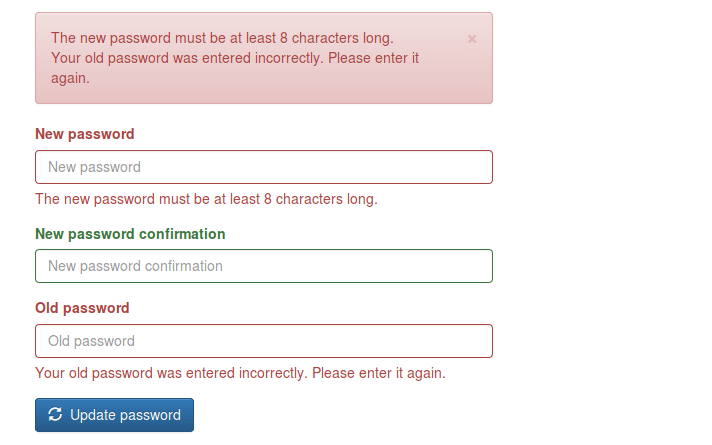
Handling Errors

If validation fails, Django automatically stores errors.

In views:

print(form.errors)

In templates:

{{ form.errors }}

Users will see helpful error messages.


Editing Existing Data with Forms

Django forms can also update records.


Example: Edit Form

def edit_article(request, id):

    article = Article.objects.get(id=id)

    if request.method == "POST":
        form = ArticleForm(request.POST, instance=article)

        if form.is_valid():
            form.save()
            return redirect("home")

    else:
        form = ArticleForm(instance=article)

    return render(request, "edit.html", {"form": form})

Key concept:

instance=article

This links the form to an existing record.


Styling Django Forms

By default, Django forms look simple.

You can customize them using widgets.


Example: Adding CSS Classes

class ArticleForm(forms.ModelForm):

    class Meta:
        model = Article
        fields = ['title', 'content']

        widgets = {
            'title': forms.TextInput(attrs={'class': 'form-control'}),
            'content': forms.Textarea(attrs={'class': 'form-control'}),
        }

This works well with Bootstrap or Tailwind.

Widgets Docs:
https://docs.djangoproject.com/en/stable/ref/forms/widgets/


File Upload Forms

Django supports file uploads easily.


Form

class UploadForm(forms.Form):
    file = forms.FileField()

View

form = UploadForm(request.POST, request.FILES)

Template

<form method="post" enctype="multipart/form-data">

File Upload Docs:
https://docs.djangoproject.com/en/stable/topics/http/file-uploads/


Django Form Lifecycle (How It Works Internally)

Every Django form follows this cycle:

User → HTML Form → POST Request
     → Django Form
     → Validation
     → Cleaned Data
     → Save / Process
     → Response

Or simply:

  1. Display
  2. Submit
  3. Validate
  4. Save
  5. Respond

Advantages of Using Django Forms

Using Django forms gives you:

✅ Less code
✅ Built-in security
✅ Automatic validation
✅ Database integration
✅ Reusable components
✅ Faster development

Compared to manual handling, Django forms are safer and more scalable.


When to Use Which Form

Use CaseBest Choice
Contact formforms.Form
RegistrationModelForm
CRUD appsModelForm
Admin panelsModelForm

In most applications, ModelForm is recommended.


Best Practices for Real Projects

Follow these rules for professional Django projects:

✔ Keep forms in forms.py
✔ Prefer ModelForm
✔ Validate critical fields
✔ Always use CSRF tokens
✔ Redirect after submission
✔ Customize UI with widgets
✔ Handle errors gracefully

These practices improve security and user experience.


Useful Learning Resources

Here are some high-quality resources to master Django forms:

Official Documentation

https://docs.djangoproject.com/en/stable/topics/forms

Django Tutorial

https://docs.djangoproject.com/en/stable/intro/tutorial01

Django Girls Tutorial

https://tutorial.djangogirls.org

Mozilla Django Guide

https://developer.mozilla.org/en-US/docs/Learn/Server-side/Django

Real Python (Forms)

https://realpython.com/django-forms

Final Summary

Django forms provide a complete system for managing user input.

They help you:

  • Create forms quickly
  • Validate data automatically
  • Secure your application
  • Save records easily
  • Reduce errors

You mainly use:

🔹 forms.Form for custom input
🔹 ModelForm for database-driven input

By mastering Django forms, you gain one of the most important skills needed to build professional web applications.


Game Development vs Artificial Intelligence: Skills, Hardware, and Startup Pathways

Team Webnzee · February 13, 2026 · Leave a Comment

In today’s digital economy, game development and artificial intelligence (AI) are two of the fastest-growing technology domains. While they often overlap, they require different expertise, hardware investments, and product-development strategies.

This article explains:

  • How expertise in game development and AI is similar and different
  • What hardware each field needs
  • How users, developers, and founders build products
  • Where to learn and how to get cloud and hardware credits

Understanding Expertise: Game Development vs AI

Similarities

Both fields rely on strong foundations in:

  • Programming (C++, C#, Python, JavaScript)
  • Algorithms and problem-solving
  • Software engineering practices
  • Version control and collaboration
  • Iterative testing and optimization

Whether you are building a game or training a model, success depends on logical thinking, experimentation, and continuous improvement.

Differences

AreaGame DevelopmentArtificial Intelligence
Core FocusInteractivity, graphics, storytelling, performanceData, learning algorithms, prediction, automation
Main SkillsGame engines, physics, UI/UX, renderingStatistics, ML models, neural networks
Nature of WorkCreative + technicalAnalytical + research-driven
OutputPlayable experienceIntelligent system

Game developers primarily focus on user experience and immersion, while AI developers focus on data and decision-making systems.


Skills and Tools in Game Development

Image
Image
Image
Image
Image

Modern game developers typically work with:

  • Game engines
  • 2D/3D graphics and animation tools
  • Physics simulation systems
  • Audio and UI frameworks
  • Performance profiling and debugging tools

Popular platforms include:

  • Unity (by Unity Technologies)
  • Unreal Engine (by Epic Games)

A game developer often combines the roles of programmer, designer, and artist, especially in indie projects.

Key Skills in Game Development

  • C# or C++ programming
  • Level and environment design
  • Real-time rendering optimization
  • Multiplayer networking basics
  • Player experience design

Skills and Tools in Artificial Intelligence

Image
Image
Image

AI developers usually specialize in:

  • Data processing and cleaning
  • Machine learning and deep learning
  • Model training and evaluation
  • Cloud-based deployment
  • Automation and optimization

Common frameworks and platforms include:

  • TensorFlow
  • PyTorch
  • Scikit-learn, Keras, and NumPy

Key Skills in AI Development

  • Linear algebra and statistics
  • Python programming
  • Neural network architectures
  • Model tuning and validation
  • Responsible AI practices

AI developers focus more on mathematical reasoning and experimentation than on visual design.


Hardware Requirements: Game Dev vs AI

Hardware for Game Development

Game development needs balanced performance:

  • CPU: Multi-core processors (Intel i7/Ryzen 7 or better)
  • GPU: Dedicated graphics card (RTX series or equivalent)
  • RAM: 16–32 GB (64 GB for large projects)
  • Storage: NVMe SSD

This setup ensures smooth rendering, fast compilation, and efficient asset handling.

Hardware for AI Development

AI workloads are more resource-intensive:

  • CPU: Multi-core, mainly for preprocessing
  • GPU/TPU: High-performance GPUs with large VRAM
  • RAM: 32–64 GB or more
  • Storage: Large SSDs for datasets

Training deep learning models often requires cloud GPUs, as local systems may not be sufficient.

Comparison Summary

FeatureGame DevelopmentAI Development
GPU UsageReal-time graphicsModel training
RAM NeedsModerate–HighHigh–Very High
Cloud DependencyOptionalOften essential
Local WorkCommonLimited for big models

How Products Are Built: Users, Developers, and Founders

Role of End Users

End users (players or customers):

  • Test early versions
  • Provide feedback
  • Report bugs and usability issues
  • Shape future updates

User feedback is critical in both gaming and AI products.

Role of Developers

Game Developers:

  • Build game mechanics
  • Design levels
  • Integrate graphics and sound
  • Optimize performance

AI Developers:

  • Prepare datasets
  • Train models
  • Evaluate accuracy
  • Deploy APIs and services

In modern projects, developers often collaborate across both domains.

Role of Startup Founders

Founders manage strategy and execution:

  1. Idea & Research – Identify problems and market needs
  2. MVP Development – Build a prototype using engines or ML models
  3. Testing & Feedback – Validate with real users
  4. Cloud Scaling – Host backends and AI inference
  5. Launch & Growth – Marketing, updates, monetization

Successful founders balance technology, business, and user experience.


Learning Resources for Game Development and AI

Game Development

  • Unity Learn – https://learn.unity.com
  • Unreal Online Learning – https://www.unrealengine.com/onlinelearning
  • Udemy Game Dev Courses – https://www.udemy.com/topic/game-development
  • GDC Vault – https://www.gdcvault.com

Artificial Intelligence

  • Coursera AI Courses – https://www.coursera.org
  • Fast.ai – https://www.fast.ai
  • Google AI Learning – https://cloud.google.com/learn/ai-ml
  • MIT OpenCourseWare – https://ocw.mit.edu

Combined Learning (AI + Games)

  • AI in Game Development – https://www.coursera.org/articles/ai-for-game-development
  • Open-source projects on GitHub

Getting Cloud Credits and Hardware Support

Startup Cloud Credit Programs

Many companies support early-stage founders:

  • Google for Startups
    https://cloud.google.com/startup
  • Microsoft for Startups (Azure)
    https://startups.microsoft.com
  • Amazon AWS Activate
    https://aws.amazon.com/activate
  • NVIDIA Inception Program
    https://www.nvidia.com/en-in/startups
  • DigitalOcean Startups
    https://www.digitalocean.com/startups

These programs can provide thousands of dollars in free cloud credits.

Hardware Acquisition Options

  • Build custom PCs with GPUs and high RAM
  • Buy refurbished workstations
  • Use cloud GPU rentals
  • Apply for student/free-tier programs

Cloud platforms often provide $100–$300 free credits for beginners.


Future Trends: Where Gaming and AI Meet

The future increasingly blends both fields:

  • AI-powered NPCs
  • Procedural world generation
  • Personalized gameplay
  • Automated testing
  • Smart analytics

As AI improves, games become more adaptive and immersive, while AI applications benefit from game-like interfaces.


Final Thoughts

Game development and AI are both powerful career and business paths, but they require different mindsets:

  • Game Development focuses on creativity, interaction, and immersion
  • Artificial Intelligence focuses on data, learning, and automation

Both demand strong technical foundations, modern hardware, and continuous learning.

For developers and founders, combining these skills—supported by cloud credits and global learning platforms—offers enormous opportunities in the digital economy.


Reddit – Trending Discussions on Artificial Intelligence & Gaming

  • Look how seamlessly the AI integrated it's "civic duty" into our fiction
    submitted by /u/Relevant_Reality7465 [link] [comments]
  • Introducing Claude Duet
    submitted by /u/Tiny-Examination5627 [link] [comments]
  • Powerful new AI models are behind a growing wave of cyberattacks, experts say
    Autonomous attacks powered by AI agents are becoming more common, Jessica Ji, a senior research analyst at Georgetown’s Center for Security and Emerging Technology (CSET), told Fortune. This is primarily happening because the tools have “gotten meaningfully better” over the past year or so, she said. Specifically, AI companies have improved their models’ coding skills, […]
  • Built a durable audit trail for AI phone workflows instead of reconstructing them from logs
    AI agents can complete a phone workflow successfully and still leave one awkward question unanswered: what actually happened? I built an open-source Python sample that treats the audit trail as part of the workflow’s API instead of reconstructing it later from application logs. The sample uses Telnyx Missions to: – Create a durable objective – […]
  • Locality of reference helped 94GB Qwen3.8-Flash-Next runs at 68 tok/s on one RTX 5090
    llama.cpp merged PR #29887 two weeks ago and I think it is the most interesting thing to land in local inference this year, so I went through the PR, the benchmarks and the review thread and wrote up how it actually works. Short version below, long version linked at the end. The problem Qwen3.8-Flash-Next at […]
  • A doctor, an investor, and a beer brewer – Bioware founders and their calling after gaming
    For some reason, I've always been fascinated by the human stories behind our beloved games, the developers and the "where he is now". Many people who bled and sweated for our hobby are no longer in the business. This trio is the perfect example, I've known this for years now (probably you do as well) […]
  • Thankyou bioware for the memories.
    Bye Sandal! submitted by /u/AUTOMATA88 [link] [comments]
  • All Bioware games (1995-2026)
    submitted by /u/LordLoko [link] [comments]
  • With the Bioware Shutdown, Here's a Reminder of EA's History of Acquisitions
    Bullfrog (Syndicate, Dungeon Keeper, Populous, Theme Series) – Purchased by EA in 1995; shut down in 2001. Westwood (Command & Conquer) – Purchased by EA in 1998; shut down in 2003. Origin (Ultima, Wing Commander) – Purchased by EA in 1992; shut down in 2004. NuFX (NBA Street) – Purchased by EA in 2004; shut […]
  • If you’re a fan of FPS or cowboys, this game holds up very well
    I love the story telling and arcade feel of this game. Also runs well on handhelds. submitted by /u/Pterodactyl_midnight [link] [comments]

Developing Forms in WordPress vs Django: From Manual Coding to Plugins and Framework-Level Control

Rajeev Bagra · February 12, 2026 · Leave a Comment

Forms are one of the most important features of modern websites. They power contact pages, registrations, surveys, feedback systems, and lead generation.

But the way forms are built in WordPress and Django is fundamentally different.

In this article, we’ll explore three approaches:

  1. Creating forms in WordPress without plugins
  2. Using ready-made form plugins like WPForms
  3. Building forms in Django using its built-in system

By the end, you’ll understand which approach fits your goals best.


1️⃣ Building Forms in WordPress Without Any Plugin

Image
Image
Image
Image
Image

Many people assume WordPress always needs plugins for forms. In reality, you can build forms manually, but it requires writing PHP inside your theme.


🔹 How It Works

When creating forms without plugins, you must:

  • Write HTML in theme templates
  • Handle submissions using PHP
  • Process data via $_POST
  • Send emails using wp_mail()
  • Secure data manually

Example:

<form method="post">
  <input type="text" name="name" required>
  <input type="email" name="email" required>
  <textarea name="message"></textarea>
  <button type="submit">Send</button>
</form>

Processing in functions.php:

if(isset($_POST['name'])) {
  $name = sanitize_text_field($_POST['name']);
  wp_mail("admin@example.com", "New Message", $name);
}

🔹 What You Must Manage Yourself

When you don’t use a plugin, you are responsible for:

❌ Validation
❌ Security (nonces, CSRF-like protection)
❌ Spam filtering
❌ Database storage
❌ Error messages
❌ User feedback

This makes development:

  • More technical
  • Less structured
  • More error-prone

🔹 Architectural Style

WordPress manual forms are:

  • Procedural
  • Template-based
  • Dependent on global variables
  • Not object-oriented

So, WordPress without plugins means:

“Write everything yourself in PHP.”


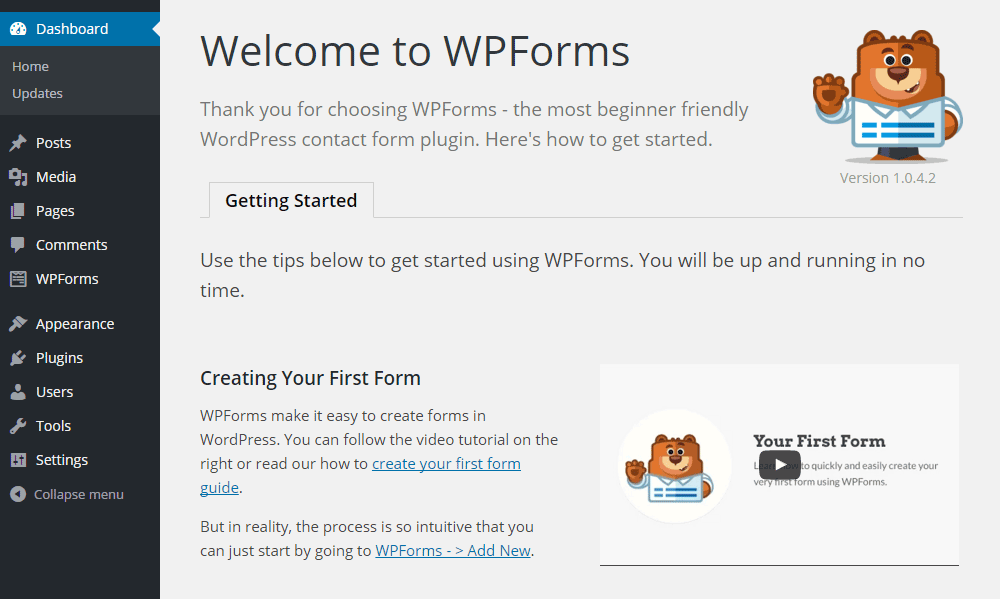
2️⃣ Creating Forms in WordPress Using Plugins (WPForms and Similar Tools)

Image
Image
Image
Image
Image

Most WordPress users prefer plugins because they remove technical complexity.

Popular tools like WPForms provide visual form builders.


🔹 How Plugin-Based Forms Work

With WPForms, you simply:

  1. Install the plugin
  2. Open the drag-and-drop editor
  3. Add fields visually
  4. Configure notifications
  5. Embed the form

No coding required.


🔹 Features Provided by Plugins

Plugins automatically handle:

✅ Validation
✅ Security
✅ Spam protection
✅ Database storage
✅ Email alerts
✅ Conditional logic
✅ Payment integration

You only configure settings.


🔹 Ready-Made Templates

WPForms includes templates such as:

  • Contact forms
  • Registration forms
  • Surveys
  • Newsletter forms
  • Feedback forms

You select → customize → publish.


🔹 Development Model

Plugin-based forms are:

  • UI-driven
  • Configuration-based
  • Low-code or no-code

So, WordPress with plugins means:

“Use tools instead of building systems.”


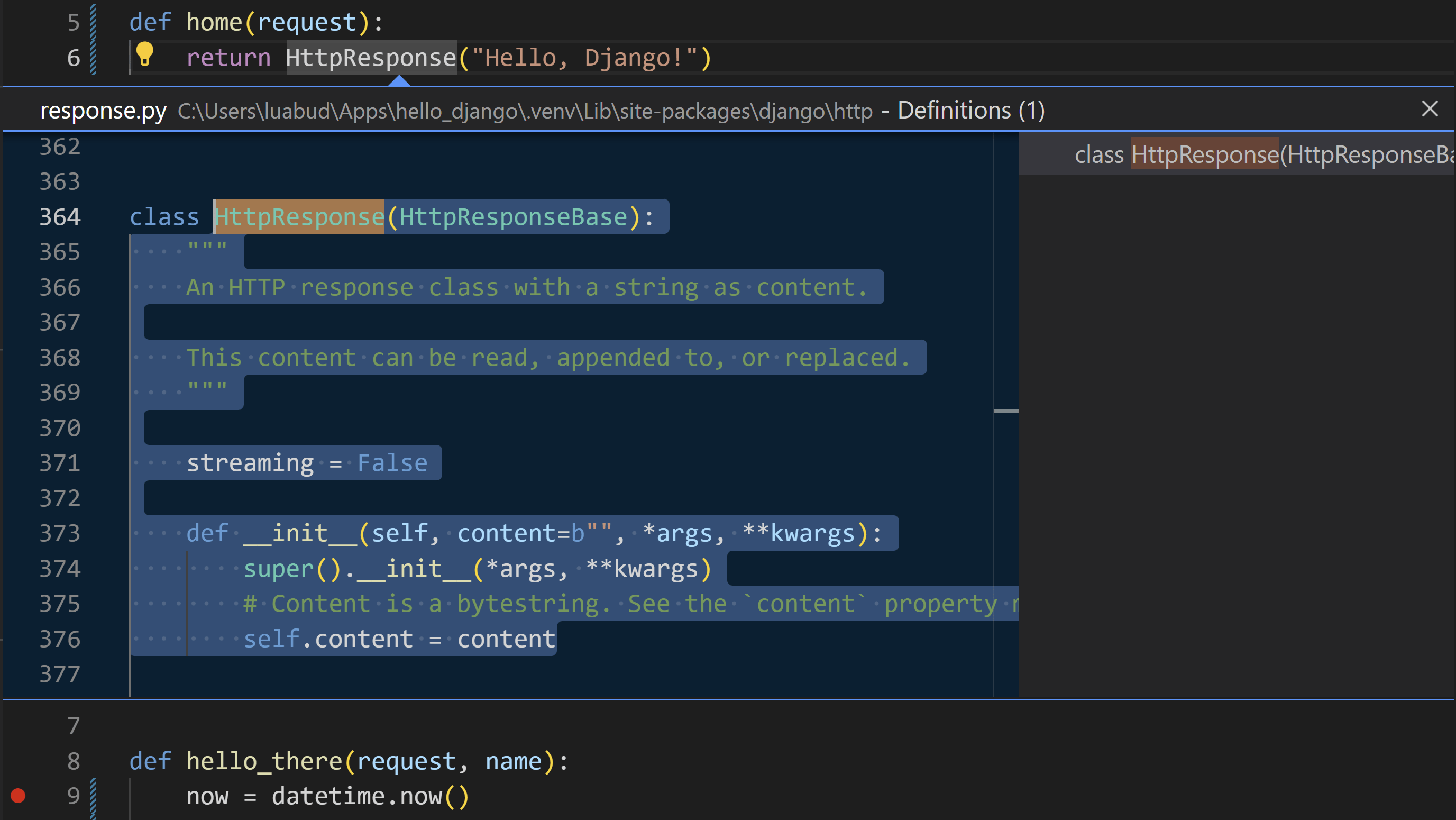
3️⃣ Forms in Django: Framework-Level Integration

Image
Image
Image
Image

Unlike WordPress, Django treats forms as a core feature of the framework.

Forms are not add-ons. They are part of the system.


🔹 How Django Forms Work

Forms are written as Python classes:

from django import forms

class ContactForm(forms.Form):
    name = forms.CharField(max_length=100)
    email = forms.EmailField()

In views:

if form.is_valid():
    data = form.cleaned_data

In templates:

{{ form.as_p }}

🔹 Built-In Capabilities

Django automatically provides:

✅ Field validation
✅ Type checking
✅ Error handling
✅ CSRF protection
✅ Data cleaning
✅ Model integration
✅ Security

No third-party plugin is required.


🔹 Template Form Features

Django templates allow full customization:

{{ form.name.label }}
{{ form.name }}
{{ form.name.errors }}

You control:

  • Layout
  • Styling
  • Error display
  • Accessibility

🔹 Development Model

Django forms are:

  • Object-oriented
  • Structured
  • Scalable
  • Framework-integrated

So, Django means:

“Build robust systems using built-in tools.”


📊 Comparison: WordPress vs Django Forms

FeatureWordPress (No Plugin)WordPress (Plugin)Django
SetupManual codingVisual UIPython classes
ValidationManualPlugin-managedBuilt-in
SecurityManualPlugin-managedBuilt-in
DatabaseManualPlugin-dependentORM-based
FlexibilityMediumLimitedVery High
ScalabilityMediumMediumHigh
Learning CurveHighLowMedium–High

🧠 Philosophical Difference

WordPress Philosophy

Originally built for blogging and content management.

Forms are:

  • Optional features
  • Implemented via plugins
  • Not core architecture

Approach:

“Extend with tools.”


Django Philosophy

Built for application development.

Forms are:

  • Core components
  • Linked to models
  • Linked to validation
  • Linked to security

Approach:

“Engineer the system.”


🔁 Real-World Example: Contact Form

In WordPress (Without Plugin)

You must create:

  1. HTML form
  2. PHP processor
  3. Validation logic
  4. Security system
  5. Email handler

More freedom, more work.


In WordPress (With WPForms)

You do:

  1. Install plugin
  2. Choose template
  3. Publish

Fast, simple, limited.


In Django

You create:

  1. Model (optional)
  2. Form class
  3. View logic
  4. Template

More setup, long-term stability.


🚀 When Should You Use Each?

Choose Manual WordPress Forms If:

✔ You want full control in WordPress
✔ You know PHP well
✔ You need lightweight solutions


Choose WPForms If:

✔ You want fast deployment
✔ You run marketing or content sites
✔ You don’t want to code
✔ You need integrations


Choose Django Forms If:

✔ You’re building SaaS platforms
✔ You need complex validation
✔ You manage large datasets
✔ You want scalable systems


📝 Final Summary

PlatformForm StyleStrength
WordPress (No Plugin)Manual PHPFlexibility
WordPress (Plugin)Visual BuilderSpeed
DjangoFramework-BasedPower & Scalability

👉 WordPress without plugins = Handcrafted
👉 WordPress with plugins = Tool-based
👉 Django = System-based


📌 Conclusion

Forms reflect the philosophy of each platform:

  • WordPress gives you freedom or convenience, depending on plugins.
  • Django gives you structure and engineering depth.

If your goal is fast website deployment, WordPress plugins are ideal.
If your goal is building long-term software products, Django forms offer unmatched control.


🎮 Beyond Entertainment: The Real Value of Gaming Websites and Online Games

Rajeev Bagra · February 10, 2026 · Leave a Comment


When people think about websites, two popular types usually come to mind: blogs and ecommerce stores.

  • Blogs share knowledge and information.
  • Ecommerce websites enable real buying and selling of products.

Both clearly create visible value.

But what about gaming websites and online games?

Many people wonder:

“Apart from entertainment, what is the real value of gaming?”

This is a valid question. Let’s explore the answer in a clear and practical way.


1️⃣ Gaming Is a Serious Global Business

Gaming is no longer just a hobby. It is a multi-billion-dollar global industry.

Today, gaming platforms generate revenue through:

  • Advertisements
  • Subscriptions
  • In-game purchases
  • Sponsorships
  • Tournaments
  • Merchandise

🎯 Career Opportunities in Gaming

Gaming websites support thousands of careers, such as:

  • Professional gamers
  • Streamers and content creators
  • Game developers
  • Designers and testers
  • Esports managers
  • Community moderators

Many gamers now earn full-time income, just like bloggers and online sellers.

👉 Just as blogging creates content businesses, gaming creates digital entertainment businesses.


2️⃣ Games Help Build Important Skills

Modern games are designed to challenge the brain.

Regular gaming can improve:

  • Problem-solving ability
  • Strategic thinking
  • Quick decision-making
  • Memory
  • Focus
  • Coordination

🎓 Gaming in Education and Training

Games are also used in professional training:

FieldExample
AviationFlight simulators
MedicineSurgery practice
MilitaryCombat simulations
BusinessManagement games
SchoolsLearning apps

These simulations allow people to practice safely before facing real situations.

👉 Games teach by experience, not just theory.


3️⃣ Gaming Creates Strong Online Communities

Today’s games are also social platforms.

Players connect through:

  • Voice chat
  • Team missions
  • Online tournaments
  • Forums and groups

🌍 Social Benefits

Gaming helps people:

  • Make friends worldwide
  • Learn teamwork
  • Improve communication
  • Reduce loneliness

For many users, gaming is their main way of socializing online.

During lockdowns and remote work periods, games played a major role in keeping people connected.


4️⃣ Gaming Drives Technology Innovation

The gaming industry pushes technology forward faster than most sectors.

Many technologies we use today were developed or improved through gaming:

  • High-performance graphics cards (GPUs)
  • Virtual Reality (VR)
  • Artificial Intelligence (AI)
  • Real-time simulations
  • Motion capture

These technologies are now used in:

  • Movies
  • Architecture
  • Medical research
  • Engineering
  • Virtual meetings

👉 Gaming acts as a laboratory for future technologies.


5️⃣ Gaming vs Blogs vs Ecommerce: A Comparison

Let’s compare all three platforms:

PlatformPrimary Value
BlogsKnowledge and education
EcommerceTrade of goods and services
GamingExperience, skills, economy, community

Each serves a different purpose.

  • Blogs teach through reading
  • Ecommerce enables transactions
  • Gaming teaches through interaction

All are valuable in their own way.


6️⃣ Is Gaming Only a Waste of Time?

This is an important question.

The honest answer: It depends on how it is used.

❌ Unproductive Use

Gaming becomes harmful when it leads to:

  • Addiction
  • Ignoring studies/work
  • Poor health
  • Financial loss

✅ Productive Use

Gaming becomes valuable when used for:

  • Skill development
  • Content creation
  • Competition
  • Networking
  • Career building

The same applies to social media, shopping apps, and even blogging.

No platform is harmful by default. Usage matters.


7️⃣ Gaming Is Like Digital Sports

Think about traditional sports like cricket or football.

They are mostly for entertainment, yet they create:

  • Careers
  • Businesses
  • Communities
  • National pride
  • Economic activity

Gaming is similar—just in digital form.

It is sports + media + technology + networking combined.


📌 Final Thoughts: Where Does Gaming Really Stand?

Gaming websites are not “less valuable” than blogs or ecommerce.

They provide value in different ways:

✔ Create jobs
✔ Generate income
✔ Build skills
✔ Support mental well-being
✔ Connect people globally
✔ Advance technology

In today’s digital world, gaming is:

Not just play — it is an ecosystem.


✅ Conclusion

Blogs inform.
Ecommerce trades.
Gaming engages.

All three contribute to the digital economy.

Instead of asking whether gaming is useful, the better question is:

“How can we use gaming wisely and productively?”

When used well, gaming can be both enjoyable and meaningful.


  • « Go to Previous Page
  • Page 1
  • Interim pages omitted …
  • Page 9
  • Page 10
  • Page 11
  • Page 12
  • Page 13
  • Interim pages omitted …
  • Page 15
  • Go to Next Page »

Primary Sidebar

Recent Posts

  • The Future of the Internet: Every Person, Every Business, One Digital Identity
  • Affiliate Marketing in the Age of AI: How the Industry Works and Why Affiliate Networks Still Matter
  • Why Direct Traffic and Organic Search Should Be Analyzed Separately
  • Does 0 Keywords in Google Search Console Mean 0 Google Impressions?
  • Public Analytics Reports for WordPress: A Practical Way to Share Website Performance

Archives

  • October 2026
  • September 2026
  • August 2026
  • July 2026
  • June 2026
  • May 2026
  • April 2026
  • March 2026
  • February 2026
  • January 2026
  • December 2025
  • November 2025
  • October 2025
  • September 2025
  • August 2025

Categories

  • Blog
  • Offers

Tag

adsense affiliate marketing ai AI website builder AWS EC2 AWS Lightsail bitnami cloud computing Codespace CSS digitalassets Django domain domainsale email marketing forms freelancing gaming Genesis Framework Git Github Google Analytics Google Search hardware HTML IONOS mediavine Moosend Omnisend oop PayPal premium domain publisher ads Python Sendpulse SEO social media software SQL StudioPress Twilio webdev web hosting webhosting WordPress

Explore expert guides on WordPress, web hosting, website development, and online business growth. Visit Our Blog

Webnzee

This website may use AI tools to assist in content creation. All articles are reviewed, edited, and fact-checked by our team before publishing. We may receive compensation for featuring sponsored products and services or when you click on links on this website. This compensation may influence the placement, presentation, and ranking of products. However, we do not cover all companies or every available product.

  • Home
  • Blog
  • Trending
  • Offers
  • Terms
  • Subscribe
  • Support
  • Contact
Scroll Up