• Skip to primary navigation
  • Skip to main content
  • Skip to primary sidebar
webnzee

Webnzee

Webnzee — Your Web Dev Companion.

  • Home
  • Blog
  • Trending
  • Offers
  • Terms
    • Privacy
    • Disclaimer
  • Subscribe
  • Support
  • Contact
  • Show Search
Hide Search
You are here: Home / Archives for Blog

Blog

Working with HTML & Git on Primebook (PrimeOS / PrimeX) — A Practical Guide

Team Webnzee · January 15, 2026 · Leave a Comment


Image
Image
Image
Image

ߎ Who this session is for

  • Learners using Primebook / PrimeOS / PrimeX
  • Beginners learning HTML, Git, and basic web development
  • Anyone confused by errors like code: command not found or Git clone issues

ߧ Session Objective

By the end of this session, learners will be able to:

  • Understand what PrimeOS is (and what it is not)
  • Use Git safely without copy-paste errors
  • Edit HTML files using terminal-friendly tools
  • View HTML files correctly in a browser
  • Follow a realistic workflow suited to Primebook users

1️⃣ Understanding Your Environment (Most Important Lesson)

Image
Image
Image

Key Reality Check

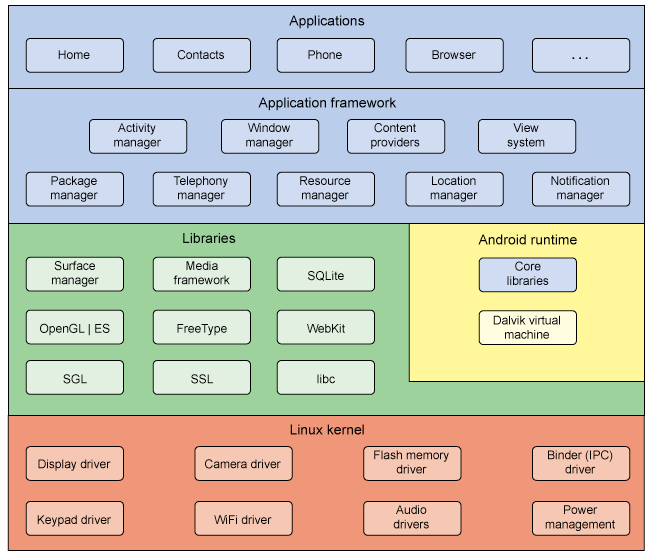
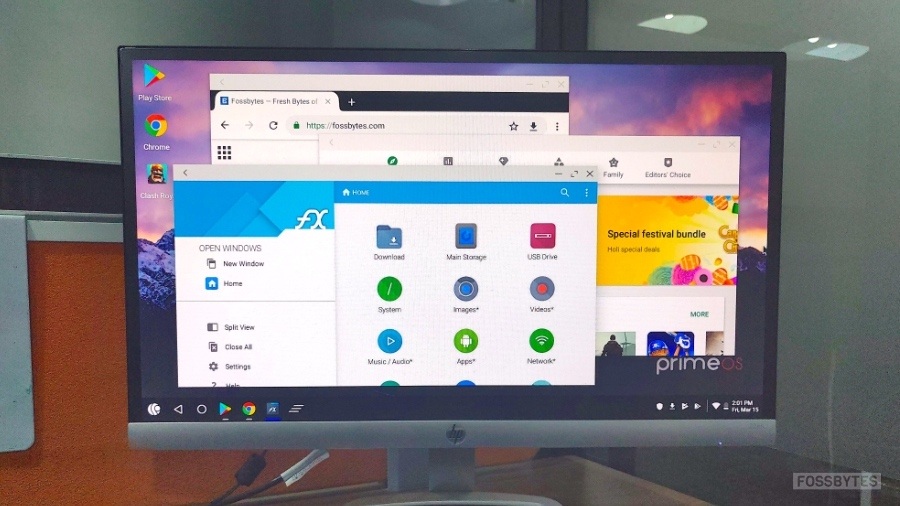
PrimeOS / PrimeX is:

  • ✅ Android-based
  • ✅ Has a Linux-like terminal
  • ❌ NOT Ubuntu
  • ❌ NOT Windows
  • ❌ NOT AWS / cloud server

ߑ That’s why commands like this fail:

code test.html
sudo apt install code

And that’s normal, not your fault.


2️⃣ Git Basics on Primebook (Common Pitfalls & Fixes)

Image
Image
Image

❌ Common Error

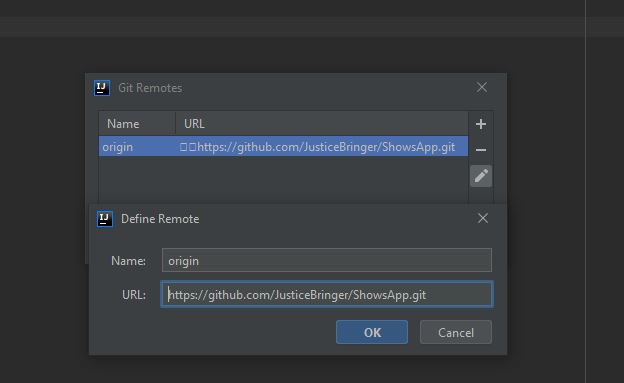
fatal: protocol '?[200~https' is not supported

Why it happens

  • Copy-pasting GitHub URLs adds hidden characters
  • Terminal interprets them as invalid protocols

✅ Best Practice

Always type Git commands manually:

git clone https://github.com/USERNAME/REPOSITORY.git

3️⃣ Creating & Editing an HTML File (The Right Way)

Image
Image
Image

Create a file

touch test.html

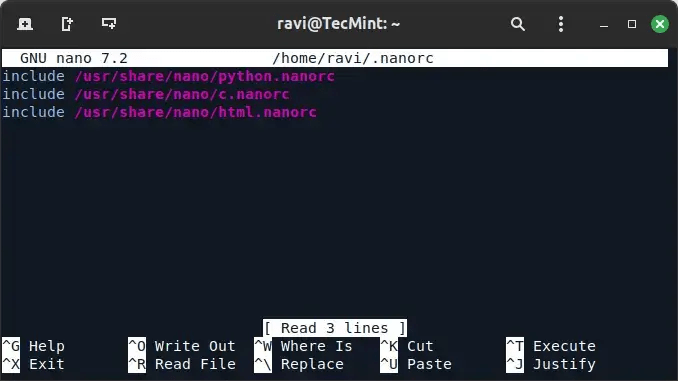
Edit using Nano (recommended)

nano test.html

Example content:

<!DOCTYPE html>
<html>
  <head>
    <title>My First Primebook Page</title>
  </head>
  <body>
    <h1>Hello from Primebook</h1>
  </body>
</html>

Save: Ctrl + O → Enter
Exit: Ctrl + X


4️⃣ Viewing the HTML File in a Browser

Image
Image
Image

✅ Method 1: Terminal

xdg-open test.html

✅ Method 2: Browser (Guaranteed)

Open Chrome and type:

file:///home/USERNAME/test/test.html

✅ Method 3: File Manager

  • Go to Home → test
  • Double-click test.html
  • Open with Chrome

5️⃣ When the Terminal Shows > (Hidden Lesson)
Image
Image

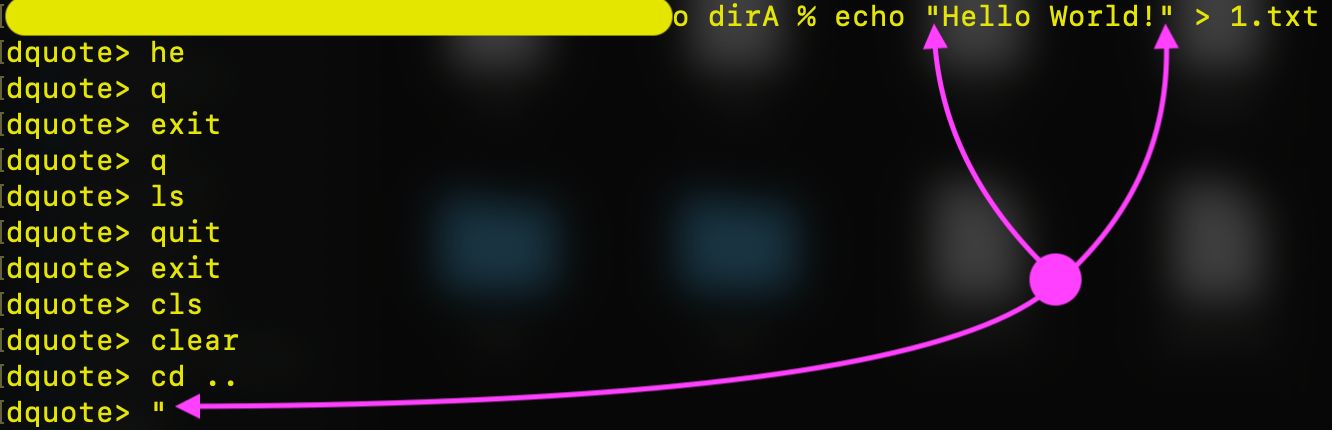
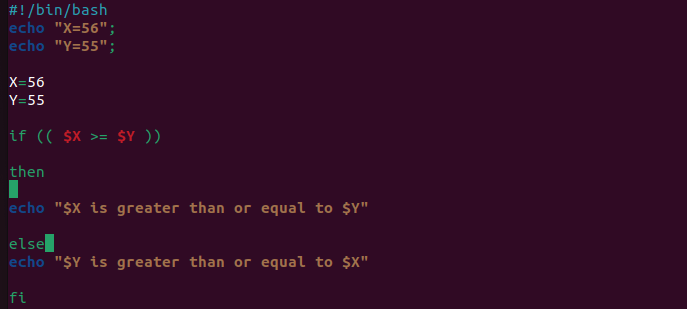
If you ever see:

>

It means:

  • You started a quote (' or ")
  • Bash is waiting for you to finish

Fix instantly:

Ctrl + C

6️⃣ Recommended Workflow for Primebook Users
Image
Image
Image

ߟ Best Long-Term Workflow

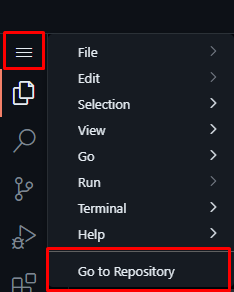
  1. Edit files using GitHub’s browser editor
  • Open repo on GitHub
  • Press . (dot) → VS Code opens in browser
  1. Commit & push online
  2. Sync locally:
git pull origin main

ߟ Use Nano

  • For quick fixes
  • For learning terminal basics

7️⃣ What Learners Should NOT Worry About

❌ “Why VS Code doesn’t install”
❌ “Why apt doesn’t work”
❌ “Why PrimeOS is different”

ߑ These are platform limits, not skill gaps.


ߧ Session Summary (Key Takeaways)

  • PrimeOS ≠ Ubuntu ≠ Windows
  • Git works well, but copy-paste carefully
  • Nano is your best editor locally
  • HTML files open via file:// in Chrome
  • Browser-based editors are powerful and valid


Is GitHub Still Relevant for WordPress Developers?

Rajeev Bagra · January 12, 2026 · Leave a Comment


Many people assume that since WordPress already has built-in revision history for posts and pages, external tools like GitHub are unnecessary. After all, WordPress allows you to restore earlier versions of content, track edits, and undo mistakes.

But WordPress websites today are no longer just collections of blog posts. They are full software applications — and that is where GitHub becomes essential.


WordPress Revisions vs GitHub: What’s the Real Difference?

WordPress revisions handle content:

  • Blog posts
  • Pages
  • Block editor changes

GitHub handles code:

  • Themes
  • Plugins
  • PHP logic
  • CSS and JavaScript
  • Custom WooCommerce features
  • APIs and integrations

In simple terms:

WordPress tracks what you write. GitHub tracks how your website works.


What Modern WordPress Sites Really Are

A professional WordPress site contains thousands of lines of code inside folders like:

/wp-content/themes/
    header.php
    functions.php
    style.css

/wp-content/plugins/
    custom-plugin.php
    includes/
    assets/

These files control:

  • How the site looks
  • How it loads
  • How payments work
  • How forms submit
  • How data is processed

These are software components, not content — and WordPress does not version them. GitHub does.


Why WordPress Revisions Are Not Enough

Imagine a developer accidentally changes this:

return $price * 0.8;

to:

return $price * 0.08;

Suddenly, every product is selling at 92% off.

WordPress revision history:

  • Cannot see the code change
  • Cannot roll it back
  • Cannot show who did it

GitHub:

  • Shows the exact line that changed
  • Records who changed it
  • Allows instant rollback
  • Preserves a full audit trail

This is why businesses use GitHub.


How Professional WordPress Teams Use GitHub

Real WordPress workflows look like this:

Developer → GitHub → Staging → Live Website

This allows:

  • Multiple developers to work safely
  • Code review before going live
  • Automated testing
  • Rollbacks if something breaks
  • Deployment with one click

Without GitHub, WordPress development becomes risky and unscalable.


How relevant is GitHub for WordPress developers?
byu/DigitalSplendid inWordPress

Every Major WordPress Tool Uses GitHub

All of these are built and maintained using Git:

  • WordPress Core
  • WooCommerce
  • Elementor
  • Gutenberg
  • Yoast SEO
  • RankMath
  • WP Rocket

GitHub is the backbone of the WordPress ecosystem.


Why GitHub Makes WordPress a Platform

Without GitHub, WordPress is just a CMS.

With GitHub:

  • WordPress becomes a software framework
  • Developers build reusable products
  • Agencies manage dozens of sites
  • Businesses deploy updates safely
  • Bugs are tracked and fixed professionally

This is how WordPress powers large stores, SaaS platforms, and enterprise websites.


Final Thought

WordPress revisions help you recover a paragraph.
GitHub helps you recover an entire business.

That’s why GitHub is not just relevant for WordPress developers — it is foundational.


Using Escrow.com, Atom, and Sedo for Domain and Website Sales: Pros, Cons, and Best Practices

Rajeev Bagra · December 29, 2025 · Leave a Comment


Selling a domain name or a domain bundled with a live website is very different from selling physical goods. The assets are digital, transfers are irreversible, and trust is critical.

That’s why most serious buyers and sellers rely on platforms such as Escrow.com, Atom, and Sedo.

Although all three are involved in domain transactions, they serve very different purposes. This guide explains what each one actually does, where their limits are, and which is safest depending on what you are selling.


Understanding the Three Options (At a Glance)

Before comparing features, it’s important to clarify one thing:

Atom and Sedo are marketplaces with transaction services.
Escrow.com is a neutral escrow provider.

That distinction matters a lot when a website is included in the deal.


Atom: Best for Domain-Only Sales and Modern Checkout

Atom is a brandable domain marketplace with a built-in transaction system called AtomPay.

What Atom does well

  • Holds buyer funds until domain transfer completes
  • Supports installment plans (lease-to-own)
  • Allows buyers to start using the domain during payment plans
  • Offers modern checkout flows that feel familiar to SaaS buyers

AtomPay is particularly attractive when:

  • You are selling domains only
  • You want a friction-free buyer experience
  • Payment plans increase buyer affordability

What Atom does not do

Atom does not explicitly escrow website assets, such as:

  • Hosting accounts
  • CMS admin access
  • Databases or source code
  • Content verification

Atom’s own terms clarify that it is not a traditional licensed escrow service. This doesn’t make it unsafe — it just means its scope is domain-centric.

Best use case:
✔ Brandable domains
✔ Domain portfolios
✔ Installment-based sales


Sedo: Established Marketplace with Transfer Support

Sedo is one of the oldest and most trusted global domain marketplaces.

What Sedo offers

  • Neutral payment holding during domain transfer
  • Assisted domain ownership change
  • Purchase agreements and transaction support
  • Broker-led negotiations (optional)

Sedo works well for buyers who are:

  • Already active in domain investing
  • Looking for higher-value or aged domains
  • Comfortable with broker-mediated transactions

Sedo’s limitation

Like Atom, Sedo’s transfer service focuses on domains, not full website handover. While a website can be sold alongside a domain, Sedo does not provide a structured system for verifying:

  • Website delivery
  • CMS access
  • Hosting migration

Best use case:
✔ Premium or aged domains
✔ Broker-assisted sales
✔ Marketplace exposure


Escrow.com: The Safest Option for Domain + Website Sales

Escrow.com is fundamentally different from Atom and Sedo.

It is a licensed, neutral escrow provider, not a marketplace.

Why Escrow.com stands out

  • Explicit support for website escrow
  • Funds are released only after buyer confirmation
  • Supports handover of:
    • Website files
    • Databases
    • Hosting credentials
    • Admin logins
  • Optional domain concierge service
  • Strong dispute resolution framework

If your sale includes:

  • A WordPress site
  • A SaaS project
  • A content website
  • Any business assets beyond the domain

Escrow.com provides protections the other two simply do not.

Best use case:
✔ Domain + website bundles
✔ Off-market private deals
✔ Corporate or business asset sales


Side-by-Side Comparison

FeatureAtomSedoEscrow.com
Holds buyer fundsYesYesYes
Manages domain transferYesYesYes
Installment paymentsYesNoLimited
Marketplace exposureYesYesNo
Website escrowNoNoYes
Licensed neutral escrowNoNoYes
Best for domain + website❌❌✅

What Should You Use? (Practical Advice)

If you are selling only a domain

  • Use Atom for modern checkout and installments
  • Use Sedo for broker-led or premium marketplace exposure

If you are selling a domain + website

  • Use Escrow.com for the transaction
  • This protects both buyer and seller
  • Reduces disputes and post-sale risk

If you want maximum visibility

  • List domains on Atom and Sedo
  • Finalize complex deals through Escrow.com

This hybrid approach is common among professional sellers.


Final Thoughts

There is no single “best” platform — only the right tool for the right asset.

  • Atom excels at modern, domain-only sales
  • Sedo excels at marketplace discovery and brokerage
  • Escrow.com excels at complex, high-trust transfers involving websites

If your goal is to build long-term credibility as a seller, using each platform for what it does best is the smartest strategy.


Payoneer, Wise, Paytm, and Razorpay for Domain Sales: Are They Safer Than PayPal?

Rajeev Bagra · December 28, 2025 · Leave a Comment


When sellers realize the risks of PayPal for domain sales, the next question is obvious:
Are Payoneer, Wise, Paytm, or Razorpay safer alternatives?

The short answer: Yes—most of them are safer than PayPal, but none replace escrow.
The long answer is below.


1. Payoneer – Generally Safer for Sellers

Payoneer is widely used for international B2B payments.

Seller Safety

  • Payments are harder to reverse than PayPal
  • Buyer cannot easily raise consumer-style disputes
  • No “item not received” system like PayPal

Risks

  • Funds may be temporarily frozen for compliance checks
  • Account reviews can delay withdrawals
  • Not designed for anonymous buyer transactions

Verdict

✔ Much safer than PayPal
⚠️ Still not escrow
✔ Good for trusted or semi-trusted buyers


2. Wise – Low Chargeback Risk, High Practical Safety

Wise (formerly TransferWise) works more like a bank transfer than a wallet.

Seller Safety

  • Payments are bank-to-bank
  • Once received, no easy chargeback
  • No buyer dispute interface

Risks

  • Compliance checks for large amounts
  • No buyer protection (which is actually good for sellers)

Verdict

✔ One of the safest non-escrow options
✔ Excellent for domain sales
⚠️ Requires buyer trust


3. Paytm – Safe Domestically, Limited International Use

Paytm is popular in India but limited for global domain buyers.

Seller Safety

  • Wallet transfers are difficult to reverse
  • No structured buyer dispute system

Risks

  • Primarily India-only
  • Not suitable for international buyers
  • Regulatory freezes possible in rare cases

Verdict

✔ Safe for India-to-India domain sales
❌ Not practical for global domain trading


4. Razorpay – Merchant-Friendly but Not Ideal for Domains

Razorpay is a full payment gateway, similar to Stripe.

Seller Safety

  • Designed for businesses selling services/products
  • Allows chargebacks via card networks
  • Buyer protection applies

Risks

  • Chargebacks can happen after domain transfer
  • Seller bears dispute burden
  • Gateway may side with issuing bank

Verdict

⚠️ Risky for domain sales
✔ Better than PayPal only if buyer pays via UPI/net banking
❌ Not recommended for card payments


Quick Comparison Table (Seller Perspective)

PlatformChargeback RiskDispute SystemDomain-Seller Safety
PayPalVery HighYes❌ Poor
PayoneerLow–MediumLimited✔ Good
WiseVery LowNo✔✔ Excellent
PaytmLow (India)Limited✔ Good (Domestic)
RazorpayMedium–HighYes (Cards)⚠️ Mixed
EscrowNoneNeutral✔✔✔ Best

Best Practice for Domain Sellers

💰 Low-value domains (< $100)

  • Wise
  • Payoneer
  • Paytm (India only)

💼 Mid-value domains ($100–$1,000)

  • Wise
  • Payoneer
  • Escrow preferred

🏆 High-value domains ($1,000+)

  • Escrow only
  • Never PayPal
  • Never card-based gateways

Final Takeaway

  • PayPal = convenience, not security
  • Wise & Payoneer = seller-friendly
  • Paytm = local safe option
  • Razorpay = business gateway, not domain-safe
  • Escrow remains the gold standard

Selling a Domain and Receiving Payment via PayPal: What Sellers Really Need to Know

Rajeev Bagra · December 28, 2025 · Leave a Comment

Selling a domain name sounds simple: buyer pays, you transfer the domain, deal done.
But when PayPal is involved, things are not always that straightforward.

Selling a domain and receiving payment through PayPal
byu/DigitalSplendid inpaypal
Comment
byu/DigitalSplendid from discussion
inpaypal

This article explains how PayPal disputes actually work for domain sales, why sellers face risk even after transferring a domain, and what safer alternatives exist—based on real-world experience.


Image
Image
Image
Image

Why Domain Sales Are Risky on PayPal

A domain name is an intangible digital asset, not a physical product. This single fact has major consequences.

On PayPal, intangible goods are not covered by Seller Protection in the same way physical goods are. There is:

  • No shipping address
  • No courier tracking number
  • No delivery confirmation PayPal can independently verify

Because of this, domain sellers are often at a disadvantage during disputes.


“The Money Reached My Bank — Am I Safe?”

This is a very common misconception.

Even if:

  • The payment shows Completed
  • You transfer the money to your bank
  • Several hours or days pass

👉 PayPal can still reverse the transaction later.

What usually happens:

  • PayPal refunds the buyer
  • Your PayPal balance goes negative
  • PayPal recovers money from your linked bank account or card

Withdrawing funds does not end PayPal’s authority over the transaction.


How Long Can a Buyer Raise a Dispute?

A buyer can open a PayPal dispute up to 180 days after the payment.

Common dispute reasons used in domain sales:

  • Item not received
  • Unauthorized transaction
  • Significantly not as described

This applies even if the domain has already been transferred.


Can a Buyer Dispute Within Minutes of Transfer?

Yes. Absolutely.

A worst-case (but realistic) scenario:

  1. Buyer pays via PayPal
  2. Seller immediately transfers the domain
  3. Buyer opens a dispute minutes later
  4. PayPal freezes funds
  5. Buyer keeps the domain and gets refunded

This is why experienced domain sellers treat PayPal as high-risk.


What Happens During a PayPal Dispute?

Step 1: Dispute Opened

  • Funds are immediately frozen
  • This happens even if you already withdrew them

Step 2: Evidence Requested

Sellers may submit:

  • Domain transfer screenshots
  • WHOIS records
  • Email confirmations

⚠️ Important: PayPal does not consistently accept domain transfers as proof of delivery.

Step 3: PayPal Decision

In many domain-related cases:

  • Buyer wins
  • Seller loses
  • Payment is reversed

This can happen even when the seller acted honestly and correctly.


Does PayPal Mediate Fairly for Domain Sales?

PayPal’s system is designed for:

  • Physical goods
  • Trackable shipments
  • Courier-based confirmation

Domains do not fit this model.

As a result, PayPal often defaults to buyer protection, not seller protection, in domain disputes.


Real-World Seller Experience (Summary)

Among domain sellers:

  • PayPal disputes are common
  • Seller losses are frequent
  • Credit-card–funded PayPal payments are especially risky
  • Many professional sellers refuse PayPal entirely

Safer Alternatives for Domain Payments

✅ Best Option: Escrow

Using Escrow.com:

  1. Buyer sends money to escrow
  2. Seller transfers the domain
  3. Buyer confirms receipt
  4. Funds are released to seller

✔ No chargebacks
✔ Neutral third-party protection
✔ Industry standard for domain sales


⚠️ Moderate Risk (Use With Caution)

  • Bank wire transfers
  • Wise (manual verification)
  • Crypto payments (trust-based)

❌ Highest Risk

  • PayPal
  • PayPal funded by credit cards
  • Any easily reversible payment method

If You Must Use PayPal: Risk-Reduction Tips

If PayPal is unavoidable:

  1. Prefer Friends & Family (still risky, but fewer disputes)
  2. Clearly state: “Domain names are non-refundable digital assets”
  3. Avoid buyers paying via credit card
  4. Delay domain transfer when possible
  5. Keep written confirmation of domain receipt

⚠️ Even with these steps, risk cannot be eliminated.


Final Verdict

  • PayPal can reverse domain payments
  • Domain transfer ≠ payment security
  • Bank withdrawal ≠ dispute immunity
  • Buyer dispute window = 180 days

PayPal offers convenience, not safety, for domain sellers.

For anything beyond low-value domains, escrow is not optional—it’s essential.


  • « Go to Previous Page
  • Page 1
  • Interim pages omitted …
  • Page 13
  • Page 14
  • Page 15
  • Page 16
  • Page 17
  • Interim pages omitted …
  • Page 23
  • Go to Next Page »

Primary Sidebar

Recent Posts

  • The Future of the Internet: Every Person, Every Business, One Digital Identity
  • Affiliate Marketing in the Age of AI: How the Industry Works and Why Affiliate Networks Still Matter
  • Why Direct Traffic and Organic Search Should Be Analyzed Separately
  • Does 0 Keywords in Google Search Console Mean 0 Google Impressions?
  • Public Analytics Reports for WordPress: A Practical Way to Share Website Performance

Archives

  • October 2026
  • September 2026
  • August 2026
  • July 2026
  • June 2026
  • May 2026
  • April 2026
  • March 2026
  • February 2026
  • January 2026
  • December 2025
  • November 2025
  • October 2025
  • September 2025
  • August 2025

Categories

  • Blog
  • Offers

Tag

adsense affiliate marketing ai AI website builder AWS EC2 AWS Lightsail bitnami cloud computing Codespace CSS digitalassets Django domain domainsale email marketing forms freelancing gaming Genesis Framework Git Github Google Analytics Google Search hardware HTML IONOS mediavine Moosend Omnisend oop PayPal premium domain publisher ads Python Sendpulse SEO social media software SQL StudioPress Twilio webdev web hosting webhosting WordPress

Explore expert guides on WordPress, web hosting, website development, and online business growth. Visit Our Blog

Webnzee

This website may use AI tools to assist in content creation. All articles are reviewed, edited, and fact-checked by our team before publishing. We may receive compensation for featuring sponsored products and services or when you click on links on this website. This compensation may influence the placement, presentation, and ranking of products. However, we do not cover all companies or every available product.

  • Home
  • Blog
  • Trending
  • Offers
  • Terms
  • Subscribe
  • Support
  • Contact
Scroll Up